
- Manuals
- Brands
- Tascam Manuals
- Recording Equipment
- DP-24SD
- Owner’s manual
-
Contents
-
Table of Contents
-
Troubleshooting
-
Bookmarks
Quick Links
D01258820B
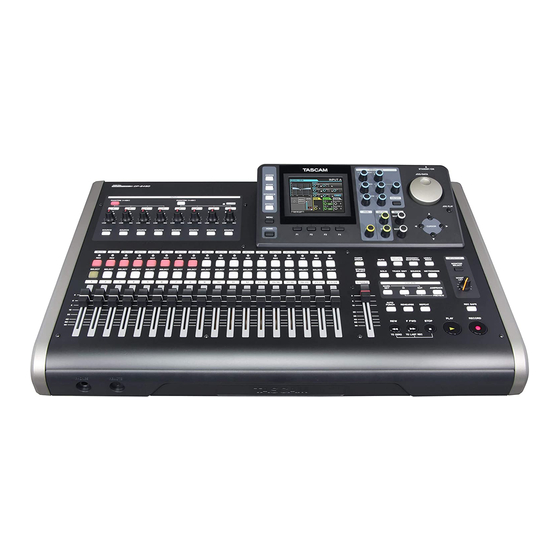
DP-24SD
Digital Portastudio
OWNER’S MANUAL
Related Manuals for Tascam DP-24SD
Summary of Contents for Tascam DP-24SD
-
Page 1
D01258820B DP-24SD Digital Portastudio OWNER’S MANUAL… -
Page 2: Important Safety Precautions
(1) this device may not cause harmful interference, and (2) this device must accept any interference received, including interference that may cause undesired operation. This product complies with the European Directives request and the other Commission Regulations. TASCAM DP-24SD…
-
Page 3: Important Safety Instructions
TASCAM DP-24SD…
-
Page 4: Safety Information
(e) The return and collection systems are available to the end users. For more detailed information about disposal of old electrical and electronic equipment, please contact your city office, waste disposal service or the shop where you purchased the equipment. TASCAM DP-24SD…
-
Page 5: Table Of Contents
Shutting down …………27 Undoing an operation ………….40 Setting the date and time ……….27 Undo feature settings ……….40 Preparing an SD card for use ……..28 Undoing the last operation (single undo) ..41 Recorder modes …………..28 Undoing older operations (multiple undo) ..41 TASCAM DP-24SD…
-
Page 6
13 — Exchanging Data with a Computer ..67 CLONE TRACK (Track Duplication) ……52 CLEAN OUT (Delete Track) ……….52 Operating system requirements ………67 Connecting to a computer ……….67 9 — Using Built-In Effects …….53 Disconnecting ………….68 Dynamic effects …………..53 Track import and export ……….68 TASCAM DP-24SD… -
Page 7
15 – Messages ……….72 General messages ………….72 16 – Specifications ……..75 Ratings ………………75 Input/output ratings …………75 Analog audio input/output ratings …..75 Control input/output ratings ………75 Audio performance …………75 Operating requirements ……….75 General ……………..76 Dimensional drawings …………76 Block diagram…………..77 Level diagram …………..78 TASCAM DP-24SD… -
Page 8: Introduction
1 – Introduction Thank you very much for purchasing the TASCAM DP-24SD Items included with the product Digital Portastudio. Before connecting and using the unit, please take time to read The DP-24SD package contains the following items. this manual thoroughly to ensure you understand how to…
-
Page 9: Trademarks
TEAC Global Site (http://teac-global.com) such data and/or information. TEAC Corporation disclaims to find the list or contact the TASCAM customer support service. any warranty that any use of such data and/or information shall be free from infringement of any third party’s intel-…
-
Page 10: Quick Guide
Listening to the demo song The included SD card in the unit contains a demo song. We will use this demo song to practice listening to and mixing a recording. 1. Press the HOME button to open the Home screen. Headphones TASCAM DP-24SD…
-
Page 11: Recording And Mastering
7. Press the HOME button to return to the Home screen. 8. Press the PLAY (7) button, and raise the TRACK 1 to 23/24 faders, the STEREO fader and the MONITOR LEVEL knob to listen to the demo song. TASCAM DP-24SD…
-
Page 12: Creating A New Song
When connecting an electric-acoustic guitar with a built-in preamp or an active-type electric guitar, or when using an effects pedal, for example, between the guitar and this unit, set the LINE-GUITAR switch to LINE on the rear panel. TASCAM DP-24SD…
-
Page 13: Setting The Guitar As The Recording Source For Track 1
The recorded file is saved in the folder of the currently loaded song. 3. Press the REC button for TRACK 1 so the REC button becomes unlit. 2. Press the REC button for TRACK 1. The REC button flashes and the unit enters recording standby. TASCAM DP-24SD…
-
Page 14: Playing Back The Recording
INPUT H to set the recording source of the TRACK 2 to The recorded file is saved in the folder of the currently loaded song. 9. Press the REC button for TRACK 2 so the REC button becomes unlit. TASCAM DP-24SD…
-
Page 15: Recording A Vocal To Track 3
When you input a sound through an external microphone, the input level is shown by the level meter. When you raise the fader for TRACK 3, the STEREO fader and the MONITOR LEVEL knob, you can hear the sound of the mic input through the headphones. TASCAM DP-24SD…
-
Page 16: Mixing The Tracks
NOTE • The IN and OUT points must be at least 4 seconds apart. If the interval is shorter than 4 seconds, the message will appear and the Recorder mode cannot Too Short switch to mode . Mixdown TASCAM DP-24SD…
-
Page 17
6. Press the PLAY (7) button on the Mastering screen to listen to the master file with compression. NOTE If the item is set to on the screen, the EQUALIZER effect of the equalizer on the sound will also be heard. TASCAM DP-24SD… -
Page 18: Shutting Down
All settings made since the last time you saved will not be saved. If you cut the power while an SD card is being accessed, all recorded songs and data may be damaged and cannot be recovered. TASCAM DP-24SD…
-
Page 19: Names And Functions Of Parts
• Turn phantom power on only when using a condenser is in Mute mode. When the SOLO button is lit, it indicates microphone that requires phantom power. Turning the track is in Solo mode. phantom power on when a dynamic mic or other mic that TASCAM DP-24SD…
-
Page 20
Use this button to stop playback, recording and when using menus. fast-forward/rewind. Press at the same time as you press the REW (m) (TO ZERO) button or F FWD (,) (TO LAST REC) button to locate the beginning of the song TASCAM DP-24SD… -
Page 21
After a single undo or multi-undo, the UNDO/REDO button becomes lit, showing that an operation has been undone. MONITOR SELECT button Press this button to open the pop-up MONITOR SELECT window on the Home screen. (See “Monitor selection” on page 36.) TASCAM DP-24SD… -
Page 22: Front Panel
REMOTE jack (2.5mm dia. TRS jack) Connect the TASCAM RC-3F foot switch (sold separately). This allows you to remotely control a variety of operations, including punch in/out (start and stop recording).
-
Page 23: Rear Panel
Mixdown Mastering mode Mastering The following items are also displayed: Rehearsal Auto Punch Search INPUT A to H overload indicators If the input signal of any INPUT A to H source is too loud, the corresponding indicators light. TASCAM DP-24SD…
-
Page 24: Menu Structure
53 makes parameters settings. Assigns each type of effect EFFECT and makes parameter page 53 settings. BOUNCE Performs track bouncing. page 43 MIXDOWN/ Creates and adjusts page 57 MASTERING master files. METRONOME Sets the metronome. page 61 TASCAM DP-24SD…
-
Page 25: Screen Operations
• On the sub-menu, you can press the F1 (g) button to return to the previous screen. This example shows the screen. LOAD On the sub-menu, use the JOG/DATA dial or the CURSOR (5/b) buttons to select , and then press the F4 (t) LOAD button to load the song. TASCAM DP-24SD…
-
Page 26: Preparation
Do not use the adapter if there is anything abnormal about the plug after changing it. Use when the plug is abnormal could cause fire or electric shock. Contact the store where you purchased this unit or a TASCAM customer support service to request repair. TASCAM DP-24SD…
-
Page 27: Start-Up & Shutdown
• You can automatically add the date you have set to file names by specifying on the Song Name Type menu. PREFERENCE The power is turned off (standby) after the unit completes its shutdown process, including saving various information from your session. TASCAM DP-24SD…
-
Page 28: Preparing An Sd Card For Use
Recorder modes This unit has four recorder modes. Multi Track Foot switch Use this mode to operate the unit as a multitrack recorder. TASCAM RC-3F (Optional) Bounce Use this mode to perform track bouncing. (See “Bouncing tracks” Headphones on page 43.) Mixdown Use this mode to mix down tracks to create a master file.
-
Page 29: Rear Panel
4. After making the settings, press the HOME button to return connected to a computer via USB. to the Home screen. When connecting an electric-acoustic guitar with a built-in preamp or an active-type electric guitar, or when using an TASCAM DP-24SD…
-
Page 30: Song Management
SONG LIST 6. Once the song is loaded, the pop-up window disappears and the display returns to the screen. SONG LIST 7. Press the HOME button to return to the Home screen. TASCAM DP-24SD…
-
Page 31: Creating A New Song
SONG LIST 9. Once the song is created, the pop-up window disappears and the display returns to the screen. SONG LIST 10. 10. Press the HOME button to return to the Home screen. TASCAM DP-24SD…
-
Page 32: Viewing Song Information
To cancel the song copy operation, press the F1 ( ) button instead of the F2 ( ) button. 6. When the song copy operation is completed, the pop-up window disappears and the display returns to the SONG screen. LIST TASCAM DP-24SD…
-
Page 33: Protecting Songs
A confirmation message appears. 5. Press the F2 ( ) button. The unnecessary audio data is deleted from the song(s). When the erase operation is completed, the pop-up window disappears and the display returns to the SONG LIST screen. TASCAM DP-24SD…
-
Page 34: Changing A Song Name
To cancel the song name change, press the F1 ( ) button instead of the F2 ( ) button. 6. Once the song name is changed, the pop-up window disap- pears and the display returns to the screen. SONG LIST TASCAM DP-24SD…
-
Page 35: Basic Recording
Tracks 13/14 to 23/24 are stereo tracks. Stereo tracks are always simultaneously recorded. You cannot record to a single track of a stereo track pair. 1. When the recorder is stopped, press the ASSIGN button to open the Assign screen. TASCAM DP-24SD…
-
Page 36: Using Phantom Power
Use the TRIM knobs of INPUT A to H or the output volume 1. When the Home screen is displayed, press the MONITOR controls of the input sources to adjust the level. SELECT button to open the pop-up MONITOR SELECT window. TASCAM DP-24SD…
-
Page 37: Peak Hold Display
Setting range: (Default: ) button to clear the peak value. 0.25 CLEAR Press the EQUALIZER ON/OFF button to turn the equalizer 4. After making the settings, press the HOME button to return on or off. to the Home screen. TASCAM DP-24SD…
-
Page 38: Digital Trim Setting (Track Only)
3. Use the SEND EFF 1/EFF 2 knobs to adjust the external PHASE send levels. Ø indicator lit: Inverted phase PHASE Setting range: (Default: 4. Use the SEND MASTER 1/MASTER 2 to adjust the send master level. Setting range: (Default: TASCAM DP-24SD…
-
Page 39: Checking The Fader Level
In Rehearsal mode, appears on the upper left Rehearsal on/off. corner of the Home screen. When muting is turned on, the MUTE/SOLO indicator of the 4. Press the RECORD (0) button. track whose REC button was pressed lights. TASCAM DP-24SD…
-
Page 40: Multitrack Recording
3. Use the CURSOR (5/b) buttons to select (blue highlight) recording. Undo History Input selection and assignment Use the procedures described earlier in this chapter to assign input sources to the recording tracks. TASCAM DP-24SD…
-
Page 41: Undoing The Last Operation (Single Undo)
History PREFERENCE LEVEL10 multi-undo will be erased. “Undo feature settings” on page 40.) 1. Set on the menu to Undo History PREFERENCE LEVEL10 2. When the Home screen is displayed, press the UNDO/REDO button to display HISTORY LIST TASCAM DP-24SD…
-
Page 42: Recorder Functions
4. Use the JOG/DATA dial to select the function that you want The unit switches to playback (punch out). to assign to the pedal R (right) of the TASCAM RC-3F foot switch. You can also press the STOP (8) button to punch out at the…
-
Page 43: Bouncing Tracks
For stereo bouncing, the lower numbered track becomes the left channel. In the case of mono bounce, set the PAN knob on the Mixer screen of the track that will be the bounce source completely to the L side. TASCAM DP-24SD…
-
Page 44: Locating Directly A Specified Time
To return to the last recording position (LAST REC point), press verses, etc. and hold the STOP (8) button and press the F FWD (,) (TO LAST REC) button (TO LAST REC function). This function is useful when you want to record again after finishing recording. TASCAM DP-24SD…
-
Page 45: Fast Forwarding And Rewinding
3. Use the CURSOR (g/t) buttons to scale up/down the display horizontally (time) as necessary. Press the CURSOR (g) button to scale down horizontally (time), or the CURSOR (t) button to scale up. Scaling up makes it easier to cue the position precisely. TASCAM DP-24SD…
-
Page 46: Using Repeat Playback
• Pre-roll period: Track playback signal + input source signal 4. After making the settings, press the HOME button to return • Punch in–out interval: Input source signal to the Home screen. • Post-roll period: Track playback signal + input source signal TASCAM DP-24SD…
-
Page 47: Setting Punch-In/Out Points
Home screen without entering Auto Punch In/Out mode. NOTE You can press the AUTO PUNCH button before putting any tracks into recording standby. Press the REC button of any track to put it into recording standby after enabling automatic punching. TASCAM DP-24SD…
-
Page 48: Recording With Automatic Punching
• To delete a virtual track, press the F3 ( ) button in CLEAR step 3 above. • A virtual track assigned to a physical track cannot be deleted. • You can assign an unused virtual track. The track becomes an empty track. TASCAM DP-24SD…
-
Page 49: Track Editing
• The TO point is the current position (current point). • : 1 to 24 tracks NOTE If you press the JOG PLAY button to enable jog mode, you can set IN and OUT points with subframe (1/10 frame) precision. COPY PASTE screen TASCAM DP-24SD…
-
Page 50: Copy/Paste
In other words, you can overwrite the COPY destination track from the TO point with a designated number of repetitions of the COPY data. The following parameters are used in this operation. • SOURCE Track ( 13/14 23/24 • IN/OUT/TO • TARGET Track • TIMES TASCAM DP-24SD…
-
Page 51: Move/Paste
This operation inserts recorded data into the MOVE destination track starting from the TO point. Therefore, the MOVE destination track becomes longer. The following parameters are used in this operation. • SOURCE Track ( 13/14 23/24 • IN/OUT/TO • TARGET Track TASCAM DP-24SD…
-
Page 52: Silence (Erase Part)
The following parameters are used in this operation. • SOURCE Track ( 13/14 23/24 • TARGET Track NOTE If you choose the same track for both SOURCE Track appears and the TARGET Track Same Track operation cannot be executed. TASCAM DP-24SD…
-
Page 53: Using Built-In Effects
Use the CURSOR (5/b/g/t) buttons to select the playback with the parameter on the Guitar Effect POSITION parameter that you want to change, and then use the JOG/ screen. DATA dial to select the value. NOTE There is no preset or storage functions available. TASCAM DP-24SD…
-
Page 54: Calling Effects From The Guitar Effect Library
F3 ( ) button. SAVE NOTE The library list contains a PRESET area and a USER area. PRESET area data cannot be overwritten. 2. Enter a name if necessary. Names of the PRESET library cannot be changed. TASCAM DP-24SD…
-
Page 55: 10 — Mixing Down And Mastering Tracks
(there is still a lit button), the FADER GROUP on or off. button blinks to indicate that the group setting is active. Use INPUT SOURCE (A–H) buttons to select inputs to set the equalizer. (See “Using the input equalizer” on page 37.) TASCAM DP-24SD…
-
Page 56: Send Effects
When using an external effect, connect the output of the external effect (return) to INPUT A to H. By assigning the connected input to the stereo bus, you can return the effect sound to the stereo bus. (See “Assigning to a stereo bus” on page 35.) TASCAM DP-24SD…
-
Page 57: Creating A Master File
Recorder mode to mode, Mastering and then press the PLAY (7) button to start playback. Ending master file checking After checking the master file, press the MIXDOWN/ MASTERING button to return to the mode of Multi Track the Recorder mode. TASCAM DP-24SD…
-
Page 58: Finishing Up A Master File (Mastering)
The recording starts and the PLAY (7) and RECORD (0) buttons become lit. Recording always starts from regardless of 00:00:00:00 the current position. Recording in mode overwrites the master file. Mastering At the end of the master file, recording finishes automatically and the position returns to 00:00:00:00 TASCAM DP-24SD…
-
Page 59: Using The Mastering Equalizer
Single band type At this time, the selected band is shown in the upper left corner. 5. Use the CURSOR (5/b/g/t) buttons to select the item whose value you to change, and then use the JOG/DATA dial to change it. TASCAM DP-24SD…
-
Page 60: Using Normalize
) button to turn the compressor on ON/OFF or off. The ON or OFF state is shown on the Mastering screen. 8. After setting the parameters, press the F1 (g) button to return to the screen. Mastering Compressor ON/OFF TASCAM DP-24SD…
-
Page 61: 11 — Various Other Functions
The metronome works according to the setting made MODE in step 2 above. When the setting is enabled, the METRONOME button flashes according to the metronome tempo. The metronome signal is not recorded even if set to work during recording. TASCAM DP-24SD…
-
Page 62: Tuner Function
• Initialize (Factory setting reset) 7. After tuning the instrument, press the HOME button to return to the Home screen. NOTE The following buttons can be controlled in the Tuner mode. INPUT TRIM (Analog) JOG/DATA dial (Calibration) Monitor level TASCAM DP-24SD…
-
Page 63: Setting Automatic Power Saving
WORD: The characters set are used for the beginning of the song name. 5. Once the initialization is completed, the display returns to Example (set to “TASCAM”): “TASCAM0001” screen. PREFERENCE DATE: The date is used for the beginning of the song name.
-
Page 64: Viewing Information
(green highlight) , and INFORMATION then press the F4 (t) button. screen appears. INFORMATION The following information is displayed on the INFOR- screen. MATION CURRENT SONG NAME FORMAT DATE SIZE INFO TOTAL SONG TOTAL SIZE REMAIN SIZE SYSTEM VERSION TASCAM DP-24SD…
-
Page 65: 12 — Sd Card Management
Please access to a product page of this product from the TEAC Global Site (http://teac-global.com) to find the list or contact the TASCAM customer support service. 3. Use the JOG/DATA dial to select QUICK FORMAT press the F4 (t) button.
-
Page 66: Full Formatting An Sd Card
F1 ( ) button. 5. Once the full format is completed, the display returns to the menu screen. FORMAT NOTE When a card is formatted, a song is automatically created in the MUSIC folder. TASCAM DP-24SD…
-
Page 67: 13 — Exchanging Data With A Computer
Windows Backed up data can be restored to a different DP-24SD unit Windows 8 (including 8.1) than the one that created it. In other words, files can be freely…
-
Page 68: Disconnecting
Command + E to eject the DP-24SD. Depending on the OS version or OS settings you might also be able to eject the DP-24SD icon by clicking on an eject icon next to it in the Finder window or by using a control key.
-
Page 69: Exporting Tracks
7. After the pop-up message appears, the display returns to screen. Audio Depot 8. Press the HOME button to return to the Home screen. 9. Connect the unit to a computer. (See “Connecting to a computer” on page 67.) TASCAM DP-24SD…
-
Page 70: Deleting Files From The Audiodepot Folder
2. Press the F3 ( ) button, which will cause a confir- DELETE mation message to appear. 3. Press the F2 ( ) button to execute the deletion. When you want to delete multiple files, repeat the procedure above. TASCAM DP-24SD…
-
Page 71: 14 — Troubleshooting
If there is a power amplifier or other device that uses a large transformer, a fluorescent light or something similar nearby, you might be able to reduce the noise by changing the distance and orientation of this unit in relation to such equipment. TASCAM DP-24SD…
-
Page 72: 15 — Messages
FAT format using a computer connected via USB and if an unformatted card is inserted in the unit. Format Error Always use the DP-24SD to format cards to be used with it. Replace the card or format the card using the Format CARD menu.
-
Page 73
Work Memory Full operations. You may be able to continue the work if execute the item of the DELETE UNUSED SONG menu to increase the available space in the work memory. (See “Undoing an operation” on page 40.) TASCAM DP-24SD… -
Page 74
If any of these errors occur, turn the unit power off and restart it. System Error 1 If the error message continues to appear frequently, please contact the store where you purchased this System Error 2 unit or a TASCAM customer support service. System Error 3 System Error 4 System Error 5… -
Page 75: 16 — Specifications
Output impedance: 200 Ω OS X Mountain Lion (10.8) OS X Lion (10.7) PHONES jack Connector: 6.3 mm stereo jack Mac OS X Snow Leopard (10.6) Maximum output level: 70 mW+70 mW or more (THD+N 0.1% or less, 32 Ω load) TASCAM DP-24SD…
-
Page 76: General
Operating temperature range Dimensions 5 to 35ºC/41 to 95ºF Dimensional drawings 514mm 100.4mm * Illustrations in this manual may differ from the actual product. * In order to improve the product, specifications and appearance could be changed without prior notice. TASCAM DP-24SD…
-
Page 77: Block Diagram
16 – Specifications Block diagram TASCAM DP-24SD…
-
Page 78: Level Diagram
16 – Specifications Level diagram TASCAM DP-24SD…
-
Page 79
Ce produit est sujet aux réglementations concernant la garantie légale dans le pays d’achat. En cas de défaut ou de problème, veuillez Your unit must be serviced by an authorized TASCAM service station in Except as specified below, this warranty covers all defects in materials contacter le revendeur chez qui vous avez acheté… -
Page 80
✂ WARRANTY Model/Modèle/Modell Owner’s name/Nom du possesseur/Name des Eigentümers Modello/Modelo/型号 Nome del proprietario/Nombre del propietario/顾客姓名 DP-24SD Serial No./No de Série/Seriennummer Address/Adresse/Adresse Numero di serie/Número de serie/序列号 Indirizzo/Dirección/顾客地址 Date of purchase/Date de l’achat/Datum des Kaufs Dealer’s name/Nom du détaillant/Name des Händlers Data dell’acquisto/Fecha de compra/购买日期…
Посмотреть инструкция для Tascam DP-24SD бесплатно. Руководство относится к категории Hi-Fi системы, 9 человек(а) дали ему среднюю оценку 9.3. Руководство доступно на следующих языках: английский. У вас есть вопрос о Tascam DP-24SD или вам нужна помощь? Задайте свой вопрос здесь
Не можете найти ответ на свой вопрос в руководстве? Вы можете найти ответ на свой вопрос ниже, в разделе часто задаваемых вопросов о Tascam DP-24SD.
Какой вес Tascam DP-24SD?
Когда звук считается слишком громким?
Могут ли устройства разных марок подключаться друг к другу при помощи Bluetooth?
Как лучше всего выполнять чистку Hi-Fi система?
Инструкция Tascam DP-24SD доступно в русский?
Не нашли свой вопрос? Задайте свой вопрос здесь
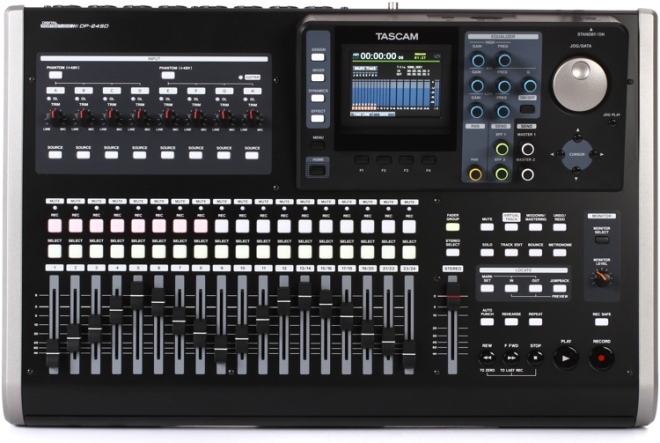
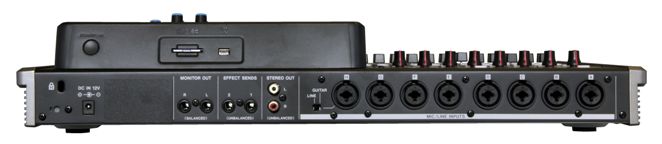
DP-24SD – это компактная портастудия от американской компании TASCAM, которая известна на рынке профессиональной аудиоаппаратуры уже более 30 лет. Основными достоинствами данной модели являются: компактные размеры, привлекательный дизайн, многофункциональность и гибкость, качество и надежность, а также доступная цена. DP-24SD предоставляет владельцу возможность одновременной записи до 8 треков и прослушивание до 24 треков. Запись ведется на съемный SD/SDHC накопитель максимальной емкостью до 32 Гб в CD качестве 16/24-бит, 44.1/48 кГц. Управление процессом прослушивания, сведения и записи трека, происходит с интуитивно понятной навигационной панели устройства, на которой размещены механические органы управления: кнопки выбора функций, поворотные регуляторы эквалайзера, фейдеры микшера и небольшой цветной ЖК дисплей с подсветкой для отображения системной информации. DP-24SD предоставляет большой набор функций для профессионального создания трека, среди которых: микширование, редактирование (копирование, вырезка и перемещение части трека), создание петель, удаление шумов и многое другое. Для создание более качественного саунда, DP-24SD имеет огромный набор динамических, гитарных, mix-down и мастеринг эффектов, а также независимый 3-х полосный эквалайзер для каждого входа. Все это дает возможность делать профессиональную звукозапись и сведение трека практически в любом месте и при любых обстоятельствах. Для подключения внешних источников звука, микрофонов, музыкальных инструментов и внешних органов управления, на тыльной панели DP-24SD предусмотрены следующие коннекторы:
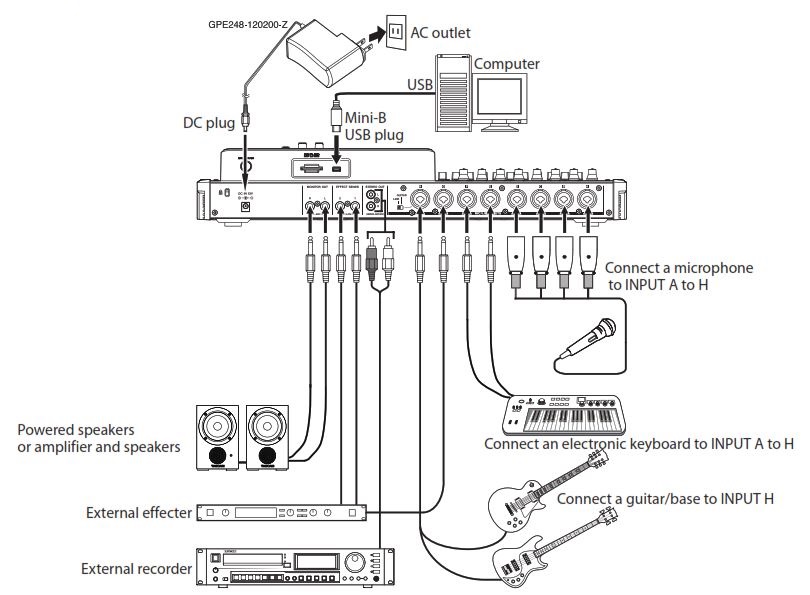
- 8х комбинированных XLR/TRS с фантомным питанием, которые имеют буквенные обозначения от A до H и служат для подключения конденсаторных микрофонов;
- выход H имеет Hi-Z переключатель, что позволяет использовать его для подключения музыкальных инструментов;
- 2х небалансных RCA;
- 2х балансных TRS для подключения мониторов;
- 2х небалансных TRS для посыла эффектов;
- 1х PHONES Jack с отдельным регулятором громкости для подключения наушников;
- 1х USB 2.0 для подключения к компьютеру.
Основные особенности:
- компактная цифровая портастудия;
- воспроизведение/запись: 24/8 треков;
- запись на съемный SD/SDHC носитель емкостью до 32 Гб;
- качество записи 16/24-бит, 44.1/48 кГц;
- независимый трехполосный эквалайзер для каждого входа;
- встроенный процессор динамических, гитарных, mix-down и мастеринг эффектов;
- встроенный микшер (19 фейдеров);
- наличие функций метронома и хроматического тюнера;
- функция редактирования трека (копирование, вырезка и перемещение части трека);
- установка регулируемых маркеров на трек (до 99 шт);
- порт USB 2.0 для коммутации с PC и обмена данными;
- цветной 3.5” ЖК-дисплей с подсветкой;
- опциональное подключение педали управления (RC-3F);
- питание от внешнего блока (входит в комплект).
Подробное описание
Схема подключения TASCAM DP-24SD
<< свернуть
| Тип: | цифровая портастудия |
| Запись аудио: | 16/24 бит/44,1/48 кГц на карту памяти SD/SDHC |
| Карта памяти: | SD (512 MB – 2 GB) или SDHC (4–32 GB) |
| USB-порт: | разъем USB 4-pin типа Mini-B, формат USB 2.0 HIGH SPEED |
| Разъем REMOTE: | 2.5-мм разъем (для педального переключателя RC-3F) |
| Частотная характеристика: | 20 Гц — 20 кГц, +1 дБ / -1 дБ |
| Отношение сигнал / шум: | ≥90 дБ |
| Полное гармоническое искажение: | ≤0.01% |
| Компьютерные требования: | |
| -Windows: | Pentium 300 МГц или выше, память 128 МБ или более, порт USB (рекомендуется USB 2.0) |
| -Mac: | Power PC, iMac, G3, G4 266 МГц или выше, 64 МБ или более памяти, порт USB (рекомендуется USB 2.0) |
| -Рекомендуемый USB-хост-контроллер: | Intel chipset |
| -Поддерживаемые операционные системы: | Windows XP, Windows Vista, Windows 7, Windows 8 (включая 8.1), Mac OS X 10.2 или новее |
| Дисплей: | 3.5″ цветной ЖК-дисплей с подсветкой |
| Тюнер: | хроматический |
| Микшер: | 18 канальных и один мастер-фейдер |
| Эквалайзер: | 3-полосный эквалайзер на каждый вход |
| Встроенные микрофоны: | — |
| Фантомное питание: | +48 В |
| Питание: | адаптер переменного тока GPE248-120200-Z (вход: 100–240 В AC, 50/60 Гц, 1 A; выход: 12 В, 2.5 A) |
| Потребление: | 12 Вт |
| Температурный диапазон эксплуатации: | от +5°C до +35°C |
| Габариты (ШхВхГ): | 514х104х340 мм |
| Вес: | 5.8 кг |
| Входы A и H: | сбалансированный XLR |
| Номинальное входное сопротивление: | 2.4 кОм |
| Номинальный входной уровень: | -14 дБу |
| Максимальный входной уровень: | +2 dBu |
| Phone разъем (сбалансированный): | сбалансированное гнездо TRS 6.3 мм |
| Номинальное входное сопротивление: | ≥22 кОм |
| Номинальный уровень входного сигнала: | +4 dBu |
| Максимальный входной уровень: | +20 дБу |
| Стерео выход (L/R): | RCA |
| Номинальное выходное сопротивление: | 200 Ом |
| Номинальный выходной уровень: | -10 дБВ |
| Максимальный выходной уровень: | +6 дБВ |
| Посыл эффектов: | 6.3-мм TS phone jack |
| Номинальное выходное сопротивление: | 200 Ом |
| Номинальный уровень выходного сигнала: | -10 dBu |
| Максимальный выходной уровень: | +6 дБу |
| Выход для подключения мониторов L/R: | 6.3-мм TRS phone jack |
| Номинальное выходное сопротивление: | 200 Ом |
| Номинальный выходной уровень: | -2 дБВ |
| Максимальный выходной уровень: | +14 дБВ |
| Выход для наушников (6.3-мм стереоразъем): | максимальная выходная мощность 70 мВт + 70 мВт или более (THD + N 0,1% или менее, 32 Ом нагрузки) |
| Портастудия (TASCAM DP-24SD): | 1 шт |
| Сетевой адаптер (GPE248-120200-Z): | 1 шт |
| Кабель питания: | 1 шт |
| SD-карта (2 Гб): | 1 шт |
| Руководство пользователя: | 1 шт |
Распечатать информацию о товаре
Дополнительно

DP-03SD TASCAM Портастудия
Цифровая портастудя, воспроизведение/запись: 8/2, формат записи: 44.1 кГц, 16-бит WAV, USB 2.0, микшер 9 каналов, 2-полосный эквалайзер, процессор эффектов и реверберации, метроном и хроматический тюнер, редактирование трека, ЖК-дисплей, входы: 2 совмещенных XLR/TRS, выходы: стерео-джек и PHONES для наушников, SD/SDHC (до 32 Гб), 12 В, 2.5 A — адаптер в комплекте, потребление 5 Вт, 290х54х207 мм, 1.4 кг.
DP-32SD TASCAM Портастудия
Цифровая портастудия, воспроизведение/запись: 32/8, формат записи: 44.1/48 кГц, 16/24-бит WAV, USB 2.0, микшер 20 каналов (8 моно, 12 стерео), 3-полосный эквалайзер, процессор динамических, гитарных, mix-down и мастеринг эффектов, метроном и хроматический тюнер, редактирование трека, 3.5″ ЖК-дисплей, входы: 8 совмещенных XLR/TRS, выходы: стерео-джек и PHONES для наушников, SD/SDHC (до 32 Гб), адаптер питания в комплекте, потребление 12 Вт, 514 x 100 x 337 мм, 6,2 кг.
RC-3F TASCAM Footswitch для рекордеров Tascam
Разъем TRS 1/9 (2,5), длина кабеля 3,9 метра, совместимость — SS-R250N, SS-CDR250N, CD-500, CD-500B, DP-03, DP-24, DP-32, DR-100MKII, GB-10, LR-10, US-366, электропитание — от 2-х батареек АА, размеры 190х32х122 мм.
| Производитель | TASCAM |
| Основные особенности | — |
| — | запись звука в качестве от 16 бит/44,1 кГц до 24 бит/48 кГц |
| — | восемь входов на комбинированных разъёмах XLR + TRS |
| — | фантомное питание +48 В подаётся на все входы (A – D и E – H) |
| — | вход H можно использовать в качестве инструментального |
| — | небалансный стереофонический выход 2 × RCA |
| — | выделенный выход для подключения мониторов плюс выход посыла эффектов. Оба реализованы на разъёмах 2 × TRS |
| — | достаточно мощный выход на наушники (2 × 70 мВт) |
| — | разъём для подключения ножного переключателя RC-3F |
| — | 3,5-дюймовый цветной ЖК-дисплей плюс 12 вращаемых регуляторов для настройки различных параметров |
| — | восемнадцать 45-миллиметровых фейдеров и один мастер-фейдер |
| — | доступны различные функции редактирования: copy, paste, open, cut, silence и т. д. |
| — | независимый 3-полосный эквалайзер для каждого входа |
| — | одновременное использование до восьми динамических эффектов (по одному для каждого входа): лимитер, компрессор, noise suppressor и эксайтер |
| — | доступны гитарные эффекты: эмулятор усилителя, ревербератор, хорус, компрессор, флэнжер и фейзер |
| — | mix-down эффекты: реверберация, дилей и стерео-хорус |
| — | эффекты мастеринга: многополосный компрессор, эквалайзер, дизер и нормалайзер |
| — | порт USB 2.0 для копирования записанного материала на компьютер |
| — | встроенный хроматический тюнер и метроном |
| — | SD-карта и адаптер питания поставляются в комплекте |
| Технические характеристики | — |
| — | соотношение сигнал/шум: ≥ 90 дБ |
| — | коэффициент гармоник: ≤ 0,01% |
| — | XLR-входы: — |
| — | номинальный входной уровень: -14 dBu |
| — | максимальный входной уровень: +2 dBu |
| — | TRS-входы: — |
| — | номинальный входной уровень: +4 dBu |
| — | максимальный входной уровень: +20 dBu |
| — | небалансный стереовыход 2 × RCA: — |
| — | номинальный выходной уровень: -10 dBV |
| — | максимальный выходной уровень: +6 dBV |
| — | балансный стереовыход 2 × TRS: — |
| — | номинальный выходной уровень: -2 dBu |
| — | максимальный выходной уровень: +14 dBu |
| — | мощность на выходе для наушников: 2 × 70 мВт (THD+N ≤ 0,1%, 32 Ом) |
| — | потребляемая мощность: 12 Вт |
| — | габариты: 100,4 × 514 × 336,9 мм |
| — | масса: 6,2 кг |
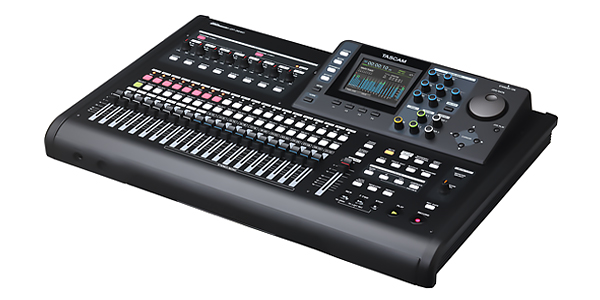
Новый рекордер TASCAM DP-24SD представляет собой 24-трековую цифровую портастудию, которая проста в использовании и позволяет сделать запись простым и творческим процессом. Новинка обеспечивает одновременную запись до восьми дорожек и воспроизведение до двадцати четырёх. Предусилители на восьми XLR микрофонных входах с фантомным питанием обеспечивают широкий диапазон для записи, каждый вход имеет компрессор и лимитер. Цветной ЖК-дисплей контролирует запись каждого канала, а ряд эффектов делают TASCAM DP-24SD завершенным решением для музыкантов.
В отличие от предшествующей модели TASCAM DP-24, устройство не имеет привода CD-RW, а записывает аудио только на SD/SDHC-карту объёмом до 32 Гб.
В TASCAM DP-24SD встроены три вида эффектов. Для корректировки звучания восемь динамических эффектов могут направляться на один или на все треки во время записи Мультиэффект-процессор, обеспечивающий эмуляцию усиления, задержку, хорус и другие эффекты, идеально подходит для использования прямого подключения гитары. Регулируемая реверберация доступна для посыла и возврата.
Новый рекордер TASCAM DP-24SD представляет собой 24-трековую цифровую портастудию, которая проста в использовании и позволяет сделать запись простым и творческим процессом. Новинка обеспечивает одновременную запись до восьми дорожек и воспроизведение до двадцати четырёх. Предусилители на восьми XLR микрофонных входах с фантомным питанием обеспечивают широкий диапазон для записи, каждый вход имеет компрессор и лимитер. Цветной ЖК-дисплей контролирует запись каждого канала, а ряд эффектов делают TASCAM DP-24SD завершенным решением для музыкантов.
В отличие от предшествующей модели TASCAM DP-24, устройство не имеет привода CD-RW, а записывает аудио только на SD/SDHC-карту объёмом до 32 Гб.
В TASCAM DP-24SD встроены три вида эффектов. Для корректировки звучания восемь динамических эффектов могут направляться на один или на все треки во время записи Мультиэффект-процессор, обеспечивающий эмуляцию усиления, задержку, хорус и другие эффекты, идеально подходит для использования прямого подключения гитары. Регулируемая реверберация доступна для посыла и возврата.
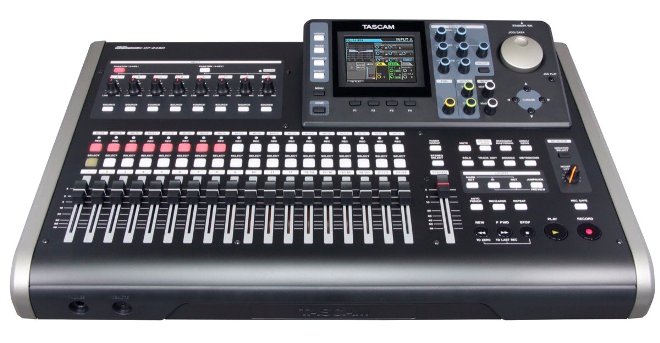
Основные особенности TASCAM DP-24SD:
- в качестве носителя для записи используется SD-карта, которая более устойчива к вибрации из-за отсутствия движущихся частей;
- запись звука в качестве от 16 бит/44,1 кГц до 24 бит/48 кГц;
- восемь входов на комбинированных разъёмах XLR + TRS;
- фантомное питание +48 В подаётся на все входы (A – D и E – H);
- вход H можно использовать в качестве инструментального;
- небалансный стереофонический выход 2 × RCA;
- выделенный выход для подключения мониторов плюс выход посыла эффектов. Оба реализованы на разъёмах 2 × TRS;
- достаточно мощный выход на наушники (2 × 70 мВт);
- разъём для подключения ножного переключателя RC-3F;
- 3,5-дюймовый цветной ЖК-дисплей плюс 12 вращаемых регуляторов для настройки различных параметров;
- восемнадцать 45-миллиметровых фейдеров и один мастер-фейдер;
- доступны различные функции редактирования: copy, paste, open, cut, silence и т. д.;
- независимый 3-полосный эквалайзер для каждого входа;
- одновременное использование до восьми динамических эффектов (по одному для каждого входа): лимитер, компрессор, noise suppressor и эксайтер;
- доступны гитарные эффекты: эмулятор усилителя, ревербератор, хорус, компрессор, флэнжер и фейзер;
- mix-down эффекты: реверберация, дилей и стерео-хорус;
- эффекты мастеринга: многополосный компрессор, эквалайзер, дизер и нормалайзер;
- порт USB 2.0 для копирования записанного материала на компьютер;
- встроенный хроматический тюнер и метроном;
- SD-карта и адаптер питания поставляются в комплекте.
Технические характеристики TASCAM DP-24SD:
- частотный диапазон: 20 Гц – 20 кГц (по уровню +/-1 дБ);
- соотношение сигнал/шум: ≥ 90 дБ;
- коэффициент гармоник: ≤ 0,01%;
- XLR-входы:
- входной импеданс: 2,4 кОм;
- номинальный входной уровень: -14 dBu;
- максимальный входной уровень: +2 dBu;
- TRS-входы:
- входной импеданс: 22 кОм или 1 МОм;
- номинальный входной уровень: +4 dBu;
- максимальный входной уровень: +20 dBu;
- небалансный стереовыход 2 × RCA:
- выходной импеданс: 200 Ом;
- номинальный выходной уровень: -10 dBV;
- максимальный выходной уровень: +6 dBV;
- балансный стереовыход 2 × TRS:
- выходной импеданс: 200 Ом;
- номинальный выходной уровень: -2 dBu;
- максимальный выходной уровень: +14 dBu;
- мощность на выходе для наушников: 2 × 70 мВт (THD+N ≤ 0,1%, 32 Ом);
- потребляемая мощность: 12 Вт;
- габариты: 100,4 × 514 × 336,9 мм;
- масса: 6,2 кг.
Простой в использовании и доступной цене интерфейс TASCAM DP-24SD является идеальной системой для музыкантов, исполнителей и авторов песен.