
- Home
- Инструкции
- Автоматика для ворот
- CAME
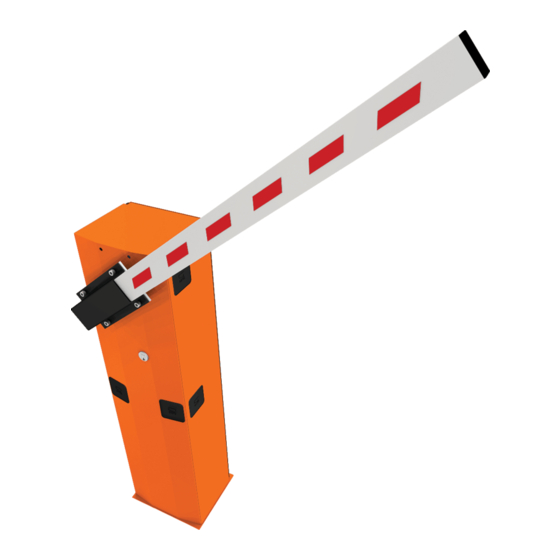
- GARD G3750
 Автоматический шлагбаум CAME GARD G3750 инструкция по монтажу на русском языке в формате pdf, размер файла 2.6 Mb. Используйте кнопки «Скачать инструкцию» или «Открыть в новом окне» (документ откроется в новом окне или вкладке браузера). Функция просмотра доступна при наличии плагина Adobe Acrobat в вашем браузере.
CAME GARD G3750 инструкция
Язык: Русский
Размер : 2.6 Mb
Формат файла: pdf
Добавлен: 12.06.2015
Руководство по установке
Предварительный просмотр

Информация, описание, технические характеристики изделия
ТЕХНИЧЕСКИЕ ХАРАКТЕРИСТИКИ
Масса: 47 кг;
Напряжение питания: =24 В;
Потребляемый ток: 15 А;
Мощность: 300 Вт;
Интенсивность использования: интенсивно;
Передача: 1/202;
Вращающий момент: 200 Нм;
Время открывания: 2-6 с;
Шлагбаум CAME GARD G3750, предназначенный для использования на частных и общественных парковках, в коллективном жилом секторе и местах с интенсивным автомобильным движением. Проезд шириной до 3,75 метров со временем открывания от 2 до 6 секунд.
Отзывы по оборудованию и комментарии к материалу
Здесь можно оставить свои отзывы по оборудованию «CAME GARD G3750 — Шлагбаум», а также написать комментарии к материалу.
-
Contents
-
Table of Contents
-
Troubleshooting
-
Bookmarks
Quick Links
Street barriers
FA01237-EN
G3750
EN English
Related Manuals for CAME G3750
Summary of Contents for CAME G3750
-
Page 1
Street barriers FA01237-EN G3750 INSTALLATION MANUAL EN English… -
Page 2
• T close supervision or once They have been properly insTrucTed To use The his producT should only be used for The purpose for which iT was . caMe s. apparaTus safely and To The poTenTial hazards involved hildren MusT… -
Page 3
The barrier is designed for use in private and public parking facilities, in residential settings and for high-rates of vehicle traffic. Any installation and use other than that specified in this manual is forbidden. Limits to use Model G3750 Maximum clearance width of the passage (m) 3.75 Technical data… -
Page 4
Description of parts Cabinet Gearmotor Transmission-shaft plate Control panel Boom-attachment cover Balancing spring Anti-shearing protective cover 10. Inspection hatch Gearmotor release with customized key Hatch lock with customized key Standard installation Barrier Photocell casing Flashing light Photocells post Semi-oval boom Fixed rest Luminous cord 10. -
Page 5
GENERAL INSTRUCTIONS FOR INSTALLING ⚠ Installation must be carried out by expert qualified personnel and in full compliance with the regulations in force. Important! Using original CAME control and safety devices and accessories ensures easy installation and system maintenance. Preliminary checks ⚠… -
Page 6
INSTALLATION ⚠ The following illustrations are mere examples. Consider that the space available where to fit the barrier and accessories will vary depending on the area where it is installed. It is up to the installer to find the most suitable solution. ⚠… -
Page 7
Place the plate over the iron cage. Fill the foundation frame with concrete. The base must be perfectly level with the bolts which are entirely above surface. Wait at least 24 hrs for the concrete to solidify. Remove the foundation frame. Fill the hole with earth around the concrete block. -
Page 8
Place the cabinet onto the anchoring plate and fasten it using nuts and washers. M12 UNI 5588 nut Washer To change the rotation at a later date, request the documentation from your local retailer or contact Came in your Country (see the last page or visit www.came.com) Entry side… -
Page 9
Fit the shock-resistant frame to the boom’s lower side. Fit the boom into the boom-attaching cover and fasten it using the screws. Note: to mount with the G0402 boom, fit and fasten the two spacers (supplied with the boom) in the boom attachment, as shown in the figure. -
Page 10
Cut the groove profiles to length and fit them into the boom’s groove. Perform this procedure on both ends. Fit the cap onto the end of the boom. Fit and fasten the anti-shearing protective cover onto the boom attachment-cover. -
Page 11
Balancing the boom Before proceeding, check that the spring you have chosen is suitable for the accessories and the clearance. G03750 Passage clearance (3.75 m max.) 001G04060 Ø 50 mm 001G02040 Ø 40 mm springs 001G06080 Ø 55 mm springs springs BOOM COMPOSITION (m) 1.5 to 1.75… -
Page 12
Release the gearmotor and position the boom vertically. Lock the gearmotor again. RELEASING Screw the spring onto the anchoring pin, hooked onto the transmission arm. Hook the eyelet rod on the spring onto the anchoring bracket. -
Page 13
Manually turn the balancing spring to increase or reduce the traction force so that the boom balances at a 45-degree angle. Fasten the rod nut and lock the gearmotor again. Note: check the proper working state of the spring: — with the boom raised vertically, the spring is not taut; — with the boom lowered horizontally, the spring is taut. -
Page 14
ELECTRICAL CONNECTIONS AND PROGRAMMING ⚠ Warning! Before working on the control panel, cut off the main current supply and, if present, remove any batteries. Power supply to the control panel and control devices: 24 V AC/DC. The features are set using the DIP switches, the adjustments using the trimmer. All connections are quick-fuse protected. -
Page 15
Factory wiring The gearmotor is already connected. To install the barrier on the right, follow the instructions in the PREPARING THE BARRIER paragraph. Opening micro 24 V DC gearmotor switch Orange White Orange Blue Brown Closing micro switch PT F FC FA E +10 -11 1 C1 C5 Warning devices… -
Page 16
Safety devices DIR photocells DELTA-S photocells Configure contact C1 and/or C5 (NC), input for safety devices such as photocells, which comply with EN 12978 regulations. C1 reopening while closing. When the boom is closing, opening the contact causes its movement to invert until fully opened;… -
Page 17
Keep the PROG programming button pressed on the control board. The programming LED will flash . Press a button on the transmitter you wish to memorize. The LED stays lit to confirm that the transmitter is now memorized. . 3 4 5 6 7 8 9 10 PROG key Programming LED… -
Page 18
To correct the horizontal position (=closing), raise the bar, adjust the mechanical closing stop and secure it with the counter nut. counter nut Mechanical closing stop Adjusting speed Min. = minimum Med. = medium Max. = maximum COM = common DIS. -
Page 19
Trimmer adjustments SENS. A.C.T. 3 4 5 6 7 8 9 10 SENS. A.C.T. Trimmer Description of functions Sensitivity SENS It adjusts the obstruction detection sensitivity during gate movement. Minimum sensitivity (-) or maximum sensitivity (+). Automatic Closing Time A.C.T. It regulates the open barrier’s waiting time. -
Page 20
FINAL OPERATIONS When you have completed the electrical connections and setting up, fit the control panel cover,replace the inspection hatch . Lock the hatch by using the key . RELEASING THE BOOM ⚠ This procedure must be done with the mains power cut off. … -
Page 21
PAIRED CONNECTION WITH A SINGLE COMMAND Establish the Master barrier and the Slave barrier. MASTER SLAVE On the MASTER barrier’s electronic board, make the necessary electrical connections, activate the radio control, program the functions and settings. MASTER 3 4 5 6 7 8 9 10 On the SLAVE barrier’s control board, connect the power supply to L-N, the flashing light on 10-E, set DIP switch 7 to ON and adjust the travel and slow-down speeds just like on the MASTER barrier. -
Page 22
TROUBLESHOOTING PROBLEM REFERENCE CHECK The barrier neither opens nor closes 1-2-3-4-6-8-18 1 — Lock the inspection hatch with the key The boom opens but does not close 4-7-10 2 — Deactivate the MAINTAINED ACTION function The boom closes but does not open 4-7-9 3 — Check the power supply and fuses The barrier does not automatically close… -
Page 23
________________________________________________________________________________________________ DISMANTLING AND DISPOSAL ☞ CAME S.p.A. complies with a certified Environmental Management System at its premises, compliant with the UNI EN ISO 14001 standard to ensure the environment is safeguarded. Please continue safeguarding the environment. At CAME we consider it one of the fundamentals of our operating and market strategies. Simply… -
Page 24
CAME S.p.A. Via Martiri Della Libertà, 15 31030 Dosson di Casier — Treviso — Italy tel. (+39) 0422 4940 — fax. (+39) 0422 4941…

Автоматические шлагбаумы
- Принадлежности для G4040 /G2080
- Принадлежности для G2500/G4000/G6000/G12000
Документация по монтажу автоматики и шлагбаумов
- Распашные ворота
- Откатные ворота
- Гаражные ворота
- Промышленные ворота
- Автоматические шлагбаумы
- Парковки и цепные барьеры
- Автоматика для дверей
- Блоки управления
- Радиоуправление
- Устройства управления
- Устройства безопасности
- Турникеты
- Контроль доступа
- Оконная автоматика MOWIN
Главная
- КОМПЛЕКТЫ CAME
- Автоматика для распашных ворот
- Автоматика для откатных ворот
- Автоматика для гаражных ворот
- Автоматика для промышленных ворот
- Автоматические шлагбаумы и барьеры
- Автоматика для дверей
- Аксессуары управления и безопасности
- Радиоуправление
- Комплекты для сборки и изготовления ворот
- Запасные части САМЕ
- ИНТЕРНЕТ-МАГАЗИН
- Карта сайта
- Документация по монтажу автоматики и шлагбаумов
- Статьи о продукции
- Сервисный центр
- Техподдержка
- Доставка
- Акции
- ЦЕНЫ
- Новости
- Контакты

