
GoGEN DAB 620 BTC DAB Plus и FM-радио КОНЕЦ ПРОДУКТАVIEW Благодарим вас за покупку нашего продукта. Пожалуйста, прочитайте эту инструкцию по эксплуатации, чтобы вы знали, как правильно эксплуатировать свое оборудование. Когда вы закончите читать руководство по эксплуатации, уберите его в безопасное место для дальнейшего использования. ИНСТРУКЦИИ ПО БЕЗОПАСНОСТИ Обратите внимание на все предупреждения о …
Подробнее «Руководство пользователя GoGEN DAB 620 BTC DAB Plus и FM-радио»
GoGEN DAB 610 BTC DAB Plus и FM-радио ЗАВЕРШЕНОVIEW Благодарим вас за покупку нашего продукта. Пожалуйста, прочтите эту инструкцию по эксплуатации, чтобы знать, как правильно эксплуатировать свое оборудование. После прочтения руководства по эксплуатации уберите его в безопасное место для дальнейшего использования. ИНСТРУКЦИИ ПО БЕЗОПАСНОСТИ Обратите внимание на все предупреждения о …
Подробнее «Руководство пользователя GoGEN DAB 610 BTC DAB Plus и FM-радио»
Lenco PDR-016 Portable DAB Plus или FM-радио с Bluetooth ПРЕДОСТЕРЕЖЕНИЕ. Использование элементов управления или регулировок или выполнение процедур, отличных от указанных здесь, может привести к опасному радиационному облучению. МЕРЫ ПРЕДОСТОРОЖНОСТИ ПЕРЕД ИСПОЛЬЗОВАНИЕМ ЗАПОМНИТЕ ЭТИ ИНСТРУКЦИИ: Не закрывайте и не блокируйте вентиляционные отверстия. При размещении устройства на полке оставьте …
Подробнее «Lenco PDR-016 Portable DAB Plus или FM-радио с Bluetooth. Руководство пользователя»
Портативный FM-радио DAB Plus Lenco PDR-026 ПРЕДУПРЕЖДЕНИЕ. Использование элементов управления, регулировок или выполнение процедур, отличных от указанных здесь, может привести к опасному облучению. МЕРЫ ПРЕДОСТОРОЖНОСТИ ПЕРЕД ИСПОЛЬЗОВАНИЕМ ЗАПОМНИТЕ ЭТИ ИНСТРУКЦИИ: Не закрывайте и не блокируйте вентиляционные отверстия. При размещении устройства на полке оставьте 5 см (2 дюйма)…
Подробнее «Руководство пользователя портативного радио DAB Plus FM Lenco PDR-026»
FM-радио Heimgard FOX100 DAB Plus Внимательно прочтите данное руководство по эксплуатации перед подключением и эксплуатацией изделия и сохраните его для дальнейшего использования. Цифровое/FM-радио DAB+ Благодарим вас за приобретение цифрового/FM-радио DAB+. Пожалуйста, внимательно прочитайте инструкции и предупреждения перед использованием, чтобы обеспечить безопасную и удовлетворительную работу этого продукта. Важная безопасность…
Подробнее «Руководство по эксплуатации FM-радио Heimgard FOX100 DAB Plus»
AZATOM Desire X2 DAB+ FM-радио с Bluetooth Что в коробке Desire X DAB Radio Руководство пользователя Адаптер питания Гарантийный талон Элементы управления и интерфейс Меню дисплея Режим питания TUN+ TUN- 5/6 3/4 1/2 Предустановка будильника Сканирование/Воспроизведение/Пауза Сон Повтор /Select/Volume/Scroll 3.5 мм наушники Aux Port DC In Socket Телескопическая антенна Крышка батарейного отсека Начало работы ВВЕДЕНИЕ: Пожалуйста, возьмите …
Подробнее «Радио AZATOM Desire X2 DAB+ FM с Bluetooth Руководство пользователя»
DAB Go DAB Plus или FM-радио Руководство пользователяDAB Go DAB+/UKW-Radio, Bluetooth DAB+/FM-радио, Bluetooth Информация о безопасности Прочтите инструкции – Перед началом эксплуатации устройства необходимо прочитать все инструкции по технике безопасности и эксплуатации. Сохраните инструкции – инструкции по технике безопасности и эксплуатации следует сохранить для дальнейшего использования. Обратите внимание на предупреждения — все предупреждения на…
Подробнее «Руководство пользователя KARCHER DAB Go DAB Plus или FM-радио»
GV-DR08 Boston Деревянное DAB и FM-радио с Bluetooth Руководство пользователя GV-DR08 Boston Деревянное DAB и FM-радио с Bluetooth 30-дневное право на возврат Мы не предполагаем каких-либо проблем с вашим Groov-e GV-DR08 Boston. Однако, для вашего спокойствия, в случае возникновения какой-либо неисправности, пожалуйста, верните его в течение 30 дней вашему …
Подробнее «groov-e GV-DR08 Boston Wooden DAB и FM-радио с Bluetooth, руководство пользователя»
CURTIS CRC1490 Nostalgia Bluetooth FM-радио NOSTALGIA BLUETOOTH FM-РАДИО ИНСТРУКЦИЯ ПО ЭКСПЛУАТАЦИИ № МОДЕЛИ: CRC1490 Благодарим вас за покупку этого продукта. Возможно, вы уже знакомы с использованием подобного устройства, но, пожалуйста, найдите время, чтобы прочитать эти инструкции. CURTIST ЯВЛЯЕТСЯ ЗАРЕГИСТРИРОВАННОЙ ТОРГОВОЙ МАРКОЙ КОМПАНИИ CURTIS INTERNATIONAL LTD. Заявление FCC Примечание. Это оборудование имеет…
Подробнее «Руководство по эксплуатации Bluetooth FM-радио CURTIS CRC1490 Nostalgia»
Lenco SCD-650 Проигрыватель CD-USB-MP3 с FM-радио ВНИМАНИЕ! Использование элементов управления или регулировок или выполнение процедур, отличных от указанных здесь, может привести к опасному облучению. МЕРЫ ПРЕДОСТОРОЖНОСТИ ПЕРЕД ИСПОЛЬЗОВАНИЕМ ЗАПОМНИТЕ ЭТИ ИНСТРУКЦИИ: Не закрывайте и не блокируйте вентиляционные отверстия. При размещении устройства на полке оставьте 5 см (2 дюйма)…
Подробнее «Lenco SCD-650 CD-USB-MP3-плеер с FM-радио. Руководство пользователя»
| инструкция | устройство | размер |
| MOTOROLA TLKR T80 Extreme | рация | 366.40 kB |
| MOTOROLA TLKR-T92 H20 (A9P00811YWCMAG) | радиостанция | 1.51 MB |
| MOTOROLA TLKR-T50 (P14MAA03A1BC) | радиостанция | 2.35 MB |
| MOTOROLA Talkabout T82 | радиостанция | 1.92 MB |
| MOTOROLA Talkabout T62 | радиостанция | 7.90 MB |
| MOTOROLA Talkabout T42 Triple | радиостанция | 4.50 MB |
| MOTOROLA Talkabout T42 | радиостанция | 4.50 MB |
| MOTOROLA C5001RU | радиотелефон | 995.53 kB |
| DEXP Sorex-2 | набор радиостанций | 1.33 MB |
| VECTOR VT-80 F | радиостанция | 956.75 kB |
| VECTOR VT-44 Master | радиостанция | 688.96 kB |
| MOTOROLA TLKR-T92 H2O | радиостанция | 60.92 MB |
| MOTOROLA TLKR-T80EX | радиостанция | 5.13 MB |
| MIDLAND LXT-425 | радиостанция | 7.29 MB |
| MIDLAND GXT-1050 | радиостанция | 2.07 MB |
| MIDLAND GXT-1000 | радиостанция | 2.07 MB |
| SENCOR SMR 110 | комплект из двух портативных раций | 822.07 kB |
| MOTOROLA TLKR-T61 | рация | 4.06 MB |
| MOTOROLA TLKR-T50 | рация | 2.36 MB |
| АРГУТ А-41 New | радиостанция | 16.61 MB |
| АРГУТ А-25 New | радиостанция | 582.72 kB |
| АРГУТ А-24 New | радиостанция | 1023.43 kB |
| АРГУТ А-23 New | радиостанция | 1.03 MB |
| KENWOOD TK-3407 | портативная радиостанция | 1.69 MB |
| KENWOOD TK-3406 | портативная радиостанция | 1.69 MB |
| KENWOOD TK-2407 | портативная радиостанция | 1.69 MB |
| KENWOOD TK-2406 | портативная радиостанция | 1.69 MB |
| ENTEL HT582PMR | радиостанция | 456.62 kB |
| ТАИС РМ-45 АМ/ЧМ (ЖКИ) | рация | 1.54 MB |
| ТАИС РМ-43У | рация | 1.76 MB |
| ТАИС РМ-43АУ | рация | 621.66 kB |
| ТАИС РМ-43 АМ/ЧМ (ЖКИ) | рация | 1.71 MB |
| ТАИС РМ-43 | рация | 620.31 kB |
| ТАИС РМ-41 ЧМ | рация | 554.86 kB |
| ТАИС РМ-41 АМ/ЧМ | рация | 1.36 MB |
| АЛЬФА 27 | рация | 4.28 MB |
| YOSAN Stealth 5 | рация | 859.51 kB |
| YOSAN EXCALIBUR TURBO | рация | 647.31 kB |
| YOSAN Excalibur | рация | 647.31 kB |
| YOSAN Evolution | рация | 2.07 MB |
| VECTOR VT-27 RADIUS TURBO | рация | 3.52 MB |
| TTI TCB-551 | рация | 5.10 MB |
| MEGAJET MJ-850 | рация | 3.29 MB |
| MEGAJET MJ-650 Turbo | рация | 3.69 MB |
| MEGAJET MJ-600 TURBO | рация | 1.53 MB |
| MEGAJET MJ-600 PLUS TURBO | рация | 1.67 MB |
| MEGAJET MJ-450 TURBO | рация | 830.59 kB |
| MEGAJET MJ-400 | рация | 536.62 kB |
| MEGAJET MJ-350 TURBO | рация | 3.70 MB |
| MEGAJET MJ-333 Turbo | рация | 2.89 MB |
- Рации (все)
- Профессиональные ▾
- Любительские ▾
- Морские радиостанции
- Авиационные радиостанции
- Радиостанции WCDMA
- Авионика ▾
- Трансиверы SUN SDR
- Радиостанции Motorola ▾
- Радиостанции Hytera ▾
- Радиостанции Kirisun ▾
- Аксессуары ▾
- Антенны для раций ▾
- Антенно-фидерное оборудование ▾
- Усилители мощности
- Преобразователи напряжения
- Блоки питания ▾
- Кейсы Байкал
- Измерительные приборы
- Мачты
- Системы охраны, видеонаблюдения и контроля доступа
- Строителям
- Дальнобойщикам
- Авиационные
- Охранные предприятия
- Рации 1 ватт
- Рации 2 ватта
- Рации 4 ватта
- Рации 5 ватт
- Рации 8 ватт
- Рации 10 ватт
- Для леса
- Для охоты
- Для больниц
- Для мероприятий
- Горнолыжные склоны
- Для страйкбола
- Для улицы
- Для города
- Рации двухдиапазонные
- Рации UHF диапазона
- Рации VHF диапазона
Для профессионалов:
Макс. мощность:
Среда эксплуатации:
Параметры:
- Профессиональные радиостанции ▾
- Любительские радиостанции ▾
- Радиостанции WCDMA
- Аксессуары ▾
- Системы охраны, видеонаблюдения и контроля доступа
- Рации
- Рации 1 ватт
- Рации 2 ватта
- Рации 4 ватта
- Рации 5 ватт
- Рации 8 ватт
- Рации 10 ватт
- Для леса
- Для охоты
- Для больниц
- Для мероприятий
Макс. мощность:
Среда эксплуатации:
Инструкции для радиостанций

Большинство инструкций для радиостанций представлено в формате
PDF. для их просмотра на нашем компьютере должна быть установлена программа Adobe Acrobat Reader.
для улучшения качества предоставляемых услуг, проявляя заботу о клиентах, мы стараемся своевременно обновлять и добавлять инструкции для радиостанций на русском языке. н случае, если вы обнаружили ошибки или неточности в инструкциях, пишите на основной форум по радиостанциям с указанием вероятной ошибки.
|
|
- AnyTone AT-310M
- AOR AR-3000
- Baofeng KS-315
- Baofeng Mini 1
- Baofeng UV-5R
- Baofeng UV-5R 3800
- BF-A58
- BF-T3
- BFDX BF-RT7500
- CB TTI TCB-775
- Codan NGT SRx
- Comet CAA-500 Mark II
- COMET CMX2300
- FlightLine FL-760
- FlightLine FL-M1000A
- FT-4X
- FT-897
- FTM-300DR
- FTM-3200DR
- FTM-6000R
- iradio DP-168
- MFJ-259B
- MFJ-259B
- MH-85A11U
- Nissei NS-520A
- Nissei NS-60A
- NISSEI RS-101
- NISSEI RS-102
- NISSEI RS-402
- NISSEI RS-50
- NISSEI RS-502
- NISSEI TX-502
- OPEK BS-450
- OPEK HF-BD1
- OPEK HVT-600
- OPEK UH-2401
- OPEK UVS-200
- OPEK VH-2201
- SDC 225
- STEALTH 2390
- STEALTH 6010
- STEALTH 9360
- STEALTH 9400
- SURECOM SA-160
- SURECOM SA-250
- SURECOM SF-401 PLUS
- SURECOM SR-328
- SURECOM SW-102-N
- Vertex EVX-R70
- Vertex VX-1400
- Vertex VX-2100/2200
- Vertex VX-231
- Vertex VX-3000
- VERTEX VX-3200
- Vertex VX-510
- Vertex VXA-220
- VERTEX VXR-7000 UD
- VERTEX VXR-7000 VC
- VERTEX VXR-9000 UA
- VERTEX VXR-9000 UD
- Vertex VZ-30
- VL-1000
- Xiego X108g
- Xiego X1M
- XIEGU G90
- Yaesu FC-30
- Yaesu FT DX 5000MP
- Yaesu FT DX-1200
- Yaesu FT DX-3000D
- Yaesu FT-1900R
- Yaesu FT-1907
- YAESU FT-1DR
- YAESU FT-1DR с чехлом CSC-97
- YAESU FT-250/FNB-83/VAC-10
- Yaesu FT-252
- Yaesu FT-257
- Yaesu FT-25R
- Yaesu FT-270R
- Yaesu FT-2900R
- Yaesu FT-2980R
- Yaesu FT-5DR
- Yaesu FT-60R
- Yaesu FT-65
- Yaesu FT-70DR
- Yaesu FT-7800R
- Yaesu FT-7900R
- Yaesu FT-817ND
- Yaesu FT-818ND
- Yaesu FT-847
- Yaesu FT-857D
- Yaesu FT-8800R
- Yaesu FT-8900R
- Yaesu FT-891
- Yaesu FT-991
- Yaesu FT-991A
- Yaesu FT2-DR
- Yaesu FT3DR
- Yaesu FTA-250L
- Yaesu FTA-450L
- Yaesu FTA-550
- Yaesu FTDX-10
- Yaesu FTDX101D
- Yaesu FTM-100DR
- Yaesu FTM-3100R
- Yaesu FTM-3207DR
- Yaesu G-1000 DXC
- Yaesu G-1000DXA
- Yaesu G-250
- Yaesu G-2800DXA
- Yaesu G-450A
- Yaesu G-5500
- Yaesu G-650
- Yaesu G-800DXA
- Yaesu G-800SA
- Yaesu VX-120/VX-170
- Yaesu VX-177
- Yaesu VX-1R
- Yaesu VX-3R
- Yaesu VX-6R
- Yaesu VX-7R
- Yaesu VX-8DR
- YAESU VXA-710
- Антенна Yaesu YA-31
- Антенна базовая COMET C-150BX-L
- Антенный тюнер Yaesu FC-40
- Базово-мобильная радиостанция CB КРУИЗ-608М
- Базово-мобильная радиостанция VERTEX VX-4000 V/U/LB
- Базово-мобильный трансивер Yaesu FTM-7250 DR
- Байкал 20
- Байкал 500
- Байкал 501
- Байкал 7,8 144-174 МГц
- Байкал-10
- Байкал-15 (136-174МГц)
- Байкал-15 (400-470 МГц)
- Байкал-27
- Байкал-35 UHF
- Байкал-35 VHF
- Байкал-7
- Байкал-9+ В1
- БК23Л1
- БК30Л1
- БК30Л2
- БК30Л3
- БК50Л3
- БЛ30Л5
- БЛ50Л2
- Блок питания
- Блок питания Manson SSP 8080
- Блок питания Байкал БК1830
- Импульсный преобразователь SDC-210/225/245
- КВ-трансивер Vertex FT-600
- Круиз 64
- Круиз 90
- Круиз 90 VHF
- Круиз 98
- Круиз-1
- Круиз-3
- Круиз-55
- КРУИЗ-63
- Круиз-78
- Круиз-7P
- Линейный КВ-усилитель HL-1.2KFX
- Морская рация Vertex HX-280S
- Морская рация Vertex HX-370S
- Мотор для поворотного устройства Yaesu G-800DXA
- Переключатель резервного питания MS-928
- Портативная авиационная радиостанция YAESU FTA-230
- Портативная авиационная радиостанция YAESU FTA-310
- Портативная авиационная рация Vertex VXA-300
- Портативная радиостанция APOLLO GPFRS-200
- Портативная радиостанция APOLLO GPX-210Портативная радиостанция APOLLO GPX-210
- Портативная радиостанция KIRISUN PT-3209
- Портативная радиостанция Vertex VXA-210
- Портативная радиостанция WOUXUN KG-UV6D
- Портативная радиостанция КРУИЗ-22
- Портативная радиостанция КРУИЗ-62
- Профессиональная портативная рация Wouxun KG-UVA1
- Профессиональная радиостанция CB TTI TCB-900
- Профессиональная радиостанция Vertex VX-5500
- Радиостанция CODAN-NGT-SRX-TCVR-CON-PACKAGE в комплекте
- Радиостанция Vertex HX-600s
- Радиостанция Yaesu FT-90R
- радиостанция Байкал-50
- Радиостанция профессиональная Vertex VX-4200
- Рация Vertex VX-920
- Рация Yaesu FT-3000M
- Рация Yaesu FT-450D
- Рация Yaesu FTM-350R
- Рация Yaesu FTM-400DR B3 EXP
- Рация Yaesu FTM-400XDR
- Рация Yaesu VX-110
- Рация Yaesu VX-127
- Рация Yaesu VX-2R
- Рация Байкал 21
- Рация Байкал-17
- Рация Круиз 6
- Рация КРУИЗ-77
- Рация Круиз-9
- Рация морская Vertex HX-500S
- Рация портативная профессиональная Vertex VX-500UD
- Рация портативная профессиональная Круиз-38
- Усилитель мощности TOKYO HY-POWER HL-1.5 Kfx(1 кВт, 1.8-28 МГц) TOKYO HY-POWER
- Усилитель мощности TOKYO HY-POWER HL-450B (400 ватт, 3.5-28 МГц)
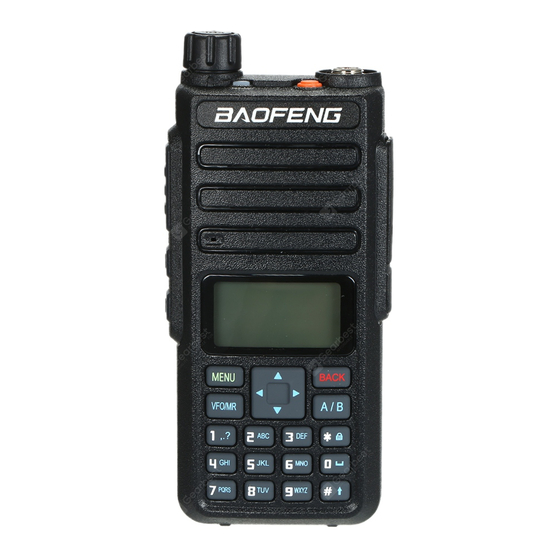
-
Contents
-
Table of Contents
-
Troubleshooting
-
Bookmarks
Quick Links
Related Manuals for Baofeng DM-1801
Summary of Contents for Baofeng DM-1801
-
Page 2
To users Thank you for your favor with our products. We are dedicated to providing high performance and high stability radio communication products. This two-way radio is no exception. The radio is a DMR dual-slot digital walkie-talkie developed and pro- duced by my team with 3000 memory channels, full-color LCD display and full keyboard hand-tuning function. -
Page 3: Main Features
Main Features RF radiation information This product is intended for professional applications that meet RF Broadband walkie talkie ● radiation requirements. Users must be aware of the hazards of RF Support UV double segment, frequency range radiation and take appropriate measures to meet the requirements of RF UHF400.000-480.000MHz / VHF136.000-174.000MHz radiation limit.
-
Page 4
User Safety Information High/low power switch ● Meets the power requirements of different call distances to save more Please read the following information in order to use this two-way radio safely and efficiently. energy 1.The maintenance work of the two-way radio can only be carried out by Alarm function ●… -
Page 5
Familiar with this Product Contents You can familiarize yourself with the external structure and the functions Familiar with this machine 01~07 of programmable buttons of this product in this section. Status indication 08~10 Basic Operation 11~28 Antenna Menu operation 29~69 Menu seting State indicator LED Indicator… -
Page 6
[BACK]/[Clear] Clear the entered information in input state In analog mode, the DTMF dial code box pops up with a short press of #. At this time, you can manually enter the [ # ]button button In menu mode.return to the previous menu DTMF code word and press PTT to start the DTMF dial [VFO/MR] button Switch the frequency mode and channel mode… -
Page 7
Preparation before use Shortcut name Purpose Relay / offline Quickly switch between relay mode and offline mode. Charging Scan on / off Quickly turn the scan function on or off. Note: Note:Be sure to ensure that the product is off when charging. Battery into double-segment double-waiting scan does not work the charger may be charging red flashing constantly flashing, this is the Strict/normal… -
Page 8: Battery Information
Battery information >Under normal circumstances, the charger indicator from red to green ●The first use of the battery when the battery is fully charged, at this time the battery can be Since the battery is not fully charged at the factory, please charge the removed.
-
Page 9: Status Indication
3. Pay attention to the temperature and humidity of the battery storage Description of LCD Icons environment. Store the battery at room temperature in a cool, dry place Icon name Icon Description of product status to minimize self-discharge of the battery. The more signal bars, the stronger the signal is Signal strength icon The current channel transmits at high power…
-
Page 10: Basic Operation
Basic Operation Icon Icon name Description of product status Power on/off The scan is on and is in normal mode To turn on the power, turn the [Power Switch / Volume Control] knob The scan stays on priority channel 1 Scan icon clockwise until you hear a «click»…
-
Page 11
●When “ Off ” is selected, the machine operates in single band mode. Note: Write frequency software configuration path: open the write software ● When “ Single Wait ” is selected the machine only works on the main -> Edit -> VFO mode -> VFO A -> digital / analog data -> channel mode -> channel, and the sub channel does not receive signal. -
Page 12
● Select from the menu: After entering the “Zone” menu, press [ ]/ [ Single call is a call from an individual two-way radio to another. to select the required zone, and then press [MENU] to switch to the 1. The LED indicator light is green selected zone. -
Page 13
6. The walkie talkie returns to the screen before receiving the call. You Start a walkie-talkie call Start a walkie-talkie call can also initiate a group call from your address book. You can choose a channel, user ID or talk group in the following ways: Channel knob Single call •… -
Page 14
1. In the channel mode, press the [ ] / [ ] to select the channel using 6. The walkie talkie returns to the screen before receiving the call. the active full call group alias or ID. 2. Hold the walkie talkie in its upright position and keep it at a distance of Analog channel call 1 to 2 inches (2.5 to 5.0 cm) from the mouth. -
Page 15
Emergency alarm function After the above configuration, press the corresponding side button, you Emergency alarm can achieve one touch DTMF launch. In the event of an emergency, you can use this feature to ask your fellow or control center for help. Emergency alarm has the highest priority, you PTT ID call can alarm whether the walkie talkie is transmitting or receiving. -
Page 16
Alarm Mode the screen displays a prompt that an emergency alert has been received, Except the alarm type “Disable” , other alarm types support the following until an acknowledgment is sent and the emergency mode exits. You will alarm modes. You can ask the dealer to select one of them (Note: The not be able to receive any other prompts or show any other calls until you following methods use “Conventional”… -
Page 17
Send emergency alert 4. Hold the walkie talkie in its upright position and keep it at a distance of This feature allows you to send an emergency alert, which belongs to a 1 to 2 inches (2.5 to 5.0 cm) from the mouth. non-voice signal and will trigger a prompt on another transceiver. -
Page 18
Note: If you press the [PTT] key during the emergency microphone and Restart emergency mode continue pressing the key after the duration of the emergency micro- It can happened in two situations: phone, the transceiver continues firing until you release the [PTT] key. •… -
Page 19: Menu Operation
● Press the preset [Individual Operation] shortcut to enable this function. If your radio receives encrypted calls with different encryption keys or 2. If you do not operate the radio in the preset response time, the radio different key values and key IDs, you will hear the chaotic transmission will prompt before the response time is up (depending on the dealer sound (basic encryption).
-
Page 20: Menu List
Menu list Level 1 menu Level 2 menu Level 3 menu Options Description of settings Remark View contacts View the contact name and number Contacts Contact list Quick configuration Configure number 0~9 to the contact, select idle state to turn off shortcut configuration Delete current contact Delete current contact…
-
Page 21
Level 1 menu Level 2 menu Level 3 menu Options Description of settings Remark Support Chinese and English and special characters, press the # For digital New message Edit interface button to switch input method, and press MENU key to send / save / mode clear only,… -
Page 22
Level 1 menu Level 2 menu Level 3 menu Options Description of settings Remark R CTC/DCS Change the decoding of sub audio. Setting method is same as above CTCSS/DCS T CTC/DCS Change the coding of sub audio. Setting method is same as above Strict Squelch The Software… -
Page 23
Level 1 menu Level 2 menu Level 3 menu Options Description of settings Remark Single Wait Scan main channel and sub-channel in turn; call is locked when the reception is effective; you can press PTT to talk with the other party Turn off encryption Options can Turn on encryption function, and the two sides must pair the key to… -
Page 24
Level 1 menu Level 2 menu Level 3 menu Options Description of settings Remark Input correct password to enter the setup menu; the password can be configured by default on host computer Options: On or Off / Changes boot password Options Enter password ●… -
Page 25
Level 1 menu Level 2 menu Level 3 menu Options Description of settings Remark Reception Frequency To set reception frequency; press * to clear all, press BACK to delete one Transmission Frequency To set transmission frequency; press * to clear all, press BACK to delete one Channel Name To set channel name;… -
Page 26: Input Method
Press number button [1] to enter commonly used punctuation and Input Method You can enter user aliases, numbers and text messages via the keypad. special characters. To enter a space, press the [0] button. This product supports the English input method, Simplified Chinese Note: In the input text display area, press [ ] / [ ] / […
-
Page 27
The functional description is as follows: View Contact Functional Description You can view the contact details. Call prompt Send call prompt to a contact, and the other party can call back directly Edit Contact Radio Initiate radio detection to a contact without interfering You can modify the number and alias of a contact (single call contacts detection with each other to confirm whether the other party has… -
Page 28
> For single call contacts, you can initiate single call, send text message, Receive and confirm call prompt and initiate extended function. Extended functions include: call prompt, When you receive a call alert, the screen displays a call alert, alternating radio detection, remote monitor, activation, and remote kill. -
Page 29
You can activate or remote kill any walkie-talkie in the system.For Remote monitor This function works only if the function is set and turned on by example, you might want to disable a stolen walkie-talkie, prevent the writing-frequency software. thief from using it, and enable it when recovered. Initiate remote monitor Set activation and remote kill User menu function:… -
Page 30
press [MENU] key. 4. Press [ ] key to “Radio kill” , then press [MENU] key to select 4. Press [ ] key to “Radio active”, then press [MENU] key to select 5. The screen displays “Radio kill” <User alias or ID>, the LED indicator 5. -
Page 31
channel is free for you to answer. Press the call key [PTT] to answer. If 8. You will hear a short tone; the screen shows the termination of the call. there is no voice activity during the preprogrammed group call hang-up If you release the PTT key while the walkie talkie is setting up a call, it time, the call is terminated. -
Page 32
• press the[ * ]button to delete all contents in the editing area;Press[ # ] to 3. Press the [ ]/ [ ] button, Select “Quick Text” , press the [MENU] switch input methods. button to select. 5.After finish the SMS content, press the [MENU] button to send or save 4. -
Page 33
2. The LCD shows the SMS :< User/Call group alias or ID>, confirm that [MENU] button to read this message the SMS is being sent. •When the chosen SMS opened in the inbox and this SMS was sent from 3. If the message sent successfully, a beep sound, and the screen shows Email program, and then it will appear a subject line. -
Page 34
shows the message has been sent. Note: Indicates unread message. Indicates read message. — Or if the message has not been sent, the screen shows that the message has failed to be sent. If the message fails to be sent, the radio Reply the SMS in the inbox will return to the re-send selection screen. -
Page 35
2.Press the [ ]/ [ ] button, Select “Message ” ,press the [MENU] Forward SMS button to select. Choose forward to send the SMS to another user/call group alias or ID. 3.Press the [ ]/ [ ] button to Inbox, press the [MENU] button to 1. -
Page 36
● press the [ * ] button to delete all contents in the editing area;Press button to select. [# ] to switch input methods. 3. Press [ ]/ [ ] o send the Outbox, and then press[MENU] to select 3. After finish the SMS content, press the [MENU] button to send or save. the outbox list. -
Page 37
emergency call or an alarm. Or you receive a call alert; the radio will also 5. Press the [MENU] button when delete SMS. And choose “YES” , the exit the re-sent selection screen. The screen list will return to the re-sent screen will indicate the entire sent item is cleared. -
Page 38
Call log 3. Press [ ]/ [ ] key to missed call, then press [MENU] key to select. Your transceiver can record all dialed, picked-up and missed calls 4. Press [ ]/ [ ] key to the missed call alias or ID, then press recently. -
Page 39
The scan function helps you to receive the communication activity from 3.Press the [ ]/ [ ] button to add channel, then press the [MENU] other channels or groups call, further to know the current activity of the button to select. relative team members. -
Page 40
2.Press the [MENU] button to enter into the MENU mode; Menu setting 3.Press the [ ]/ [ ] button to scan, then press the [MENU] button to select; Radio setting 4. If the scan was stopped, the screen will indicate to open, or if the scan You can make the following settings according to your own preferences is activated, the screen will indicate to close. -
Page 41
Setting Options Description of operation Setting Options Description of operation options and Range options and Range VOX is turned off; 10.Beep Key Beep Options: Off/On. There is no prompt tone when Off is It is not necessary to press PTT when this option is on; selected 6.VOX you can speak to transmit directly;… -
Page 42
The menu functions as follows: Setting Options Description of operation options and Range 8.Press [MENU] to enter menu mode. 17.Lan- English English version, including menu, call tips, call logs and 9.Press [ ]/ [ ] o set, then press [MENU] to select. guage all other interfaces 10.Press [… -
Page 43: Talk Around
channel, the product will beep and display “Transmission failed, Talk around In case of the repeater failure or beyond the coverage of the repeater sub-audio disabled” or “Transmission failed, color code disabled” , station, but both terminals are in the other’s communication range, at this prompting that transmission is disabled at this time.
-
Page 44
5.Press [ ]/ [ ] tto “TOT” , then press [MENU] to select. 4.Press [ ]/ [ ] to the VOX, then press [MENU] to select. 6.The screen shows infinity, 15S, 30S… 555S option (additive increase in 5.The screen displays open, press [MENU] to enable the VOX function. the range of 15S), press [ ]/ [ ] tto the corresponding option, then… -
Page 45
After the power save function is on, the radio enters the power save 5.Press the [ ]/ [ ] button to “all tones” , then press the [MENU] mode after 10 seconds in standby mode to save battery power.The button to select. power saving ratio is 1:4. -
Page 46: Led Indicator
2.Press [ ]/ [ ] to set, then press [MENU] to select. 8.The screen shows the keyboard unlocking and returns to the home 3.Press [ ]/ [ ] to the radio setting, then press [MENU] to select. screen. 4.Press [ ]/ [ ] to backlight, then press [MENU] to select.
-
Page 47
7.If the first line indicates open, press [MENU] to display the power-on In frequency mode, long press [VFO/MR] to switch between frequency password application, and then you need to type the correct password to mode and channel mode. In frequency mode, you can manually type the start the radio at the next boot. -
Page 48
4.Use the keyboard to type the correct radio configuration password CTCSS CTCSS can be set only under the simulated channel, includes: (software Settings), then press [MENU] to select. ■ CTCSS encode ■ CTCSS decode 5.Press [ ]/ [ ] to CTCSS, then press [MENU] to select. CTCSS encode 6.Press [ ]/ [… -
Page 49: Radio Configuration
Check radio version Radio configuration Check and indicate this radio’ s Model information, serial number, CPS The product configuration is listed below: version, hardware version, firmware version, DSP version, programming Configuration Operating instructions 1.Reception To set reception frequency; press * to clear all, press BACK to time, etc information.
-
Page 50: Channel Name
The radio configuration is mainly to edit the channel content. Configure 2.Press [ ]/ [ ]to set, then press [MENU] to select. paths: enter the Settings -> radio configuration menu, and select the 3.Press [ ]/ [ ] to the radio configuration, then press [MENU] to corresponding configuration items to configure.
-
Page 51
[MENU] to confirm. 6.The screen shows the current channel name, then press[ # ]to switch Press [ ]/ [ ] to find Color code, press [MENU] to confirm. input method to type the related letters, numbers, or Chinese characters, Press [ ]/ [ ] to select the color code, then press [MENU] to confirm. -
Page 52
4. Click “Browse” to select the file to be upgraded (provided by the manufacturer), for example: Dm-1801-V1.1.1.sgl; 5. Click “Download “and wait the download to complete. Remember that the power mustn’ t be cut off in the update process, or else the SCM will be scrapped;… -
Page 53
Main technological specification Reception VHF:136-174MHz Frequency range UHF:400-470MHz (Dual Band) -120dBm(BER≤5%) 1W Digital receive sensitivity Memory Channel 1024 Audio power <10% Frequency Stability ±1.0ppm +1 ~ -3dB Operating Temperature -30℃~+60℃ Operating Voltage DC 7.4V Demission 133*62*32mm ( no including the antenna) ansmission Weight About 268g (Include in battery and antenna)… -
Page 54: Troubleshooting
Troubleshooting: Note: As above method still cannot solve your problem, or you meet other problem, please get contact with local distributor to get the Problem Reason Solution technological support. The battery doesn’t be Remove and re-install the installed correctly. battery. The radio The battery runs out.
-
Page 55
FCC Statement This device complies with Part 15 of the FCC Rules. Operation is subject to the following two conditions: (1) This device may not cause harmful interference, and (2) this device must accept any interference received, including interference that may cause undesired operation. NOTE 1: This equipment has been tested and found to comply with the limits for a Class B digital device , pursuant to part 15 of the FCC Rules.