Посмотреть инструкция для Skoda Bolero бесплатно. Руководство относится к категории Автомагнитолы, 14 человек(а) дали ему среднюю оценку 8. Руководство доступно на следующих языках: русский. У вас есть вопрос о Skoda Bolero или вам нужна помощь? Задайте свой вопрос здесь
- Предисловие
- Содержание
- Важная информация, касающаяся данного Руководства по эксплуатации
- Пояснения и дополнительная информация
- Используемые сокращения
- Вводная информация
- Управление и регулировки устройства
- Радио
- Носители
- Изображения
- DVD-Видео
- ТВ-тюнер
- Media Command
- Телефон
- Точка доступа WLAN и соединение для передачи данных
- SmartLink
- Навигационная система
- Системы автомобиля
- Алфавитный указатель
- Перепечатка, тиражирование, перевод и иное использование данного руководства и его частей без письменного разрешения ŠKODA AUTO a.s. запрещены.
Нужна помощь?
У вас есть вопрос о Skoda а ответа нет в руководстве? Задайте свой вопрос здесь Дай исчерпывающее описание проблемы и четко задайте свой вопрос. Чем детальнее описание проблемы или вопроса, тем легче будет другим пользователям Skoda предоставить вам исчерпывающий ответ.
Сергей • 12-2-2022Нет комментариев
На болеро 21 года удерживая кнопку меню появилась надпись обновление по нажал появилась красная надпись, как от сюда выйти

Посмотреть фото
Александр Николаевич Селезнев • 24-1-20211 комментарий
У меня шкода карок с магнитолой болеро 2.5. Где слот для карты памяти?
Как настроить навигатор на карок 2021,вывести асрту на дисплнй прибтрноц панели, ксрта слот где.
Евгений • 6-4-2022Нет комментариев
Рапид 2022 г. Возможно ли установить сопряжение Болеро с видеорегистратором, не имеющим дисплей. Если да, то какие требования к устройству?
Илья • 9-2-2023Нет комментариев
Шкода октавия . Мультимедиа Болеро. Радио играет, сенсор работает. Экран не светит, в чем причина.
Фларит • 12-6-2022Нет комментариев
Александр • 28-2-2022Нет комментариев
Не загружается магнитола после загрузки логотипа шкода выключается
Олег • 24-1-2022Нет комментариев
Bolero mib3 шкода октавия а8 21г. нет кнопки rear с замком для разблокировки климат контроля задних сидений как лечится?
олег • 15-12-2021Нет комментариев
после того как сняли акамулятор не можем включить магнитолу балеро . появляется только логотип гугл. подскожите пожалуйста как включить систему
Алексей • 7-10-2021Нет комментариев
Игорь • 11-3-20211 комментарий
Шкода Октавия А7 2020 года выпуска. Есть ли в автомагнитоле Болеро функция Apple Car Play.
Добрый день. Скажите, пожалуйста, по каким причинам может не работать радио у шкода оетавиа 7,2016 г.? Возможно нужны какие-то настройки? При включении радио, происходит поиск радиоволн, находит, но звука нет, характерного шипения тоже нет.
- 1
- 2
Количество вопросов: 13

Главная
Не можете найти ответ на свой вопрос в руководстве? Вы можете найти ответ на свой вопрос ниже, в разделе часто задаваемых вопросов о Skoda Bolero.
В чем разница между FM и AM?
Когда звук считается слишком громким?
Автомобильный радиоприемник не включается, что делать?
Как лучше всего выполнять чистку Автомагнитола?
Инструкция Skoda Bolero доступно в русский?
Не нашли свой вопрос? Задайте свой вопрос здесь
-
Contents
-
Table of Contents
-
Bookmarks
Related Manuals for Skoda Infotainment Radio Bolero
Summary of Contents for Skoda Infotainment Radio Bolero
-
Page 1
SIMPLY CLEVER Infotainment Radio Bolero Owner’s Manual… -
Page 2
Notes Structure of this Owner’s Manual WARNING (explanations) The most important notes are marked with the heading WARNING. These WARNING notes draw your attention to a serious risk of accident or injury. This Owner’s Manual has been systematically designed to make it easy for you to search for and obtain the information you require. -
Page 3
Preface You have chosen a ŠKODA vehicle, which is fitted with an Infotainment Radio Bolero (hereafter called the unit) – we thank you for your confidence in us. The new operating concept allows you to configure vehicle settings and to operate some electronic systems centrally from the unit. -
Page 4: Table Of Contents
Vehicle systems Table of Contents Vehicle settings Abbreviations Index Introductory information Important notes Equipment overview Device operation operate via the device screen Operation via the Maxi DOT display voice control device settings setup menu Radio Operation Radio settings Media Operation Signal source Communication Telephones and two-way radio systems…
-
Page 5
Abbreviation Definition Abbreviations phase alternating line — Audio-visual encoding standard in most European countries Abbreviation Definition Program identification — Station identification by means of a A2DP Advanced Audio Distribution Profile — a software profile for da- RDS code ®, ta transfer via Bluetooth designed for a one-way transfer of Radio Data System — system for the transmission of additional audio data… -
Page 6: Introductory Information
WARNING (Continued) Introductory information Adjust the volume to ensure that acoustic signals from outside, e.g. sirens ■ from vehicles which have the right of way, such as police, ambulance and fire Important notes brigade vehicles, can be heard at all time. High volumes can cause hearing damage.
-
Page 7: Equipment Overview
First read and observe the introductory information given on page 5. Equipment overview Description of the device Introduction — Switch unit on/off, adjust volume Operation and confirmation This chapter contains information on the following subjects: — Radio menu »…
-
Page 8: Switching The Unit On/Off
Note Device menus Use a soft cloth and, if necessary, methylated spirits, to remove fingerprints ■ from the screen. When doing so, ensure that you do not cause damage to other Fig. 2 parts of the interior. Unit menus It is not possible to operate the screen with your fingernails or while wearing ■…
-
Page 9
Note The change in volume is displayed on the screen of the unit. ■ The following symbol appears in the display when the sound is muted . ■ Excessively high volumes can cause sound resonance in the vehicle. ■ The car speakers may be damaged if the volume is set too loud or is distorted. ■… -
Page 10: Device Operation
Scroll bar — Shows the position in the menu; touch the scroll bar to navigate Device operation the menu Menu item with “pop-up window” operate via the device screen Screen areas which confirm a function or a menu are called “function keys”. White or green function keys are active.
-
Page 11: Input Screen With Keyboard
Set value By pressing the keyboard function key on the input screen the required character › by touching the function keys with the symbols / , / , — / + appears in text line › Touch or move your finger over the scale Only those letters or symbols making up a logical entry will be available.
-
Page 12: Operation Via The Maxi Dot Display
Operation via the Maxi DOT display Operate using the buttons on the operating lever Introduction Fig. 6 Buttons on the control lever This chapter contains information on the following subjects: Operate using the buttons on the operating lever operation via the buttons / dials on the multifunction steering wheel — Audio operation via the buttons / dials on the multifunction steering wheel — Telephone…
-
Page 13
operation via the buttons / dials on the multifunction steering wheel — Audio The information shown on the MAXI DOT display (depending on the menu selected) Radio ■ current frequency band of the radio station; ■ ■ currently playing station of the receivable radio stations in the given frequen- cy band, if less than 5 are receivable;… -
Page 14: Fig
Function Button/ Action wheel » Fig. 7 Radio Media Display list of available stations Turn upwards Switch to previous track Scroll upwards Display list of available stations Turn downwards Skip to next track Scroll downwards Press briefly Call up the main menu The sound is turned on again by pressing or turning wheel If the system plays audible messages in voice mode dialogues of the device, the volume of the audible message is affected.
-
Page 15: Voice Control
Button/wheel » Fig. 8 Action Function Turn up/down Call list, previous menu item Press briefly Confirm selected menu item Press briefly Return to a previous level on menu Press and hold Return to Main Menu Telephone call function in the MAXI DOT display Symbol Meaning Depending on the context, you can select the following functions.
-
Page 16
WARNING Note Please pay attention to the traffic first and foremost! As the driver you are During voice control, no traffic announcements are played. ■ ■ fully responsible for road safety. Only use the system so that you are in full Some voice commands must be spelled out when pronouncing depending on ■… -
Page 17
› Press a button on the unit (with the exception of brief pressing of the button As long as the system is playing a voice output, it is not necessary to await the end of the message playback. The message can be ended by briefly pressing the VOICE ›… -
Page 18
Restore entry › by pressing the function key with the symbol ; › by pressing the button on the unit; VOICE › by pressing the symbol key on the multifunction steering wheel. Voice commands not included in the Help … -
Page 19: Device Settings
Main Menu device settings Fig. 10 setup menu Unit settings: Main menu Introduction This chapter contains information on the following subjects: Main Menu Sound setup Screen settings First read and observe the introductory information given on page 17. time and date settings keyboard settings Additional keypad language settings…
-
Page 20: Sound Setup
® Media codec: … — Media codec version Bluetooth audio — Sets the volume of the connected Bluetooth device ■ ■ Update software — manual software upgrade Quiet — Low volume ■ ■ Copyright — Information on licences and copyrights are only available in English Medium — Medium volume ■…
-
Page 21: Time And Date Settings
Switch off screen (in 10 seconds) — Activate/deactivate energy-saving mode for ■ keyboard settings the display Brightness: — Adjusts the brightness of the screen ■ First read and observe the introductory information given on page 17. Brightest — brightest level ■…
-
Page 22: Voice Control Settings
Temperature: — Temperature units ■ restore factory settings °C — Degrees Celsius ■ °F — Degrees Fahrenheit ■ First read and observe the introductory information given on page 17. Volume: — Volume units ■ l — Litres ■ › ■…
-
Page 23: Radio
Main menu Radio Fig. 12 Operation Radio: Main menu Introduction This chapter contains information on the following subjects: Main menu List of available stations Search and store radio station First read and observe the introductory information given on page 21. Search the available stations (Scan) Station logos Traffic programme…
-
Page 24: List Of Available Stations
› Press the function button » Fig. 12 and select the desired range. Symbol Meaning Information symbols in the display (e.g.) Type of program being broadcast (FM) Symbol Meaning (e.g.) Type the regional broadcast (FM) Signal is not available (DAB) Traffic information station …
-
Page 25: Search The Available Stations (Scan)
You can switch between groups of individual preset buttons using the function Storing station logos manually keys For the previously stored stations a logo can be assigned manually. › Press the function key → Station logos. Search the available stations (Scan) A menu with preset buttons for radio stations is displayed.
-
Page 26: Radio Settings
Radio settings Station information (DAB) Introduction Fig. 14 Station information This chapter contains information on the following subjects: Settings Advanced settings Advanced settings (DAB) First and foremost, pay attention to the safety instructions » page 4, Important notes. The basic setting of the radio functions is the same for all broadcasting ranges. …
-
Page 27: Advanced Settings
Auto-change DAB -FM Advanced settings If the DAB signal is poor, the unit will try to find a corresponding FM station for the DAB station you are currently listening to. First read and observe the introductory information given on page 24. For auto-change to work, the DAB and FM stations must send a sender ID.
-
Page 28: Media
First read and observe the introductory information given on page 26. Media Call up the main menu › Operation Press the button MEDIA Explanation of graphic Introduction Information for the current file (e.g., artist, track title) Selected signal source/display of cover art provided that this exists in the file This chapter contains information on the following subjects: being played (ID3 tag) Display of the playing time / remaining time and the playing time axis;…
-
Page 29: Media Settings
Button Action Operation Track/folder list Press and hold but- Fast-reverse of the track Fig. 16 Press briefly Plays the next track from the start Track/folder list Press and hold but- Fast-forward of the track First press Turn on the track repeat Turn on the repetition of the entire folder / Second press …
-
Page 30: Signal Source
Sound — Sound setup » page 18, Sound setup ■ WARNING Mix/repeat/scan including subfolders — switching the song playback in the fol- ■ lowing modes (Shuffle / Repeat / Automatic play) including subfolders in the Never place external signal sources close to the airbags. Loose objects could ■…
-
Page 31
Specification Requirements and Limitations ® Bluetooth Bluetooth protocolsA2DPand AVRCP (1.0 — 1.3) Player First read and observe the introductory information and safety warn- ® ® ® Other external Portable player (e.g., iPod , iPad , iPhone , MTP player, ings on page 28. -
Page 32
CAUTION Be sure to wait until the CD has been fully ejected before you try to insert a new ■ CD. Otherwise you can damage the drive inside the unit. Only insert into the CD — drive original audio — CDs or standardised CD-Rs and ■… -
Page 33
CAUTION SD memory card Only use SD cards in standard size. When using smaller SD card with the adapt- ■ er the SD memory card may fall out or the adapter while driving the vehicle due to vibrations. We recommend using SD memory cards of class 4 and higher. This guarantees ■… -
Page 34
USB input First read and observe the introductory information and safety warn- External devices connected to the USB input can be operated from your device ings on page 28. Before removing the USBdevice, proceed as follows: The device allows you to play audio files from an external, device connected to ›… -
Page 35
For safety reasons, the video display is switched off at speeds over 5 km/h. The ■ unit continues to play the soundtrack. After power cycling the ignition, the video playback will not be restored from an ■ Apple device. Media… -
Page 36: Communication
WARNING (Continued) Communication Two-way radio systems, mobile phones or mounts must not be installed on ■ airbag covers or within the immediate deployment range of the airbags. Telephones and two-way radio systems Never leave a mobile phone on a seat in the airbag deployment area, on the ■…
-
Page 37
Operating phones or two-way radio systems may interfere with the functionality Display the phonebook » page 42 of the electronic systems in your vehicle. Display of call list (if there are new missed calls, the icon will appear here … -
Page 38
Message Importance WARNING ® Please switch on Bluetooth. Switch on the Bluetooth function. For safety reasons, the storage compartment must always be closed when No Bluetooth devices paired. Connect the phone with the device. driving. CAUTION Phonebox Protective cases or cases around the phone placed in the storage compartment ■… -
Page 39: Connect The Device With The Mobile Phone
Reminder: Remember your mobile — Switch on/off reminder for a connected tel- ■ Note ephone when the ignition is switched off and the ignition key is removed (or the ignition is turned off and the driver’s door opened in the case of vehicles with The maximum number of phones that can be registered is 20.
-
Page 40: Connect Device With Your Mobile Phone
› In the device and the phone confirm within 30 seconds, the 6-digit PIN code Connect device with your mobile phone displayed on the device screen and the phone display › If necessary select in the phone the option for automatically connecting the …
-
Page 41: Connection With Another Paired Mobile Phone
® Depending on the phone’s Bluetooth version the pairing is to be confirmed in If the desired phone is not found in the list previously paired phones, then the one of the following ways. phone with the device is paired »…
-
Page 42: Telephone Functions
Symbol Meaning Disconnection ® ® Bluetooth players (Bluetooth profiles A2DP and AVRCP) First read and observe the introductory information and safety warn- ® ® Bluetooth player connected to the unit via Bluetooth pro- ings on page 37. files A2DP and AVRCP The connection of a phone to the device can be disconnected in one of the fol- ®…
-
Page 43
There are five speed dial buttons available. Direct entry of a phone number Assign a telephone number to a contact › Press a function key for the speed dial » Fig. 21 on page 35 that is not as- Fig. 23 signed. -
Page 44
Find contact Phone book Press the button Find to open the input screen with keypad to search in the pho- nebook » page First read and observe the introductory information given on page 40. Select contact Pressing the function key with one of the contacts displayed causes the choice to ›… -
Page 45: Telephone Conversation
Explanation of graphic End call Sorting the call list Contact Image — View details of the caller or the called party details › All — List of all calls › Missed calls — list of missed calls ›…
-
Page 46: Vehicle Systems
Selecting driving mode Vehicle systems Vehicle settings Introduction This chapter contains information on the following subjects: Selecting driving mode Vehicle data Auxiliary heater and ventilation ESC system Fig. 25 Button for selecting the driving mode Octavia, Octavia Combi / Octa- via RS, Octavia Combi RS Tyre Driver assistance…
-
Page 47: Vehicle Data
Individual — Activates the Individual mode ■ Vehicle data Cancel — Cancel the menu to select the driving mode ■ Setup — Individual setting ■ Steering: — Set the power steering characteristics ■ Normal — Normal ■ ■ Sport — Sports Engine: — Set the engine (drive) characteristics ■…
-
Page 48: Auxiliary Heater And Ventilation
Range (if the estimated range is less than 300 km, the vehicle starts to ap- Auxiliary heater and ventilation proach the symbol: ) Vehicle representation (the zones of the vehicle are shown in different col- ours, corresponding to any warning messages that occur. The warning mes- sages are displayed once you touch vehicle) Driving data — Display travel data »…
-
Page 49: Esc System
Distance: — Set the distance monitoring to the vehicles ahead ■ ESC system Very close — Very small distance ■ Close — Small distance ■ First read and observe the introductory information given on page 44. Medium — Medium distance ■…
-
Page 50: Light
Message: Look! Safe to move? Light assistance — Set the light assistance ■ Dynamic Light Assist — Switch on/off the head light assist function ■ Displays the selected lane depending on the steering angle Switch-on time: — Set the sensibility of the light sensor against the change in ■…
-
Page 51: Opening And Closing
Current consumption — Switch on/off the display of current fuel consumption in ■ Opening and closing the display of the instrument cluster Average consumption — Switch on/off the display of average fuel consumption ■ First read and observe the introductory information given on page 44. in the display of the instrument cluster Refuel quantity — Switch on/off the display of refuel quantity in the display of ■…
-
Page 52: Restore Factory Settings
Call up the main menu Restore factory settings › Press the button on the Climatronic control panel. SETUP First read and observe the introductory information given on page 44. ■ Air con. profile: … — Set the Climatronic operating mode ON/OFF — Switches Climatronic on/off ■…
-
Page 53
Climatronic Digital radio reception Index automatic air recirculation Settings Automatic operation display mode Door release COMING HOME Driver Alert System Communication Driving mode Phonebox Adaptive Cruise Control Component protection Additional keyboard languages Connect the device Adjusting with the phone Eco tips volume Convenience consumer External input… -
Page 54
input screen MEDIA IN Phone language characters Multifunction steering wheel Bluetooth — profile Operation Call-lists Input screen with keyboard Playback Enter phone number Input screen with numeric keyboard Requirements and Limitations Phone book Instrument lighting Scan Speed dialling a phone number Introductory information Select signal source Phonebox… -
Page 55
Scan Setup Media Sound SD memory card Set vehicle systems Units ESC system Search for radio station 31, 32 Tyre Seats Signal source Settings Sound Select frequency range See main menu Speed limit for snow tyres Vehicle equipment Selecting driving mode START-STOP Declaration of conformity Select radio station… -
Page 56
ŠKODA AUTO a.s. pursues a policy of constant product and model development. Reprinting, duplicating, translating and any other use, either in whole or in part, is We trust that you will understand that changes to models in terms of shape, not permitted without the written consent of ŠKODA AUTO a.s.. -
Page 57
Bolero Infotainment anglicky 11.2013 S00.5614.23.20 5E0 012 720 EC…
Смотреть руководство для Skoda Bolero Infotainment system ниже. Все руководства на ManualsCat.com могут просматриваться абсолютно бесплатно. Нажав кнопку «Выбор языка» вы можете изменить язык руководства, которое хотите просмотреть.

MANUALSCAT | RU
Вопросы и ответы
У вас есть вопрос о Skoda Bolero Infotainment system, но вы не можете найти ответ в пользовательском руководстве? Возможно, пользователи ManualsCat.com смогут помочь вам и ответят на ваш вопрос. Заполните форму ниже — и ваш вопрос будет отображаться под руководством для Skoda Bolero Infotainment system. Пожалуйста, убедитесь, что вы опишите свои трудности с Skoda Bolero Infotainment system как можно более детально. Чем более детальным является ваш вопрос, тем более высоки шансы, что другой пользователь быстро ответит на него. Вам будет автоматически отправлено электронное письмо, чтобы проинформировать вас, когда кто-то из пользователей ответит на ваш вопрос.
Задать вопрос о Skoda Bolero Infotainment system
- Бренд:
- Skoda
- Продукт:
- Навигаторы
- Модель/название:
- Bolero Infotainment system
- Тип файла:
- Доступные языки:
- английский
Сопутствующие товары Skoda Bolero Infotainment system
-
www.skoda-auto.com
BoleroInfotainment rusky 11.2012S00.5614.03.755E0 012 095 AD
SIMPLY CLEVER
— Bolero
-
()
, — .
. .
, , , , , .
.
.
.
. — .
(, ) .
, .
-
KODA, — Bolero ( ) . — .
, — .
, -. — . .
KODA.
KODA AUTO a.s. ( KODA)
-
3
3
3
3
3
5
8
8
9
9
9
9
10
10
Bluetooth 10
12
12
13
/ 13
DAB 14
16
16
17
/ 17
17
CD 18
19
19
21
21
22
23
24
24
25
25
26
MAXI DOT ( ) 27
29
/ 29
29
31
31
32
32
37
37
Climatronic 38
39
2
-
, , , .
.
. KODA.
— .
-!
! . — , — ! , , -, , — , , , , . !
, — .
-.
, :
-, ;
;
KODA.
— : — . .
, — KODA.
, — .
. ! — — ! , , , .
3
-
, -, . , . , , . , — -. , -.
4
-
. 1
— / , — . 12 — . 16 : . — PHONE — . 21 : TP — . 13 VOICE — . 29
— . 8SOUND — . 81
2
3
4
5
6
7
8
— . 31MENU — . 39 . 6
— .
/
, — .
— , .
, — Bluetooth , — . 21. Bluetooth . 10.
, — . .
, — .
KESSY, — . , , -.
( ).
( ). ( ).
9
10
11
5
-
MUTE 0.
. .
. 2
, , .
, , .
.
— , , — , .
— . — , .
—
A
B
C
,
2 . 1 . 5 2 , — .
2 . 1 . 5
: /
— . — / , / , — / +
,: : .
,
, RADIO . , RADIO -, .
D
E
6
-
.
. :
— — — — — , — / — /
xyz —
xyz — xyz —
xyz —
. 3
— .
: —
— ,
—
—
— , . (, , ..)
123 —
—
ABC —
—
OK — .
7
-
. 4 :
, — . 3.
, — . 5.
SETUP .
— . 8 — . 9 — . 9 /Language — , — . 9 — ,
— . 9 — . 10 SD- 1 — SD- USB- — USB—
— . 10 Bluetooth — Bluetooth . 10
— — — . —
Copyright — — ( )
. 5
SOUND . —
— — (TP)
— —
. . —
— iPod — iPod
— — —
AUX — , AUX — — —
8
-
Bluetooth-Audio — , Bluetooth — — —
— — . — — — —
— — — , — / — / — / , —
— . CANTON — CANTON
— — —
— — — —
—
CANTON Surround — Surround
SETUP . ( 10 .) — /
1) —
— —
— — —
— / , —
—
SETUP — — / — — — —
SETUP ABC — . QWERTZ — QWERTY (
)
SETUP . —
— —
1) 10 , , 2 , . -, 2 .
9
-
— / — / —
— C — F —
— — (US) — () (UK) — ()
— /100 — 100 / — /. (US) — () / (UK) — ()
— /100 — 100 / — 3/100 — 100 /3 —
— — — psi —
SETUP . : —
— ( — )
— ( — )
— /
— / —
— /
— / —
SETUP : — — — — — — —
Bluetooth — Bluetooth —
Bluetooth
SETUP Bluetooth Bluetooth — / Bluetooth — /
Bluetooth — — — 5 —
5 / : — —
— ,
Bluetooth, -, — ,
Bluetooth — , Bluetooth
10
-
— Bluetooth
Bluetooth-Audio (A2DP/AVRCP) — / — Bluetooth A2DP AVRCP1)
1) A2DP AVRCP Bluetooth, .
11
-
. 6 :
, — . 3.
, — . 5.
RADIO .
A
B ,
C
FM /AM /DAB
RDS ( ) —
RADIO FM / AM / DAB
RADIO .
FM — FM
M — M
DAB — . 14
RADIO .
B . 6 . 12, .
15 . RADIO —
. 6 . 12.
RADIO / —
.
— ( AM)
12
-
-.
RADIO . — . 8, — —
— — .
— — —
— —
. (TP) — / —
—
— — .
— SD USB- 1)
— / — RDS
(AF) — /
(RDS) — / RDS RDS — / —
. — .
. — —
. — .
RDS (Radio Data System) — . RDS . , RDS , — AF RDS, -. (AF) — .
DAB — Digital Audio Broadcasting — DAB, DAB+ DMB. DAB () «» () . -,
(-, , , , — . .)./
: . RADIO (TP) . .
— , — . — , TP, TP-, .
1) : jpg, gif, png, bmp.
13
-
AM. — (, — ), TP TP.
TP (Traffic — Program identification) — — TP ( -).
DAB
. 7 DAB:
, — . 3.
, — . 5.
RADIO DAB .
DAB- DAB- , DAB-
— DAB—
DAB-
DAB-
DAB- (-)
, DAB , — .
RADIO .
B . 7 . 14, .
15 . RADIO . RADIO / —
.
A
B
C
14
-
—
-.
DAB XYZ — DAB.
XYZ — DAB XYZ. XYZ — DAB XYZ,
. XYZ (FM) — DAB XYZ,
FM-. XYZ (DAB) — DAB XYZ, —
DAB-.
. 8 —
RADIO DAB . — — DAB- (., —
, ) —
— — —
RADIO .
DAB — / DAB.
DAB — / DAB (.,, , -, )
DAB — DAB — / — DAB
DAB — FM — / — DAB FM- — DAB.
— / — DAB
DAB DAB , -.
DAB — FM DAB — FM-.
— DAB FM -.
FM- — (FM). DAB (FM) .
DAB — FM, .
(, — , ), . 15.
15
-
. 9 :
, — . 3.
, — . 5.
: mp3, wma,wav, aac, m4a, m4b mp4.
CD- -CD (CD-DA) CD (CD-R, CD-RW) .
.
A (., , -)
B / (cover art),
C , —
CD
, Bluetooth
WMA (Windows Media Audio) , — DRM (Digital Rights Management).
WMA- — .MEDIA CD — -. USB — USB-
AUX — AUX- —
iPod — iPod (iPhone, iPad) SD 1 — BT-Audio — Bluetooth —
. 19.
16
-
/
/: — — — — , .
( — 5
— )
— —
(- 5 —
)
—
—
— —
—
/- —
/- —
/-
— 10 a)
a) / — 2 . 1 . 5.
/
. 10 /
MEDIA .
( )
MEDIA .
A
B
C
17
-
— . 8, /, — / —
/, —
Bluetooth — Bluetooth . 10 (TP) — / —
AUX- — /
, AUX
CD
. 11 CD-
CD- .
/ CD CD CD- , —
. . — CD- . 10 , , , .
— 1. — .
CD- DVD- -. CD- — Eco Disc -. — — CD-. — CD- , — CD- . CD, — .
CD- , — , : CD. — CD. : CD CD. , — KODA. — . — . , — , CD-! CD- !
CD . CD !«/». — . — . . — , , , . — -, . CD- CD-R CD-RW .
18
-
— . CD- , . CD- — KODA.
. 12 SD
.
. .
: SETUP SD- 1 . MENU SD- 1 . , . —
.
, -, — .
32 x 24 x 2,1
1,4 . SD (Secure Digital Memory Cards), SDHC (Secure Digital
High-CapacityMemory Cards) SDXC (Secure Digital Extended Capacity). —
. — — — .
— .
.
USB- 2.0. (FAT)
AT16, FAT32 exFAT.
, .
— , . , — — .
19
-
()
, — . , .
AUX -!
AUX — . — . . — .
AUX
AUX — .
AUX 3,5- «-«. , .
USB-
USB- : SETUP USB- . MENU USB- . USB- — .
Bluetooth
Bluetooth , .
, . — . 22.
iPod (iPad, iPhone)
iPod (iPad, iPhone) .
.
Apple ( ) —
—, , , -, ,
— -, , , , , , -,
iPod (iPad, iPhone) MEDIA (iPod) . — , —
: — AV: —
20
-
, Bluetooth.
, — . 22.
-, 1). — . 22.
. 13 :
, — . 3.
, — . 5.
PHONE . , Bluetooth, .
Bluetooth, Bluetooth . 10.
— — Bluetooth . 22.
A
B , / —
C . 23 . 24 . 24 ( ,
-) . 25 . 25
a).
a)
( )a)
a) .
1) Bluetooth.
21
-
Bluetooth SKODA BT wxyz, wxyz VIN -. . 10.
. Bluetooth . 10 —
.
-, 1). — , -, .
— :
— , — , —
— . 22
(
KESSY ).
Bluetooth . Bluetooth . 10.
. 10.
, /
, (Bluetooth- HFP)a)
, — Bluetooth- HFPa)
Bluetooth- (Bluetooth- A2DP AVRCP)b)
Bluetooth-, Bluetooth- A2DP AVRCPb)
a) HFP Bluetooth, .b) A2DP AVRCP Bluetooth, .
20. — , , — .
,
PHONE . , , , Bluetooth . — B . 13 . 21, , — Bluetooth .
— .
, B . 13 . 21. .
1) Bluetooth.
22
-
— . . Bluetooth ( , 25 ). , —
. ., : 30
PIN-
30
PIN-.
Bluetooth A2DP AVRCP, — Bluetooth-.
, , . 22.
— :
— — —
Bluetooth-.
— . Bluetooth-. Bluetooth
.
: PIN-, —
4
30 PIN- —
30 —
PIN-.
— .
. 13 . 21. , —
. .
C . 13 . 21 — .
.
C . 13 . 21. . . — . 25.
C . 13 . 21. C . 13
. 21.
. .
23
-
— . 25.
. .
. 14 —
PHONE . . 14.
:
— — — , —
. 25
— — . , .
, , 32, DA, FA, EB .
.
PHONE . 2000 . 5 -.
— SIM-1) .
, — , 2000, , — ., .
. — , . — .
, — . — , Bluetooth.
— . 25.
. 7.
— .
, .
1) SIM- .
24
-
.
. 15
PHONE . . 15.
— — — — . 25, —
.
A
B
C
D
PHONE .
— / — / —
Bluetooth Bluetooth . 10 —
— — ,
— — /
. — .
— : —
— —
xxx/yyy — , —
— (, , — , -)
— — , ,
: — / — ( KESSY — ).
25
-
— , — in-band ringing1)
— / , 2)
.
.
— .
:
— — ( ) — —
.
.
:
— — — — — —
.
/ . .
: — — (
) — — — — —
, .
:
— — —
1) in-band ringing , — .
2) .
26
-
MAXI DOT ( )
. 16 :
, , .
, — .
, — .
— .
1
—
(MUTE)
2
—
, — , —
—
3
—
, , , , —
, (redial)
4
—
,
,
5
—
— .
— — —
27
-
—
— — — . . — . . — —
— — . . — . . — — — —
a).
a)
( , )
a) .
.
, — .
.
28
-
. . 10.
, . , , — .
. — , .
.
.
. 29,.
VOICE , .
/
VOICE . —
.
VOICE . —
.. ( ).
( VOICE ).
-.
. , —
. . , ,
. ,
. , —
, . , —
— .
. / . 10.
— . — .
.
, , , , — .
29
-
, , , — , -.
: VOICE ; . , -.
/ 2 . 1 . 5 — . , .
— .
: ; VOICE ; . .
, ? .
2- , , .
3- , — .
30
-
, — . 3.
, — . 5.
.
CAR . — . 31
/ —
— / . 32
— . 32
-. , — (-, ESC) — . CAR .
. 17 /
CAR .
( ) ( — 300 , — ) ( , -, , — ).
— . 17
— :
— — —
/ .
A
B
C
D
E
F
G
31
-
— — , —
— — . 17 — —
— , —
( , — )
— — —
SET —
— / .
— — — .
. 18 : /
CAR / SETUP Climatronic .
: , — . 18/: , 1-3 (10-60) —
. — . . . , -/ -. , — , / — . . 9, , — . — .
, — . 3.
, — . 5.
CAR . ESC — (ASR) . 33 — . 33
A
B
C
D
E
32
-
— . 33 — . 34 — . 34 — —
. 35 — —
. 35 — . 35 — /
. 35 — . 9 — . 9 — —
, VIN . 36 — . 36
ESC
ESC . . — ESC . ASR — (ASR)
. —
SET —
— — /
—
.
ACC ( -) — — — —
— — — —
, — /
— — — — — — —
— . — / — / — /
—
— /
: — — — —
— — / —
— / —
— /-
33
-
. 19
.
/ : ! — , -, , — , , — ! -, , — ,
ParkPilot — — / —
— —
—
A
B
C
D
E
F
G
H
— — —
—
. — — — —
-, , «-«, — .
. —
Head Light Assist — /
— — — — — —
. . . . ( ) — /
— / —
. . . — / —
— . — . —
— / — —
—
34
-
Coming/Leaving home — COMING HOME/LEAVING HOME Coming home —
—(0-30 , 0 ) Leaving home — —
(0-30 , 0 )
. —
— / —
( . ) — / —
— /
— . . — / —
. . — / —
. — —
—
— — . —
— —
— — —
— / —
. — / —
. — —
— / —
. — / —
— / — / , —
— /
— /
— / — / — / — /
. . — / —
— / . — / —
— —
35
-
. VIN — VIN ( ) — / —
— / —
. — — —
— —
— — —
— — —
, , -.
— —
36
-
, — . 3.
, — . 5.
-.
. 20 —
: ,, , , .
(, -) . 20. — — .
. —
— —
—
— — —
—
— — —
—
— — —
—
— — —
— — — —
ACC — — — — — —
— — — —
—
» » — 10 , — , .
37
-
Climatronic
. 21 Climatronic:
Climatronic — . 21. , , ( 21,5 C) ( 22 C).
Climatronic , — AUTO.
SETUP Climatronic. — Climatronic / — / Climatronic — / . 32 —
Climatronic— Climatronic — , — —
. — /
. —
Climatronic — 10 , Climatronic , .
38
-
. 22 : —
, — . 3.
, — . 5.
MENU . — . 12
— . 16
— . 8
— . 8
— . 31
— . 21
39
-
32
5
AUX 20USB 20
9 12 16 12 37 5
3
39 31 8 16 12 21
/ 29 10 29
5 5
31 31 , —
31 9 12 3 (TP) 13
. 9
10, 36 3 3 8
6 27
19 7, 9- 26
27
33
36 35
32 31 35 35 34 34 35 36 33Climatronic 38
10 9 10 5 9 8 9 23 37 25 23 8 9 8Bluetooth 10
ESC 33
16
5
40
-
7 5
12 3
7 6
12
12 12 (TP) 13 13DAB 14
12 12 12
31 16 12 21
37
8
3 31 22 6
23 24 21 29 26 27 25 22 Bluetooth 22 22 25 24
26
6
3, 9 6
AM 12AUX 20Bluetooth
10/ 10 10 20
22 22
CD 18Climatronic 38DAB 14
FM 12SD- 19TP ( ) 13USB 20iPod (iPad, iPhone) 20
41
-
KODA AUTO a.s. -. — . , , — — .
, , — KODA AUTO .
KODA AUTO a.s.
.
: KODA AUTO a.s.
KODA AUTO a.s. 2012
-
www.skoda-auto.com
BoleroInfotainment rusky 11.2012S00.5614.03.755E0 012 095 AD
SIMPLY CLEVER
— Bolero
() / ,
Bluetooth
/ DAB
/ CD AUXUSB- BluetoothiPod (iPad, iPhone)
,
MAXI DOT ( )
/
ESC
Climatronic
C
KODA AUTO a.s. . . , , — .
Bolero Информационно-развлекательное головное устройство (издание ноябрь 2014) руководство по эксплуатации устанавливалась на автомобили Skoda Octavia A7 (Typ 5E) с бензиновыми двигателями: TSI 1.2 л (1197 см³) 86-105 л.с./63-77 кВт, 1.4 л TSI G-TEC/ TSI (1390 см³) 110-140 л.с./81-103 кВт, 1.6 л MPI (1390 см³) 110 л.с./81 кВт, TSI 1.8 л (1798 см³) 180 л.с./132 кВт, TSI 2.0 л (1984 см³) 220 л.с./162 кВт и дизельными 1.6 л TDI (1598 см³) 90-105-110 л.с./66-77-81 кВт, 2.0 л TDI (1968 см³) 143-150-184 л.с./105-110-135 кВт; Радиомагнитола Болеро (Шкода Октавия А7 с кузовами пятидверный хэтчбек и универсал передне- и полноприводные модели третьего поколения выпуска с 2013 года)
Skoda Octavia A7 Combi/RS Руководство по эксплуатации, ремонту и техническому обслуживанию Здесь
Программа самообучения №96 ŠKODA Octavia III Знакомство с автомобилем Часть I
Программа самообучения №97 ŠKODA Octavia III Знакомство с автомобилем Часть II
Программа самообучения №98 ŠKODA Octavia III Электронные системы
Программа самообучения №99 Двигатели 1.8 л TFSI 132 кВт, 2.0 л TFSI 162 кВт Семейство ЕА888
Программа самообучения №100 Двигатели 1,6 л TDI и 2,0 л TDI с системой впрыска Common Rail Серия ЕА288
Skoda Octavia A7 (издание май 2016) руководство по эксплуатации
Skoda Octavia A7 (Русское издание май 2014) руководство по эксплуатации
Skoda Octavia A7 (Русское издание ноябрь 2014) руководство по эксплуатации
Infotainment моделей Columbus / Amundsen / Bolero (май 2016) руководство по эксплуатации
Система Infotainment Swing (май 2016) руководство по эксплуатации
Amundsen Информационно-командная навигационная система руководство по эксплуатации 2014 11
Columbus навигационная система руководство по эксплуатации 2014 11
Swing головное устройство руководство по эксплуатации 2014 05
ЕСЛИ ВЫ ВИДИТЕ ОШИБКУ 406 Not Acceptable и не видите документ, то скорей всего у Вас IP РФ и его надо сменить, на любой другой страны, с помощью VPN ( Scribd и SlideShare блокируют посетителей с Российским IP).
Видео Skoda Bolero автомобильный радиоприёмник (Шкода Октавия с 2013)
Škoda Octavia автомобильный радиоприёмник общая информация (Шкода Октавия 2014)
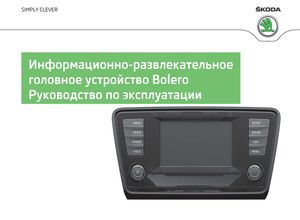
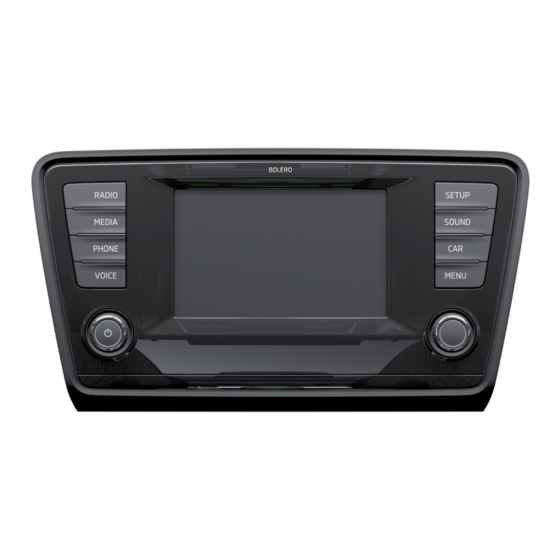
Вы выбрали автомобиль ŠKODA, оснащённый информационно-развлекательным головным устройством Bolero (далее именуется устройством) – благодарим Вас за доверие.
Новая концепция управления позволяет управлять настройками автомобиля и электронными системами централизованно – через головное устройство.
Просим вас внимательно ознакомиться не только с данным руководством, но и с руководством по эксплуатации автомобиля, потому что согласованное выполнение этих руководств является условием правильной эксплуатации автомобиля.
За дополнительной информацией и с вопросами, касающимися вашего прибора, обращайтесь к дилеру ŠKODA.
| Цены, в рублях по состоянию на 23 декабря 2014 | |||||||||
| Комплектация | 1.6 MPI 110 л.с. МКПП-5 | 1.6 MPI 110 л.с. АКПП-6 | 1.4 TSI 140 л.с. МКПП-6 | 1.4 TSI 140 л.с. DSG-7 | 1.8 TSI 180 л.с. МКПП-6 | 1.8 TSI 180 л.с. DSG-7 | 2.0 TSI 220 л.с. DSG-6 | 2.0 TSI 220 л.с. МКПП-6 | 2.0 TDI 143 л.с. DSG-6 |
| Active | 757 000 | 817 000 | — | — | — | — | — | — | — |
| Ambition | 862 000 | 922 000 | 937 000 | 977 000 | 1 019 000 | 1 059 000 | — | — | 964 000 |
| Elegance | 935 000 | 995 000 | 1 010 000 | 1 050 000 | 1 092 000 | 1 132 000 | — | — | 1 037 000 |
| L&K | — | — | — | — | 1 354 000 | 1 392 000 | — | — | — |
| RS | — | — | — | — | — | — | 1 587 000 | 1 637 000 | — |
| Спецификация / Specs | Данные | ||||||||
| Габариты (мм/mm) и масса (кг/kg) / Dimensions and Weight | |||||||||
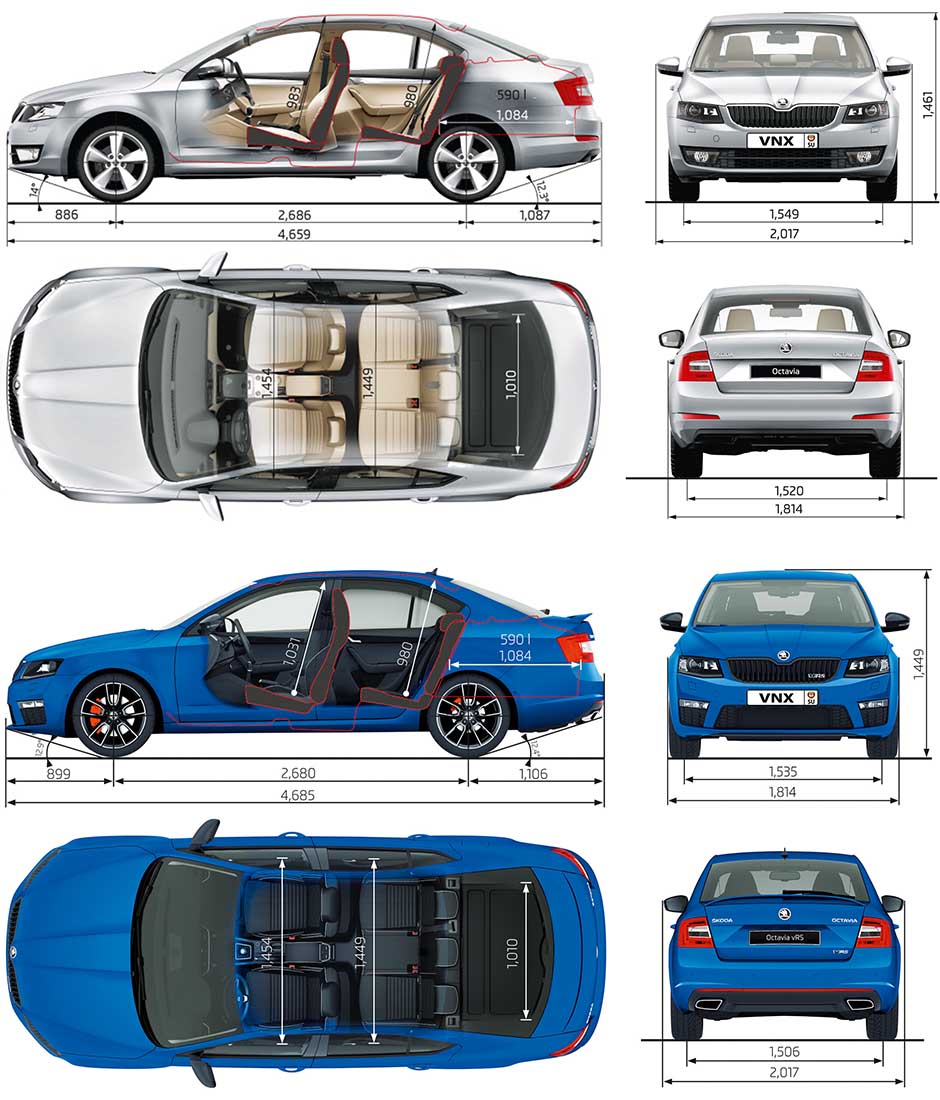
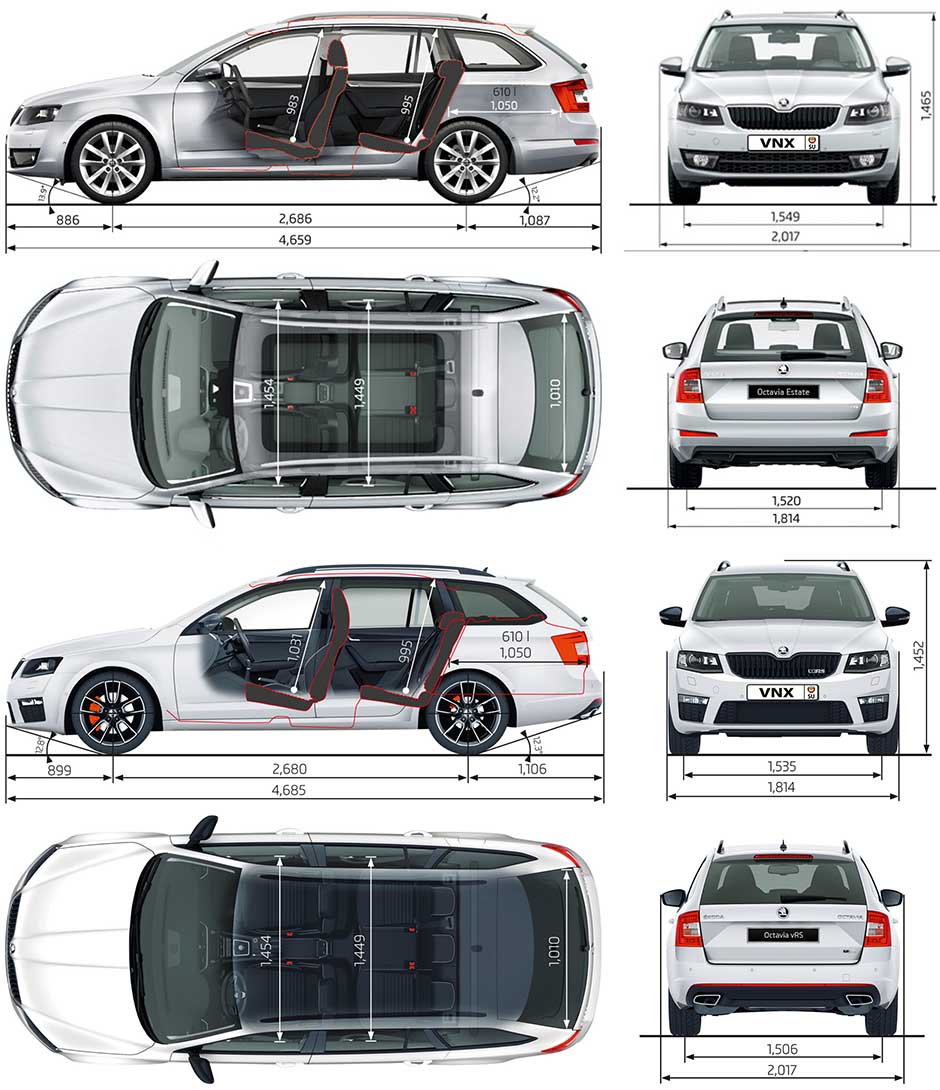
| 1 | Длина / Length | 4685 — scout (4659 — стандарт) 4685 — для RS | |||||||
| 2 | Ширина (без/с зеркалами) / Width | 1814/2017 | |||||||
| 3 | Высота (загружен/пустой) / Height | 1531 — scout (1465 — стандарт) 1452 — для RS | |||||||
| 4 | Колёсная база / Wheelbase | 2679 — scout (2680 RS) (2686 — стандарт) в зависимости от двигателя | |||||||
| 5 | Дорожный просвет (клиренс) / Ground clearance | 171 — scout (155 — стандарт) 127 — для RS | |||||||
| 6 | Снаряжённая масса / Total (curb) weight | 1518 | |||||||
| Полная масса / Gross (max.) weight | 2081 | ||||||||
|
Двигатель / Engine |
|||||||||
| 7 | Тип / Engine Type, Code | Бензиновый, жидкостного охлаждения, четырехтактный, TSI | |||||||
| 8 | Количество цилиндров / Cylinder arrangement: Total number of cylinders, of valves | 4-цилиндровый, рядный, 16V, DOHC с верхним расположением двух распределительных валов | |||||||
| 9 | Диаметр цилиндра / Bore | 82.5 мм | |||||||
| 10 | Ход поршня / Stroke | 84.1 мм | |||||||
| 11 | Объём / Engine displacement | 1798 см³ | |||||||
| 12 | Система питания / Fuel supply, Aspiration | Непосредственный впрыск топлива TSI | |||||||
| Турбонаддув и охлаждение наддувочного воздуха | |||||||||
| 13 | Степень сжатия / Compression ratio | 9.6:1 | |||||||
| 14 | Максимальная мощность / Max. output power kW (HP) at rpm | 132 кВт (180 л.с.) при 5100-6200 об/мин | |||||||
| 15 | Максимальный крутящий момент / Max. torque N·m at rpm | 250 Нм при 1250-5000 об/мин | |||||||
|
Трансмиссия / Transmission |
|||||||||
| 16 | Сцепление / Clutch type | Однодисковое, сухое, с диафрагменной нажимной пружиной и гасителем крутильных колебаний, постоянно замкнутого типа | |||||||
| 17 | КПП / Transmission type | МКПП 6 шестиступенчатая механическая, двухвальная, с синхронизаторами на всех передачах переднего хода |
О Книге
- Название: Информационно-развлекательное головное устройство Bolero Руководство по эксплуатации
- Бензиновые двигатели: TSI 1.2 л (1197 см³) 86-105 л.с./63-77 кВт, 1.4 л TSI G-TEC/ TSI (1390 см³) 110-140 л.с./81-103 кВт, 1.6 л MPI (1390 см³) 110 л.с./81 кВт, TSI 1.8 л (1798 см³) 180 л.с./132 кВт, TSI 2.0 л (1984 см³) 220 л.с./162 кВт и дизельными 1.6 л TDI (1598 см³) 90-105-110 л.с./66-77-81 кВт, 2.0 л TDI (1968 см³) 143-150-184 л.с./105-110-135 кВт
- Выпуск с 2013 года
- Серия: «Owner Guide»
- Год издания: ноябрь 2014
- Автор: Коллектив авторов
- Издательство: «ŠKODA AUTO a.s.»
- Формат: PDF
- Страниц в книге: 55
- Размер: 50.14 МБ
- Язык: Русский
- Количество электросхем: 0