
Инструкция и руководство для
Vitek VT-3960 BK  на русском на английском


60 страниц подробных инструкций и пользовательских руководств по эксплуатации
 17:17
17:17
Обзор кофеварки VITEK VT-1514 BK
 06:29
06:29
Триммер VITEK VT-2553 BK Распаковка. Обзор.
 12:34
12:34
Кофеварка VITEK VT-1502-BK. Распаковка и обзор/Aliexpress
 19:54
19:54
Отличный безмешковый Пылесос «Vitek VT-8117 BK» с AliExpress (Tmall). Распаковка, обзор, тест
 02:04
02:04
Обозреваем увлажнитель VITEK VT-2336 BK
 14:16
14:16
СГОРЕЛ Блендер VITEK VT 3416 BK РАСПАКОВКА ОБЗОР И ТЕСТЫ дешево и сердито
 05:48
05:48
Кофеварка эспрессо VITEK VT-1522 BK Видеоотзыв (обзор) Олега
 01:26
01:26
Распаковка VITEK VT-2552 BK 3-в-1
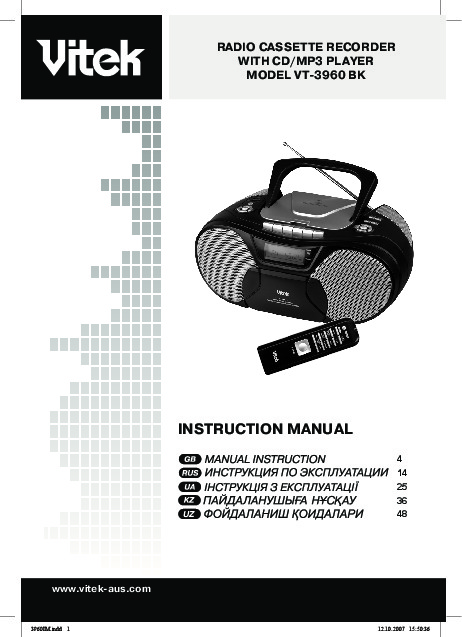
aus.com INSTRUCTION MANUAL RADIO CASSETTE RECORDER WITH CD…
Instruction manual, English
- Изображение
- Текст
ENGLISH
www.vitek-aus.com
INSTRUCTION MANUAL
RADIO CASSETTE RECORDER
WITH CD/MP3 PLAYER
MODEL VT-3960 BK
UZ
4
14
25
36
48
3960IM.indd 1
12.10.2007 15:50:36

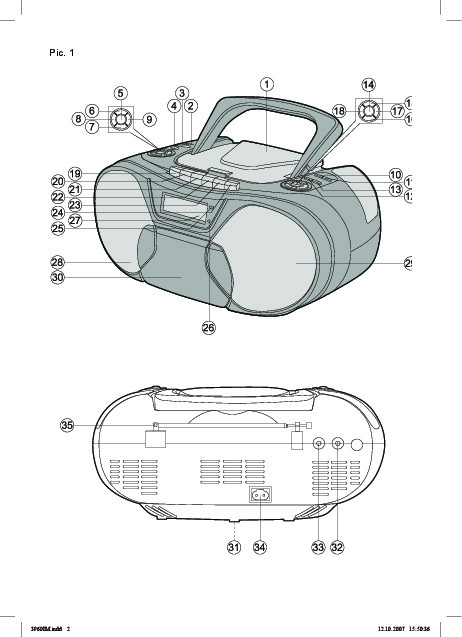
Pic. 1
3960IM.indd 2
12.10.2007 15:50:36

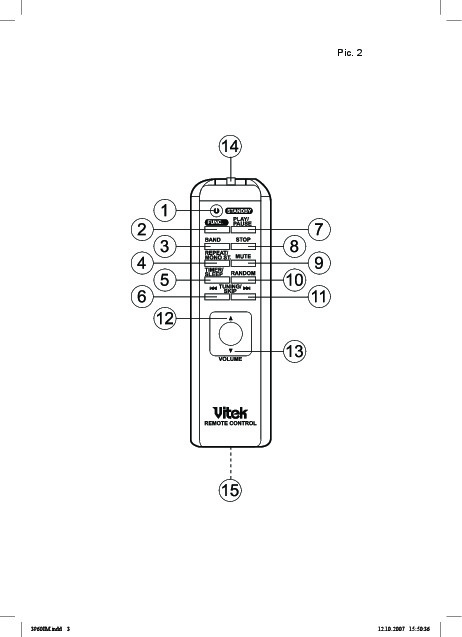
Pic. 2
3960IM.indd 3
12.10.2007 15:50:36

English, Attention! risk of electric shock! do not open
Страница 4
- Изображение
- Текст
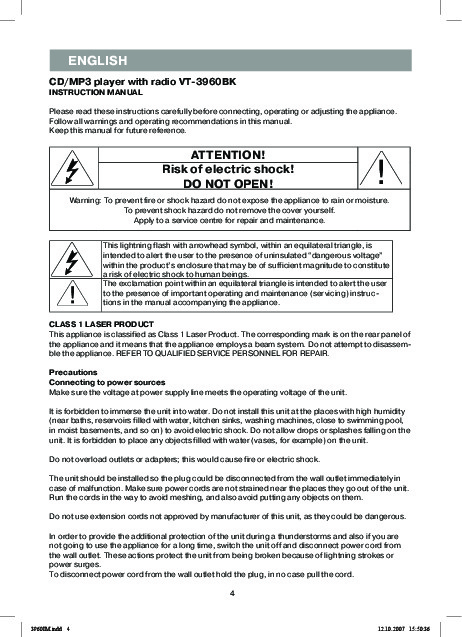
ENGLISH
CD/MP3 player with radio VT-3960BK
INSTRUCTION MANUAL
Please read these instructions carefully before connecting, operating or adjusting the appliance.
Follow all warnings and operating recommendations in this manual.
Keep this manual for future reference.
ATTENTION!
Risk of electric shock!
DO NOT OPEN!
Warning: To prevent fire or shock hazard do not expose the appliance to rain or moisture.
To prevent shock hazard do not remove the cover yourself.
Apply to a service centre for repair and maintenance.
This lightning flash with arrowhead symbol, within an equilateral triangle, is
intended to alert the user to the presence of uninsulated “dangerous voltage”
within the product’s enclosure that may be of sufficient magnitude to constitute
a risk of electric shock to human beings.
The exclamation point within an equilateral triangle is intended to alert the user
to the presence of important operating and maintenance (servicing) instruc-
tions in the manual accompanying the appliance.
CLASS 1 LASER PRODUCT
This appliance is classified as Class Laser Product. The corresponding mark is on the rear panel of
the appliance and it means that the appliance employs a beam system. Do not attempt to disassem-
ble the appliance. REFER TO QUALIFIED SERVICE PERSONNEL FOR REPAIR.
Precautions
Connecting to power sources
Make sure the voltage at power supply line meets the operating voltage of the unit.
It is forbidden to immerse the unit into water. Do not install this unit at the places with high humidity
(near baths, reservoirs filled with water, kitchen sinks, washing machines, close to swimming pool,
in moist basements, and so on) to avoid electric shock. Do not allow drops or splashes falling on the
unit. It is forbidden to place any objects filled with water (vases, for example) on the unit.
Do not overload outlets or adapters; this would cause fire or electric shock.
The unit should be installed so the plug could be disconnected from the wall outlet immediately in
case of malfunction. Make sure power cords are not strained near the places they go out of the unit.
Run the cords in the way to avoid meshing, and also avoid putting any objects on them.
Do not use extension cords not approved by manufacturer of this unit, as they could be dangerous.
In order to provide the additional protection of the unit during a thunderstorms and also if you are
not going to use the appliance for a long time, switch the unit off and disconnect power cord from
the wall outlet. These actions protect the unit from being broken because of lightning strokes or
power surges.
To disconnect power cord from the wall outlet hold the plug, in no case pull the cord.
3960IM.indd 4
12.10.2007 15:50:36

Do not lubricate moving parts of the unit.
Do not open the housing of the unit by yourself
to avoid electric shock. Do not try to repair or
modify the unit. Servicing should be undertaken
only by qualified professionals at service center.
Unit installation
Install the unit at the place where the sufficient
ventilation is provided. This unit should not be
placed inside any fitted furniture (book shelves
or built-in closets) if sufficient ventilation is not
provided.
In case of placing the unit on a bed, divan, sofa,
carpet or any other similar objects watch the
ventilation slits and openings are not closed as
they provide safe performance of the unit and
protect the unit from overheating.
Do not place the unit near the heat sources, for
example radiators, electric heaters, stoves and
other heat sources (including amplifiers), and
also at the places exposed to direct sun light or
opened for excessive dusting and mechanical
strokes. Do not expose the unit to the tempera-
ture above 3
ºС.
The unit should be installed on firm, level sur-
face, as far as possible from the appliances in-
ducing strong magnetic field, for example video
or audio players, radio tuners or large speakers,
as magnetic field fluxes could induce the noise.
Do not put heavy objects on the unit.
Special care is required when used by or near
children or invalids, do not leave them unat-
tended.
Foreign objects
Do not allow any foreign objects falling inside
the unit through the opening in the housing, as
this could cause fire and electric shock. If this
happens disconnect the unit from the wall outlet
and apply to service center for examination be-
fore using the unit again.
Damages requiring repair
In the situations described below the unit should
be switched off and disconnected from the wall
outlet immediately, after that you should apply
to a qualified professional for repair:
a) Power cord of plug is damaged.
b) Foreign object has fallen inside the unit.
c) The unit was exposed to rain or water was
shed on the unit.
d) The unit malfunctions.
e) The unit was dropped or was damaged in
any other way.
f) There are obvious changes in performance
on the unit.
Notice: unstable performance of the unit is pos-
sible in case of energy saving lamps presence in
the room the unit is placed in.
Cleaning the unit
Disconnect the unit from wall outlet before
cleaning. Use damp soft cloth to clean the
unit. Front panel could be wiped by soft cloth
damped with soap solution. It is forbidden to
use liquid or aerosol-like cleansers.
Cleaning disks
Do not use cracked or deformed disk, doing so
would cause damage of the unit.
Hold disk by its edges only. Do not touch its
operating surface. Dust, scratches and finger
prints on disk operating surface could cause its
eternal damage.
Do not expose your disks to direct sun light,
heat radiation, high temperature and humidity.
Put disk into case for storage after use.
Periodically wipe operating surface of disk with
soft cloth periodically, from center to edges.
Do not use common cleansers.
DESCRIPTION
Cassette recorder (Pic. )
. Discs compartment
2. USB-jack
3. SD/MMC jack
. STANDBY button
. STOP button
6. VOLUME
button
7. VOLUME
button
8. FUNCTION button
9. TIMER button
0. MEMORY/CLK-ADJ button
. REPEAT/MONO-ST button
2. TUNING
/SKIP button
3. TUNING
/SKIP button
. PLAY/PAUSE button
ENGLISH
3960IM.indd 5
12.10.2007 15:50:36

ENGLISH
6
, 6. PRESET/FOLDER
and
button
7. EQ/BBS button
8. BAND/ID3 button
9. PAUSE button
20. STOP/EJ button
2. F.FWD button
22. REWIND button
23. PLAY button
2. RECORD button
2. SENSOR button
26. STANDBY indicator
27. LCD-display
28. Left speaker
29. Right speaker
30. Cassette deck
3. Battery compartment lid
32. Stereo earphone jack
33. AUX in jack
3. Power supply jack
3. FM –antenna
Remote control (Pic. 2)
. STANDBY button
During operation press the STANDBY
button. The cassette recorder will switch to
the standby mode. The STANDBY indication
will be red.
To return to normal playback press the
STANDBY button once again.
2. FUNC button
3. BAND button
. REPEAT/MONO ST button
. TIMER/SLEEP button
6. TUNING
/SKIP button
7. PLAY/PAUSE button
8. STOP button
9. MUTE button
a. Press the button to mute sound.
b. Press the button again to cancel the mute
mode.
0. RANDOM button
. TUNING
/SKIP button
2. Volume (
▲) button
3. Volume (
▼)button
. IR emitter
. Battery compartment
POWER CONNECTION
Line supply
Before connecting the unit, make sure that your
home electricity supply corresponds to the volt-
age specified on the unit.
. To connect the unit, insert one end of the
power cord in the jack (3, pic. ) and the
other one – in the socket. The STANDBY
indication will light up.
2 To switch on the unit press the STANDBY
button, the LCD-display will light up, and the
STANDBY indicator will be off.
Note: Static electricity can lead to interferences
in the operation of the unit. In this case discon-
nect the unit, and then connect again. If the
problem does not disappear, apply to the serv-
ice center.
Battery supply
. Disconnect the cassette recorder.
2. Open the main battery compartment lid (3,
pic. ) on the rear of the unit, by pressing
two catches following the arrow.
3. Insert 2 UM-3/AA batteries (not supplied)
in the battery compartment to support
memory of the unit.
Insert 8 UM-2/C batteries (not supplied) in
the main battery compartment.
. Close the battery compartment lid.
USING THE REMOTE CONTROL
Insert 2 UM-/АAA batteries (not supplied) in
the battery compartment of the remote control.
When using the remote control direct it to in-
frared SENSOR on the cassette recorder. If the
remote controller does not work, check the bat-
teries and replace them if necessary.
Do not expose the remote control to high tem-
perature and direct sunlight; it can influence the
operation of the unit.
Attention!
Battery leakage can lead to injuries and dam-
ages of the unit. To avoid damages of batteries
follow the instructions below:
— Place the batteries properly, following the
polarity marked inside the unit.
— Do not use old and new batteries or
batteries of different types together.
— Take the batteries out if you are not going to
use the unit for a long time.
— Replace the batteries in time.
TIME SETTING
You can set time when the cassette recorder is
in the standby mode.
. Press the MEMORY/CLK-ADJ button once.
3960IM.indd 6
12.10.2007 15:50:36

ENGLISH
7
Time indication will start flashing on the
LCD-display. Use the TUNING
/SKIP
and TUNING
/SKIP button to adjust
hours.
2. Press the MEMORY/CLK-ADJ button once
again. Minute’s indication will start flashing
on the LCD-display. Use the TUNING
/SKIP and TUNING
/SKIP button to
adjust minutes.
3. Press the MEMORY/CLK-ADJ button again
to store the preset value.
Note: When the unit is disconnected or battery
charge of reserve supply is low, current time in-
dications will be reset. When power is supplied
again, time indication will be constantly flashing.
In this case you will need to set time again.
ALARM SETTING
You can adjust your cassette recorder in a way
that the alarm will switch on and automatically
switch off at preset time every day. As a sound
signal you can use a disc, radio, a cassette, USB
and SD/MMC devices.
Note: if a cassette is chosen as a sound source,
press the PLAY button at first (23, pic. ).
. Alarm switching on time.
In the current time mode press the TIMER
button once. The “ON TIME” indication will
appear on the LCD-display, and the “TIMER”
indication will be constantly flashing.
Set the time for the alarm to switch on, as
described in the TIME SETTING chapter.
2. Alarm switching off time.
Press the TIMER button once again. The
“OFF TIME” indication will appear on the
LCD-display, and the “TIMER” indication will
be constantly flashing.
Set the time for the alarm to switch on, as
described in the TIME SETTING chapter.
3. Sound source setting.
Press the TIMER button again. The current
mode will appear on the LCD-display (for
instance: TUNER).
Press the MEMORY/CLK-ADJ button first,
then select the sound source, successively
pressing the TUNING
/SKIP or TUNING
/SKIP button. Press the MEMORY/
CLK-ADJ button again to store the selected
sound source.
. Alarm volume setting.
Press the TIMER button again. The previous
volume level will appear on the LCD-display
(for instance: VOL 20).
Press the MEMORY/CLK-ADJ button
first, then set the desired volume level,
successively pressing the TUNING
/SKIP or TUNING
/SKIP button. To
enter the preset volume level, press the
MEMORY/CLK-ADJ button again.
Note: you can change volume level in the
range of 0-0.
. Switching on the alarm.
Press the TIMER/SLEEP button. “TIMER”
will appear on the LCD-display.
When the preset time is reached, the alarm
will automatically switch on. To switch off
the alarm press the STANDBY button.
6. Switching off the alarm.
Press the TIMER/SLEEP button again. The
“TIMER” indication will disappear.
SETTING TIME FOR THE CASSETTE RE-
CORDER TO SWITCH OFF
(Only using the buttons on the remote control)
You can set time for the cassette recorder to
switch off (max. 90 minutes).
. In the radio/cassette mode press the
TIMER/SLEEP button. The “90” minutes
indication will appear on the LCD-display,
and the “SLEEP” indication will be flashing.
2. To change the time press and hold the
TIMER/SLEEP button on the remote control.
You can set time for the cassette recorder to
switch off in the range of 0-90 minutes with
0 minutes step.
3960IM.indd 7
12.10.2007 15:50:38

ENGLISH
8
3. When the preset time is reached, the
cassette recorder will automatically switch
off.
. To cancel the timer mode press the TIMER/
SLEEP button again. The “SLEEP” indication
will disappear. To switch off the cassette
recorder press the STANDBY button.
SETTING EQUALIZER/BASS
You can set one of the five preset modes of the
equalizer: FLAT, JAZZ, ROCK, CLASSIC and
POP.
. In a playback mode select the desired
mode, successively pressing the EQ/BBS
button. The following indications will
successively appear on the LCD-display:
FLAT, JAZZ, ROCK, CLASSIC and POP.
2. In order to amplify bass signals press and
hold the EQ/BBS button at least for 2
seconds. “X BAS ON’’ will appear on the
LCD-display.
To cancel low frequency amplification mode
press the EQ/BBS button again at least for
2 seconds. “X BAS OFF’’ will appear on the
LCD-display.
MUTE
(Only using the buttons on the remote control)
To mute sound, press the MUTE button on the
remote control.
Earphones jack
For individual listening to music through the
earphones (not supplied) connect them to the
earphones jack (32, pic. ). Use the VOLUME
or
button to adjust volume. The speak-
ers will automatically turn off when headphones
are connected.
USING THE RADIO
This cassette recorder is equipped with electri-
cal digital tuning system. Besides that, you can
tune and store 20 radio station in each band FM
and MW (AM).
Radio reception
. Switch on the cassette recorder, pressing
the STANDBY button.
2. To select the TUNER mode press the
FUNCTION button successively. The
“TUNER’’ indication will appear on the LCD-
display.
3. To select FM or MW (AM) band press the
BAND button on the remote control.
. Tune to the desired radio station.
Manually: to select the desired station
press the TUNING
/SKIP or TUNING
/SKIP buttons successively.
Automatically: Press and hold the TUNING
/SKIP or TUNING
/SKIP button
for more than second; tuner will start
scanning and will stop it automatically when
a strong signal from the radio station is
found.
. Switch the MONO/STEREO mode. If the
stereo signal from FM radio stations is weak,
press the REPEAT/MONO-ST button to
improve sound quality, to switch on to the
MONO mode.
ANTENNA
For the best FM reception, completely extend
the FM ANTENNA (3, pic.) and direct it at the
desired angle. The device has a built-in antenna
in order to receive AM signals. Turn the device
left or right in order to achieve the best signal
reception.
PROGRAMMING RADIO STATIONS
You can tune and store 20 stations in each band
FM and MW (AM).
. Select the band and tune to the station,
which you want to program.
2. Press the MEMORY/CLK-ADJ button. The
“MEMORY” indication and the “00” station
indication will be flashing on the LCD-
display for 3 minutes.
3. Use the PRESET/FOLDER
or
buttons to select the station umber from to
20, under which you want to store the radio
station.
. Press the MEMORY/CLK-ADJ button again,
to store the settings.
. Repeat steps – for all radio stations,
3960IM.indd 8
12.10.2007 15:50:39

ENGLISH
9
which you want to store in memory.
Note: you must select the station number while
the MEMORY indication is flashing, otherwise
the station will not be stored in the memory. If
the indication disappears before you select the
number of the station, repeat steps -.
PROGRAMMED RADIO STATIONS RECALL
To recall the programmed radio stations select
the corresponding frequency band (FM or MW
(AW)) and press the PRESET/FOLDER
or
buttons successively to select the desired
radio station.
Note: the preset stations are stored in memory,
while the device is plugged in and the battery is
not low. When the power is off or the battery is
low the preset radio stations will be erased from
memory. You will need to program them again.
CD PLAYBACK
Loading – open the CD compartment lid. Insert
a CD disc and close the CD compartment lid.
Ejecting – after the playback stops open the CD
compartment lid and eject the disc. Put the disc
in the case for storage.
Always close the CD compartment lid in order
to prevent it from getting dust. Always eject a
disc from the CD compartment if it is not being
played back.
. Switch on the cassette recorder by pressing
the STANDBY button.
2. Select the CD playback mode. To select it
press the FUNCTION button successively
until the “CD” indication appears on the
LCD-display.
3. Open the CD compartment. Insert a CD disc
and close the CD compartment. “READING”
will appear on the LCD display. Then number
of tracks and total playback time will appear
on the LCD-display.
If after a CD disc have been inserted the “NO
DISC” indication appears on the LCD-display,
check whether the disc is inserted properly. The
disc should be inserted with the label up.
. To playback the disc from the first track
press the PLAY/PAUSE button.
You can select a track, which will be played
back first. To do it, select a track using the
TUNING
/SKIP or TUNING
/SKIP
buttons, and then press the PLAY/PAUSE
button.
. To pause the playback, press the PLAY/
PAUSE button again. The “PLAY” indication
and the playback time will be constantly
flashing. To resume to playback mode press
the button once again.
6. To stop the playback, press the STOP
button.
Note: if the CD compartment lid is open, the
“OPEN” indication will appear on the LCD-
display.
PROGRAMMED PLAYBACK
You can program playback of tracks (max. 60
tracks) in a desired sequence.
. Switch on the cassette recorder by pressing
the STANDBY button.
2. Open the CD compartment. Insert a CD disc
and close the CD compartment.
3. When the CD playback is stopped, press the
MEMORY/CLK-ADJ button. The “MEMORY”
indication will be flashing on the LCD-
display, and track number “0” on the disc
and its programmed number “P-0” will be
displayed.
Select the desired track, successively
pressing the TUNING
/SKIP or TUNING
/SKIP buttons. To store the selected
track press the MEMORY/CLK-ADJ button.
Programming indication will switch to “Р-2”.
. Programming the next track: select the next
track, successively pressing the TUNING
/SKIP or TUNING
/SKIP buttons.
Then press the MEMORY/CLK-ADJ button
to store the selected track in memory. You
can program up to 60 tracks.
Press the MEMORY/CLK-ADJ button
successively to look through the list of
programmed tracks.
3960IM.indd 9
12.10.2007 15:50:40

ENGLISH
0
To playback press the PLAY/PAUSE button. To
stop the playback, press the STOP button.
To erase programmed playback press the STOP
button, when the playback stops, open the CD
compartment lid.
REPEAT PLAYBACK
This function allows repeating all tracks on the
disc or programmed discs.
. To repeat one track press the REPEAT/
MONO-ST button once, the “REPEAT”
indication will appear on the LCD-display.
2. To repeat all tracks on the disc press the
REPEAT/MONO-ST button twice, The
“REPEAT ALL” indication will appear on the
LCD-display.
3. To cancel the repeat mode press the
REPEAT/MONO-ST button until the repeat
indication disappears.
RANDOM PLAYBACK
This function allows you to playback tracks in
random order.
. Press the RANDOM button on the remote
control once, the “RANDOM” indication
will appear on the LCD-display, random
playback will start.
2. To cancel the random playback mode,
press the RANDOM button on the remote
control again, the “RANDOM” indication will
disappear.
PLAYING МР3 DISCS
This unit can playback most of MP3 discs but
there are cases when the disc is not played back
due to the settings of the software used for re-
cording this disc.
. Switch on the cassette recorder by pressing
the STANDBY button.
2. Select discs playback mode. To select it
press the FUNCTION button successively
until the
“CD” indication appears on the LCD-display.
3. Open the compartment. Insert an MP3 disc
and close the compartment. Number of
folders and tracks will appear on the LCD-
display.
. To start playback from the first track press
the PLAY/PAUSE button.
. You can select a track, which will be played
back first. To do it, select a track using the
TUNING
/SKIP or TUNING
/SKIP
button, when the playback stops press the
PRESET/FOLDER
or
buttons to
select the desired folder, then select a track
using the TUNING
/SKIP or TUNING
/SKIP button.
Press the PLAY/PAUSE button to start play
back.
6. Press the ID3 button during an MP3 disc
playback. Track title and album title will
appear on the LCD-display. Press the ID3
button twice to display scrolling text.
Information on the LCD-display can be
different from the software settings. Tags in
Russian can be displayed incorrect.
7. To pause the playback, press the PLAY/
PAUSE button. The “PLAY” indication and
3960IM.indd 10
12.10.2007 15:50:42

Комментарии
(скачивание инструкции бесплатно)
Формат файла: PDF
Доступность: Бесплатно как и все руководства на сайте. Без регистрации и SMS.
Дополнительно: Чтение инструкции онлайн

ENGLISH
www.vitek-aus.com
INSTRUCTION MANUAL
RADIO CASSETTE RECORDER
WITH CD/MP3 PLAYER
MODEL VT-3960 BK
UZ
4
14
25
36
48
3960IM.indd 1
12.10.2007 15:50:36
Страница:
(1 из 60)
навигация

1

2

3

4

5

6

7

8

9

10

11

12

13

14

15

16

17

18

19

20

21

22

23

24

25

26

27

28

29

30

31

32

33

34

35

36

37

38

39

40

41

42

43

44

45

46

47

48

49

50

51

52

53

54

55

56

57

58

59

60
Оглавление инструкции
- Страница 1 из 61
RADIO CASSETTE RECORDER WITH CD/MP3 PLAYER ENGLISH MODEL VT-3960 BK INSTRUCTION MANUAL 4 14 25 36 48 UZ www.vitek-aus.com 3960IM.indd 1 12.10.2007 15:50:36 - Страница 2 из 61
Pic. 1 3960IM.indd 2 12.10.2007 15:50:36 - Страница 3 из 61
Pic. 2 3960IM.indd 3 12.10.2007 15:50:36 - Страница 4 из 61
ENGLISH CD/MP3 player with radio VT-3960BK INSTRUCTION MANUAL Please read these instructions carefully before connecting, operating or adjusting the appliance. Follow all warnings and operating recommendations in this manual. Keep this manual for future reference. ATTENTION! Risk of electric shock! - Страница 5 из 61
ENGLISH Do not lubricate moving parts of the unit. a) Power cord of plug is damaged. b) Foreign object has fallen inside the unit. c) The unit was exposed to rain or water was shed on the unit. d) The unit malfunctions. e) The unit was dropped or was damaged in any other way. f) There are obvious - Страница 6 из 61
ENGLISH 15, 16. PRESET/FOLDER and 17. EQ/BBS button 18. BAND/ID3 button 19. PAUSE button 20. STOP/EJ button 21. F.FWD button 22. REWIND button 23. PLAY button 24. RECORD button 25. SENSOR button 26. STANDBY indicator 27. LCD-display 28. Left speaker 29. Right speaker 30. Cassette deck 31. Battery - Страница 7 из 61
ENGLISH Time indication will start flashing on the LCD-display. Use the TUNING and TUNING hours. 3. Sound source setting. Press the TIMER button again. The current mode will appear on the LCD-display (for instance: TUNER). Press the MEMORY/CLK-ADJ button first, then select the sound source, - Страница 8 из 61
ENGLISH 3. When the preset time is reached, the cassette recorder will automatically switch off. 4. To cancel the timer mode press the TIMER/ SLEEP button again. The “SLEEP” indication will disappear. To switch off the cassette recorder press the STANDBY button. BAND button on the remote control. - Страница 9 из 61
ENGLISH which you want to store in memory. Note: you must select the station number while the MEMORY indication is flashing, otherwise the station will not be stored in the memory. If the indication disappears before you select the number of the station, repeat steps 1-4. back first. To do it, - Страница 10 из 61
ENGLISH To playback press the PLAY/PAUSE button. To stop the playback, press the STOP button. To erase programmed playback press the STOP button, when the playback stops, open the CD compartment lid. 1. Switch on the cassette recorder by pressing the STANDBY button. 2. Select discs playback mode. - Страница 11 из 61
ENGLISH playback time will be constantly flashing. To resume to the playback mode press this button once again. REPEAT PLAYBACK This function allows repeating tracks on the МР3 disc. 1. To repeat one track press the REPEAT/ MONO-ST button once, the “REPEAT” indication will appear on the - Страница 12 из 61
ENGLISH 6. To pause the playback, press the PAUSE button. 7. Press the STOP/EJ button to stop the playback. 8. To fast forward and rewind use the F.FWD/ REW buttons correspondingly. 9. When the playback is finished it will stop automatically. 10. Press the STOP/EJ button to eject the cassette, - Страница 13 из 61
ENGLISH Specifications Input power Weight Dimensions Output power Speakers Battery operation time CD formats Frequency response Signal-to-noise ratio Total harmonic distortion FM/MW (AM) Frequency range Intermediate frequency Antenna Cassette AC 230V/50Hz 2.7Kg L 350 x W 239 x H 161 (mm) 2 x 2W - Страница 14 из 61
РУССКИЙ Магнитола c CD/МР3-проигрывателем VT-3960 BK ИНСТРУКЦИЯ ПО ЭКСПЛУАТАЦИИ лазерного облучения отсутствует, если прибор не вскрывается. ОБСЛУЖИВАНИЕ УСТРОЙСТВА ДОЛЖНО ВЫПОЛНЯТЬСЯ ТОЛЬКО КВАЛИФИЦИРОВАННЫМИ СПЕЦИАЛИСТАМИ СЕРВИСНОГО ЦЕНТРА. Перед подключением, использованием или настройкой - Страница 15 из 61
РУССКИЙ Во избежание удара электрическим током не открывайте корпус устройства самостоятельно. Не ремонтируйте прибор и не вносите в него изменения. Сервисное обслуживание должно осуществляться только квалифицированными специалистами сервисных центров. Примечание: если в помещении, где - Страница 16 из 61
РУССКИЙ Описание 32. гнездо для подключения стереонаушников 33. разъем AUX in 34. гнездо для подключения к электросети 35. FM-антенна Магнитола (Рис. 1) 1. отсек для дисков 2. USB-разъем 3. разъем для SD/MMC-карты 4. кнопка STANDBY 5. кнопка остановки воспроизведения STOP 6. кнопка увеличения - Страница 17 из 61
РУССКИЙ кнопку STANDBY, при этом загорится LCD-дисплей, а индикатор режима ожидания STANDBY погаснет. Примечание: статическое электричество может привести к помехам в работе устройства. В этом случае отключите устройство от источников питания, а затем подключите снова. Если проблема не исчезнет, - Страница 18 из 61
РУССКИЙ пульте дистанционного управления. Символы «TIMER» исчезнут. Установка времени выключения магнитолы (только при помощи кнопок на пульте дистанционного управления) Вы можете установить время выключения магнитолы (максимум 90 минут). 1. В режиме прослушивания радио/воспроизведения музыки - Страница 19 из 61
РУССКИЙ REPEAT/MONO-ST, и магнитола переключится в режим моно. Выключение звука (только при помощи кнопок на пульте дистанционного управления) Для выключения звука нажмите кнопку MUTE на пульте дистанционного управления. АНТЕННА Для наилучшего приема в диапазоне FM выдвиньте полностью антенну (35, - Страница 20 из 61
РУССКИЙ Примечание: предварительно запрограммированные станции хранятся в памяти магнитолы, пока она включена в сеть или не разрядятся батареи резервного питания. В случае отключения питания или разрядки (или отсутствия) батареек резервного питания предварительно установленные радиостанции будут - Страница 21 из 61
РУССКИЙ MEMORY/CLK-ADJ, вы можете просмотреть список запрограммированных треков. Для воспроизведения нажмите кнопку PLAY/PAUSE. Для остановки воспроизведения нажмите кнопку STOP. Для отмены запрограммированного воспроизведения нажмите кнопку STOP, когда воспроизведение диска остановлено, или - Страница 22 из 61
РУССКИЙ тельно нажимая кнопку TUNING или TUNING /SKIP /SKIP , либо нажмите кнопку PRESET/FOLDER или для выбора нужной папки, затем выберите трек при помощи кнопки UNING Folder Number – номер папки, Track Number – номер трека 6. Нажмите кнопку ID3 во время воспроизведения MP3-диска. На - Страница 23 из 61
РУССКИЙ ле каждой операции обязательно нажимайте кнопку STOP/EJ. 3. Для повтора всех треков на МР3-диске нажмите три раз кнопку REPEAT/MONOST, на LCD-дисплее отобразятся символы «REPEAT ALL». 4. Для отмены повтора воспроизведения нажимайте кнопку REPEAT/MONO-ST, пока символы повтора не исчезнут. - Страница 24 из 61
РУССКИЙ носитель, на LCD-дисплее отобразятся символы «NO DEV». 4. Для воспроизведения нажмите кнопку PLAY/PAUSE. 5. Кнопки управления и последовательность действий при работе с USB-устройством аналогичны кнопкам управления и последовательности действий при работе с МР3диском. Следуйте инструкциям в - Страница 25 из 61
УКРАЇНЬСКИЙ МАГНІТОЛА З CD/МР3 ПРОГРАВАЧЕМ VT-3960BK ІНСТРУКЦІЯ З ЕКСПЛУАТАЦІЇ Перед увімкненням, використанням та налаштуванням пристрою уважно прочитайте інструкцію. Необхідно дотримуватися всіх попереджень і рекомендацій з експлуатації приладу, наведених у цьому посібнику. Збережіть посібник, - Страница 26 из 61
УКРАЇНЬСКИЙ них не були встановлені які-небудь предмети. Не використовуйте мережевих подовжувачів, які не дозволені виробником пристрою, тому що це може бути небезпечним. Для додаткового захисту пристрою під час грози, а також у тих випадках, коли ви не збираєтеся використовувати його протягом - Страница 27 из 61
УКРАЇНЬСКИЙ строю. Беріть диск тільки за краї. Не доторкайтеся до робочої поверхні диска. Пил, подряпини або відбитки пальців на робочій поверхні диска можуть призвести до виходу його з ладу. Не піддавайте диски впливу прямих сонячних променів, джерел тепла, високої температури й вологості. Після - Страница 28 из 61
УКРАЇНЬСКИЙ ПІДКЛЮЧЕННЯ ЖИВЛЕННЯ Живлення від мережі Перед підключенням пристрою до мережі переконаєтеся, що напруга в електричній мережі відповідає робочій напрузі пристрою. 1. Для підключення магнітоли до мережі вставте один кінець мережевого шнуру в гніздо (34, рис. 1) а інший – в розетку. - Страница 29 из 61
УКРАЇНЬСКИЙ Примітка: якщо як джерело звукового сигналу вибрана касета, спочатку потрібно натиснути кнопку PLAY (23, рис 1). 1. Встановлення часу увімкнення будильника. В режимі поточного часу натисніть один раз кнопку TIMER на магнітолі. На LCDдисплеї з’явиться індикація «ON TIME», а символи - Страница 30 из 61
УКРАЇНЬСКИЙ тот натисніть і утримуйте кнопку EQ/BBS не менше 2 секунд. На LCD-дисплеї відобразяться символи «X BAS OFF». якості звучання натисніть кнопку REPEAT/ MONO-ST, магнітола переключиться в режим моно. Вимкнення звуку (тільки за допомогою кнопок на пульті дистанційного керування) Для - Страница 31 из 61
УКРАЇНЬСКИЙ вона увімкнена в мережу або не розрядяться батареї резервного живлення. У випадку відключення живлення і розрядження (або відсутності) батарейок резервного живлення, попередньо встановлені радіостанції будуть видалені з пам’яті. Їх буде необхідно запрограмувати заново кнопку PLAY/PAUSE. - Страница 32 из 61
УКРАЇНЬСКИЙ ніть кнопку STOP. Для скасування запрограмованого програвання натисніть кнопку STOP, коли програвання диска зупинено, або відкрийте кришку відсіку для дисків. ПОВТОРЕННЯ ПРОГРАВАННЯ Ця функція дозволяє повторювати всі треки на диску або запрограмовані треки. 1. Для повторення одного - Страница 33 из 61
УКРАЇНЬСКИЙ тискаючи кнопки TUNING TUNING /SKIP або /SKIP або натисніть кнопки PRESET/FOLDER або для вибору потрібної папки, потім виберіть трек за допомогою кнопок TUNING Folder number – номер папки, Track number – номер треку 6. Натисніть кнопку ID3 під час програвання MP3 диску. На LCD-дисплеї - Страница 34 из 61
УКРАЇНЬСКИЙ кожної операції обов’язково натискайте кнопку STOP/EJ. ЗАПИС З РАДІОПРИЙМАЧА 3. Для повторення всіх треків на МР3 диску натисніть три рази кнопку REPEAT/ MONO-ST, на LCD-дисплеї відобразяться символи «REPEAT ALL» 4. Для скасування повторення програвання натискайте кнопку REPEAT/MONO-ST, - Страница 35 из 61
УКРАЇНЬСКИЙ 4. Для програвання натисніть кнопку PLAY/ PAUSE. 5. Кнопки керування і послідовність дій при роботі з USB-пристроєм, аналогічні кнопкам керування і послідовності дій при роботі з МР3 диском. Дотримуйтесь інструкцій у розділі ПРОГРАВАННЯ МР3 ДИСКУ Карти пам’яті SD 1. Увімкніть магнітолу, - Страница 36 из 61
ҚАЗАҚ VT-3960BK CD/МР3 ОЙНАТҚЫШЫ БАР Магнитола ПАЙДАЛАНУ ЖӨНІНДЕГІ НҰСҚАУЛЫҚ Құрылғыны қосудың, пайдаланудың және баптаудың алдында нұсқаулықпен мұқият танысып шығыңыз. Осы нұсқаулықта берілген құрылғыны пайдалану жөніндегі барлық ескертулерді және нұсқауларды орындау қажет. Нұсқаулықты сақтап - Страница 37 из 61
ҚАЗАҚ Құрылғы өндірушісі рұқсат етпейтін желілік ұзартқыштарды пайдаланбаңыз, өйткені олар өте қауіпті болуы мүмкін. алшақ тегіс тұрақты бетке орнату қажет, мысалы видео-, аудиомагнитофондар, радиоқабылдағыштар немесе үлкен дауыс зорайтқыштар, өйткені ондай құрылғылардан шығатын магниттік өрістің - Страница 38 из 61
ҚАЗАҚ пайдаланбаңыз, бұл құрылғының бұзылуына алып келуі мүмкін. Дискінің шеттерінен ғана ұстаңыз. Дискінің жұмыс бетінен ұстамаңыз. Дискінің жұмыс бетіндегі шаң, сызаттар немесе бармақтардың іздері оны істен шығаруы мүмкін. Дискіні тікелей күн сәулелерінің, жылу көздерінің, жоғары температураның - Страница 39 из 61
ҚАЗАҚ 12. дыбыс қаттылығын ұлғайту батырмасы (▲) 13. дыбыс қаттылығын азайту батырмасы (▼) 14. инфрақызыл (ИҚ) сәуле таратқыш 15. батарея бөлімі ҚОРЕКТІ ҚОСУ Желіден жұмыс істеу Құрылғыны желіге қосудың алдында электр желідегі кернеу құрылғының жұмыс кернеуіне сәйкес келетініне көз жеткізіңіз. 1. - Страница 40 из 61
ҚАЗАҚ ОЯТҚЫШ САҒАТТЫ ОРНАТУ Сіз өз магнитолаңызды күн сайын белгіленген уақытта оятқыш сағат қосылатындай және өшірілетіндей орната аласыз. Бұл жағдайда дыбыстық сигнал көзі ретінде дискіні, радионы немесе кассетаны, сонымен қатар USB және SD/MMC ағытпаларға қосылатын құрылғыларды пайдалана аласыз. - Страница 41 из 61
ҚАЗАҚ эквалайзерДІ ОРНАТУ/ТӨМЕН ЖИІЛІКТЕРДІ КҮШЕЙТУ Сіз эквалайзердің алдын ала бағдарламаланған бес режимінің бірін таңдай аласыз: FLAT, JAZZ, ROCK, CLASSIC және POP. 1. Музыканы тыңдау кезінде EQ/BBS батырмасын кезекпен басып, қалаған режиміңізді таңдаңыз. LCD-дисплейде FLAT, JAZZ, ROCK, CLASSIC - Страница 42 из 61
ҚАЗАҚ батырмаларының көмегімен радиостанцияны сақтағыңыз келетін 1-ден 20 дейін арна нөмірін таңдаңыз. 4. Жасалған орнатуларды сақтау үшін MEMORY/CLK-ADJ батырмасын тағы бір рет басыңыз. 5. Жиілігін магнитола жадында сақтағыңыз келетін барлық радиостанциялар үшін 1 – 4 қадамдарды қайталаңыз . - Страница 43 из 61
ҚАЗАҚ дискідегі «0» трек нөмірі және оның бағдарламалау кезіндегі «P-01» нөмірі бейнеленетін болады. TUNING /SKIP немесе TUNING /SKIP батырмаларын кезекпен басып, қалаған трегіңізді таңдаңыз. Таңдалған тректі сақтау үшін MEMORY/CLK-ADJ батырмасын басыңыз. Бағдарламалау индикаторы «Р-2» өзгереді. - Страница 44 из 61
ҚАЗАҚ Total folder – барлық папкалар, Total track – барлық тректер 4. Дискіні бірінші тректен бастап ойнатуды бастау үшін PLAY/PAUSE батырмасын басыңыз. баптауларының себебінен ерекшеленуі мүмкін. Орыс тіліндегі жазулар қате берілуі мүмкін. 7. Ойнатуды тоқтату үшін PLAY/PAUSE батырмасын басыңыз. - Страница 45 из 61
ҚАЗАҚ 4. Ойнатуды қайталауды тоқтату үшін қайталау индикаторы сөнгенге дейін REPEAT/MONO-ST батырмасын баса беріңіз. 4. Келесі тректі бағдарламалау үшін 1-3 қадамдарды қайталаңыз. Сіз барлығы 60 тректі бағдарламалай аласыз. 5. MEMORY/CLK-ADJ батырмасын кезекпен басып, Сіз бағдарламаланған - Страница 46 из 61
ҚАЗАҚ жазып алу сапасын құртып алудан қорықпай, дыбыс қаттылығының деңгейін реттей аласыз. 5. Жазып алуды бастау үшін PAUSE батырмасын басыңыз. 6. Жазып алуды уақытша тоқтату үшін PAUSE батырмасын басыңыз. Жазып алуды қалпына келтіру үшін осы батырманы тағы бір рет басыңыз. 7. Жазып алуды тоқтату - Страница 47 из 61
ҚАЗАҚ Техникалық сипаттамалары Тұтынылатын қуат Салмағы Өлшемдері Шығыс қуаты Динамиктер AC 230V/50Hz 2.7Kg L 350 x W 239 x H 161 (mm) 2 x 2W RMS/ channel Two-way: 1. 3» 8 Ohms 3W x2pcs (middle) 2. 2» 8 Ohms 0.5W x2pcs (Tweeter) Қорек элементтерінен жұмыс істеу 8 ч. уақыты CD форматтары CD,CD-R - Страница 48 из 61
ЎЗБЕК CD/МР3 дискларини ЎҚувчи VT-3960BK магнитоласи фойдаланиш Қоидалари электрга улашдан, ишлатишдан ва тўғрилашдан олдин ушбу қўлланмани диққат билан ўқиб чиқинг. Қўлланмада айтилган огоҳлантиришлар, жиҳозни ишлатиш борасидаги тавсияларнинг барчасига амал қилиш лозим бўлади. Кейинчалик бирор - Страница 49 из 61
ЎЗБЕК Ишлаб чиқарувчи рухсат бермаган электр узайтиргичларни ишлатманг. Акс ҳолда бу хавфли ҳолатларга сабаб бўлиши мумкин. Чақмоқ чақаётган вақтда жиҳозни қўшимча химоя қилиш учун ҳамда кўп вақт ишлатилмаганда вилкасини розеткадан чиқариб қўйинг. Шундай қилинганда чақмоқ чаққанда жиҳоз яшин - Страница 50 из 61
ЎЗБЕК Дискни фақат четидан тутиб ушланг. Дискнинг юзига қўл теккизманг. Диск юзасидаги бармоқ изи, чанг, тирналган жой уни ишдан чиқишига сабаб бўлиши мумкин. Дискка қуёш нури туширманг, иссиқ жойлар яқинига қўйманг, ҳарорат баланд бўладиган жойларда, намлик баланд жойларда сақламанг. Ишлатиб - Страница 51 из 61
ЎЗБЕК Электрга улаш Диққат. Батареяларнинг оқиб кетиши жиҳоз бузилишига, шикастланишига сабаб бўлиши мумкин. Батареялар сабабли жиҳоз шикастланмаслиги учун қуйида айтилган кўрсатмаларга амал қилиб ишланг: − Батареяларни жиҳозда кўрсатилган манфий ва мусбат томонларга тўғрилаб жойланг; − Ҳар хил - Страница 52 из 61
ЎЗБЕК мумкин. Эслатма: агар қўнғироқ манбаи кассета бўладиган бўлса олдин PLAY (23, 1-расм) тугмасини босиш керак бўлади. 1. Қўнғироқ чалинадиган вақтни белгилаш. Жорий вақтни кўрсатиш режимида магнитоладаги TIMER тугмасини бир марта босинг. LCD дисплейда «ON TIME» ёзуви кўринади “TIMER” ёзуви эса - Страница 53 из 61
ЎЗБЕК BBS тугмасини камида 2 секунд босиб ушлаб туринг. LCD дисплейда «X BAS ON» ёзуви пайдо бўлади. Паст частоталар кучайтирилишини ўчириш учун хам EQ/BBS тугмасини камида 2 секунд босиб ушлаб туринг. LCD дисплейда «X BAS OҒҒ» ёзуви пайдо бўлади. Овозни ўчириш (фақат олисдан бошқариш пултидаги - Страница 54 из 61
ЎЗБЕК ХОТИРАДАГИ ДАСТУРЛАНГАН РАДИОСТАНЦИЯЛАРНИ ЭШИТИШ Хотирага дастурлаб киритилган радиостанцияларни чиқариш учун олдин керакли диапазонни танланг (FM ёки MW (AW)) ва керакли станцияни тажнлаш учун PRESET/FOLDER ёки тугмаларини босинг. Эслатма: хотирага дастурланиб киритилган станция - Страница 55 из 61
ЎЗБЕК /SKIP ёки TUNING /SKIP тугмасини босиб кейинги трекни танланг. Шундан сўнг танланган трекни хотирада сақлаш учун MEMORY/CLK-ADJ тугмасини босинг. Энг кўпи билан 60 трекни хотирада сақлаб қўйишингиз мумкин. MEMORY/CLK-ADJ тугмасини босиб дастурга киритилган трекларни кўриб чиқишиниз мумкин. - Страница 56 из 61
ЎЗБЕК папкани танланг PLAY/PAUSE тугмасини босиб трекни эшитишга ўтинг. ва дисплейда шунингдек трекнинг дискдаги рақами «0» кўринади, унинг дастурлашдаги рақами «P-01» пайдо бўлади. 2. TUNING /SKIP ёки TUNING /SKIP тугмасини босиб трекни танланг ёки Folder number – папка рақами, Track number – - Страница 57 из 61
ЎЗБЕК РАДИОДАН ЁЗИШ 1. РАДИО бўлимида кўрсатилган тартибда керакли радиостанцияни топинг. 2. Кассета қўйиш жойига тоза кассета қўйинг 3. PAUSE тугмасини босинг. 4. RECORD тугмасини боссангиз PLAY тугмаси ҳам автоматик равишда босилади. Овоз баландлиги даражасини хохлаган тарзда ўзгартиришингиз - Страница 58 из 61
ЎЗБЕК Чиқиш қуввати Динамиклари Батареялардан ишлаши СD форматлари Қабул қиладиган частоталар доираси Сигнал/шовқин нисбати Линиядан ташқаридаги бузилишлар коэффициенти FM/MW (AM): Частота диапазони Оралиқ частота 4. Эшитиш учун PLAY/PAUSE тугмасини босинг. 5. USB воситасини улаб эшитганда бошқариш - Страница 59 из 61
gb A production date of the item is indicated in the serial number on the technical data plate. A serial number is an eleven-unit number, with the first four figures indicating the production date. For example, serial number 0606ххххххх means that the item was manufactured in June (the sixth month) - Страница 60 из 61
3960IM.indd 60 12.10.2007 15:51:03 - Страница 61 из 61
Страницы и текст этой инструкции
 Инструкция — VT-3960 BK
 Информация отображена на картинке
 Информация отображена на картинке
 Информация отображена на картинке
 Информация отображена на картинке
Как использовать наш сайт инструкций OnlineManuals.ru
Наша цель состоит в том, чтобы предоставить вам быстрый доступ к содержанию инструкции для — VT-3960 BK.
С помощью онлайн просмотра, Вы можете быстро просмотреть содержимое инструкции и найти решение проблемы с — VT-3960 BK.
Для Вашего удобства
Если листать руководство пользователя — VT-3960 BK прямо на сайте, не очень удобно для Вас, есть два возможных решения:
• Просмотр в полноэкранном режиме — легко просмотреть руководство пользователя (без загрузки его на свой компьютер), Вы можете использовать режим полноэкранного просмотра.
Для просмотра инструкции пользователя — VT-3960 BK на полном экране, используйте кнопку «Открыть в Pdf-viewer».
• Загрузка на компьютер — Вы можете также скачать Инструкция — VT-3960 BK на свой компьютер и сохранить его в файлах.
Многие люди предпочитают читать документы не на экране, а в печатной версии.
Возможность печати руководства пользователя также была предусмотрена на нашем сайте,
и вы можете использовать ее, нажав на иконку «печать» в Pdf-viewer.
Нет необходимости печатать все руководство — VT-3960 BK, можно выбрать только нужные страницы инструкции.
Магнитолы VITEK VT-3960 BK — инструкция пользователя по применению, эксплуатации и установке на русском языке. Мы надеемся, она поможет вам решить возникшие у вас вопросы при эксплуатации техники.
Вы можете скачать инструкцию к VITEK VT-3960 BK по ссылке ниже, если не хотите ждать загрузки. Если остались вопросы, задайте их в комментариях после инструкции.
«Загружаем инструкцию», означает, что нужно подождать пока файл загрузится и можно будет его читать онлайн. Некоторые инструкции очень большие и время их появления зависит от вашей скорости интернета.
Полезные видео
Остались вопросы?
Не нашли свой ответ в руководстве или возникли другие проблемы? Задайте свой вопрос в форме ниже с подробным описанием вашей ситуации, чтобы другие люди и специалисты смогли дать на него ответ. Если вы знаете как решить проблему другого человека, пожалуйста, подскажите ему

Часто задаваемые вопросы

Как посмотреть инструкцию к VITEK VT-3960 BK?
Необходимо подождать полной загрузки инструкции в сером окне на данной странице или скачать кликнув по специальной кнопке.
Руководство на русском языке?
Все наши руководства представлены на русском языке или схематично, поэтому вы без труда сможете разобраться с вашей моделью
Как можно распечатать инструкцию?
Скачайте ее по специальной кнопке над формой чтения на ваше устройства и отправьте на печать.
Магнитола Vitek VT-3960 BK
Технические характеристики
| Ширина | 35 см |
| Высота | 16 см |
| Гарантия | 1 год |
| Страна | КНР |
| Воспроизведение CD/-R/-RW | Да |
| Проигрывание кассет | 1 кассета |
| Мощность фронтальных АС | 2 x 2 Вт |
| Воспроизведение CD/-R/-RW | Да |
| Тип загрузки дисков | сверху |
| Проигрывание кассет | 1 кассета |
| Подсветка дисплея | Да |
| Тип исп. батареи | 8 x C (LR 14) |
| Вход 3.5 мм аудио | 1 шт |
| Разъем под SD/MMC | 1 шт |
| Повтор трека | Да |
| Повтор диска | Да |
| Воспр. в случайном порядке | Да |
| Программиров. воспроизв. | Да |
| Sleep-таймер | Да |
| Встроенные часы | Да |
| Будильник | 1 шт |
| Тип управления | электронный/механич. |
| Цифровой тюнер | УКВ+FM/AM |
| Фиксированные настройки тюнера | 20 FM/AM |
| Усиление низких частот | 1 уровень |
| Дистанционное управление | частичное |
| Тип батарей пульта ДУ | 2 х AAA (LR03) |
| Батареи пульта ДУ | доп.опция |
| Габаритные размеры (В*Ш*Г) | 16*35*24 см |
| Вес устройства | 2.7 кг |
| Цвет | черный/серебристый |
| Базовый цвет | черный |
| Воспроизведение MP3 с USB устройства | Да |
| Воспроизведение MP3 с карт памяти SD | Да |
| Мощность фронтальных АС | 2 x 2 Вт |