
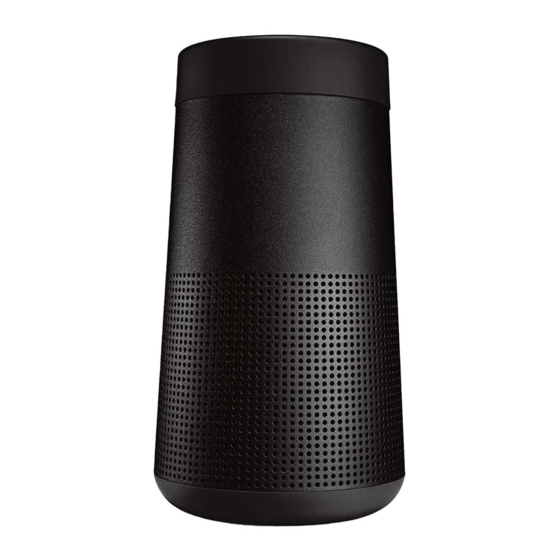
Посмотреть инструкция для Bose SoundLink Revolve бесплатно. Руководство относится к категории Колонки, 30 человек(а) дали ему среднюю оценку 7.8. Руководство доступно на следующих языках: русский, английский. У вас есть вопрос о Bose SoundLink Revolve или вам нужна помощь? Задайте свой вопрос здесь
Главная
| Bose | |
| SoundLink Revolve | 739523-1110 | |
| Колонка | |
| русский, английский | |
| Руководство пользователя (PDF) |
Порты и интерфейсы
| Bluetooth | Да |
| Технология подключения | Проводной и беспроводной |
| Wi-Fi | — |
| Радиус действия Bluetooth ® | 9 m |
| Подключение к USB | Да |
| Тип USB коннектора | Micro-USB B |
| Разъем 3,5 мм | Да |
| Вход Aux | — |
| USB-порт для зарядки | Да |
Вес и размеры
| Ширина | 82 mm |
| Глубина | 82 mm |
| Высота | 152 mm |
| Вес | — g |
Содержимое упаковки
| Количество в упаковке | 1 шт |
| Поставляемые кабели | USB |
Энергопитание
| Время работы батареи (макс) | 12 h |
| Тип источника питания | Аккумулятор |
Прочие свойства
| Сетевой адаптер в комплекте | Да |
Акустика
Аудио
| Номинальная RMS-мощность | — W |
Дизайн
| Тип продукта | — |
| Дизайн продукта | Цилиндр |
| Цвет товара | Черный |
| Регулятор громкости | Цифровой |
| Встроенный экран | Нет |
| International Protection (IP) код | IPX4 |
| Защитные возможности | Влагостойкость |
Производительность
| Рекомендованное применение | Универсальная |
| Встроенный микрофон | — |
| FM радио | — |
| Встроенный кардридер | — |
показать больше
Не можете найти ответ на свой вопрос в руководстве? Вы можете найти ответ на свой вопрос ниже, в разделе часто задаваемых вопросов о Bose SoundLink Revolve.
Когда звук считается слишком громким?
Могут ли устройства разных марок подключаться друг к другу при помощи Bluetooth?
Какой вес Bose SoundLink Revolve?
Какая высота Bose SoundLink Revolve?
Какая ширина Bose SoundLink Revolve?
Какая толщина Bose SoundLink Revolve?
Какой тип USB-подключения Bose SoundLink Revolve имеет?
Инструкция Bose SoundLink Revolve доступно в русский?
Не нашли свой вопрос? Задайте свой вопрос здесь
- Manuals
- Brands
- Bose Manuals
- Speakers
- SOUNDLINK REVOLVE
- Owner’s manual
-
Contents
-
Table of Contents
-
Troubleshooting
-
Bookmarks
Quick Links
Owner’s Guide
Brugervejledning
Bedienungsanleitung
Gebruikershandleiding
Guía del usuario
Käyttöohje
Notice d’utilisation
Manuale di istruzioni
Kezelési útmutató
Brukerveiledning
Podręcznik użytkownika
Manual do Proprietário
Bruksanvisning
Руководство владельца
SOUNDLINK
REVOLVE
®
Related Manuals for Bose SOUNDLINK REVOLVE
Summary of Contents for Bose SOUNDLINK REVOLVE
-
Page 1
Owner’s Guide Brugervejledning Bedienungsanleitung Gebruikershandleiding Guía del usuario Käyttöohje Notice d’utilisation Manuale di istruzioni Kezelési útmutató Brukerveiledning Podręcznik użytkownika Manual do Proprietário Bruksanvisning Руководство владельца SOUNDLINK REVOLVE ®… -
Page 2: Important Safety Instructions
I M P O R TA N T S A F E T Y I N S T R U C T I O N S Please read and keep all safety and use instructions. Important Safety Instructions 1. Read these instructions. 2.
-
Page 3
• Connect the equipment into an outlet on a circuit different from that to which the receiver is connected. • Consult the dealer or an experienced radio/TV technician for help. Changes or modifications not expressly approved by Bose Corporation could void the user’s authority to operate this equipment. -
Page 4
Taiwan Importer: Bose Taiwan Branch, 9F-A1, No.10, Section 3, Minsheng East Road, Taipei City 104, Taiwan Phone Number: 886 2 2514 7977 Mexico Importer: Bose de México, S. de R.L. de C.V. , Paseo de las Palmas 405-204, Lomas de Chapultepec, 11000 México, D.F. Phone Number: 001 800 900 2673 U.S. -
Page 5: Table Of Contents
Identifying connected mobile devices …………..18 Switching between two connected devices …………18 Connecting a previously paired device …………..18 Clearing the speaker pairing list……………… 18 Using the Bose® Connect app ………………18 E N G L I S H — 5…
-
Page 6
Battery indicator ………………….. 22 Bluetooth® indicator ………………….22 Input indicator ……………………22 Pairing Bose® Speakers Together Pairing the speakers using the Bose® Connect app (recommended) ..23 Pairing the speakers manually ………………23 Party mode ……………………23 Stereo mode ………………….. 24 Switching between Party mode and Stereo mode ………. -
Page 7: The Bose® Connect App
T H E B O S E ® C O N N E C T A P P Download the free Bose® Connect app to easily manage Bluetooth® connections, unlock features and access future updates. Features • Easily connect to and switch between multiple mobile devices with a single swipe.
-
Page 8: Getting Started
The USB power supply and AC power adapters may vary slightly. Use the AC power adapter for your region. If any part is damaged, do not use it. Contact your authorized Bose® dealer or Bose customer service (see page 26).
-
Page 9: Placement Guidelines
G E T T I N G S TA R T E D Placement guidelines • For best Bluetooth performance, place your mobile device within 33 ft. (10 m) of your ® speaker, and make sure there is a clear line of sight between you and your speaker. Moving your device farther away, or not having a clear line of sight may impact sound quality, and your device may disconnect from your speaker.
-
Page 10: Connecting To Power
G E T T I N G S TA R T E D Connecting to power Your speaker ships with a partial charge. Before using your speaker for the first time, connect it to an AC (mains) outlet. Your speaker does not need to be fully charged, but it does require the initial connection to activate the battery.
-
Page 11: Control Buttons
C O N T R O L B U T T O N S The button pad enables you to power on your speaker and control your speaker’s playback, volume and speakerphone. Note: Certain mobile devices may not support these functions. Power button Bluetooth®…
-
Page 12: Media Playback Functions
C O N T R O L B U T T O N S The Multi-function button controls music sources and speakerphone calls on your mobile device from your speaker. Media playback functions Function What to do Play Press Pause Press Note: In Input mode, pressing mutes the audio…
-
Page 13: Setting Up Voice Prompts
• Arabic To check for additional languages Visit: global/Bose.com/Support/SLR You can also use the Bose® Connect app (see page 7). If your language preference is not available, see “Disabling voice prompts.” Selecting a language 1. Press – or + to scroll through available languages.
-
Page 14: Bluetooth® Technology
You can pair your device with your speaker using Bluetooth wireless technology or Near Field Communication (NFC). You can also use the Bose® Connect app to pair your device (see page 7). What is NFC? NFC is a technology that enables mobile devices to establish wireless communication with each other by simply tapping the devices together.
-
Page 15: Pairing Your Mobile Device
1. On your device, turn on the Bluetooth® feature. Tip: The Bluetooth feature is usually found in the Settings menu. 2. Select your Bose® Revolve SoundLink® speaker from the device list. Once paired, you hear “Connected to <mobile device name>,” and the Bluetooth indicator glows solid white.
-
Page 16: Pairing A Mobile Device With Nfc
Refer to your device owner’s guide to learn more about these features. 2. Tap and hold the NFC touchpoint on your device to the top center of your speaker. The target area is the Bose® logo. Your device may prompt you to accept pairing.
-
Page 17: Pairing An Additional Mobile Device
• Turn off the Bluetooth feature on your device. • If your device supports pairing via NFC, tap and hold the NFC touchpoint on your device to the top center of your speaker. The target area is the Bose® logo. Reconnecting a device When powered on, your speaker tries to reconnect with the two most recently connected devices.
-
Page 18: Managing Multiple Connections
2. Delete your speaker from the Bluetooth list on your device. Using the Bose Connect app ® You can also easily manage multiple connected devices using the Bose® Connect app (see page 7). 1 8 — E N G L I S H…
-
Page 19: Wired Connections
W I R E D C O N N E C T I O N S You can connect the audio output of a smartphone, tablet, computer or other type of mobile device to the AUX connector or micro-B USB connector. Connect the 3.5mm stereo cable The AUX connector accepts a 3.5 mm stereo cable plug (not provided).
-
Page 20: Operating On Battery Power
O P E R AT I N G O N B AT T E R Y P O W E R Battery protection mode When your speaker is unplugged and unused for more than three days with a remaining charge of less than 10 percent, it enters battery protection mode to preserve battery power.
-
Page 21: Status Indicators
S TAT U S I N D I C AT O R S The top of the speaker has a series of indicators that glow according to system state. Battery indicator Bluetooth® Input indicator indicator E N G L I S H — 2 1…
-
Page 22: Battery Indicator
S TAT U S I N D I C AT O R S Battery indicator Shows the battery charge level. Each time you power on your speaker, the battery indicator displays the battery charge level for two seconds and a voice prompt announces the battery charge level.
-
Page 23: Pairing Bose® Speakers Together
P A I R I N G B O S E ® S P E A K E R S T O G E T H E R You can pair your Bose® speakers together to play in the following modes using the Bose Connect app (recommended) or the speakers’…
-
Page 24: Stereo Mode
P A I R I N G B O S E ® S P E A K E R S T O G E T H E R 5. On the other speaker, press and hold the Bluetooth® button and – simultaneously. 6.
-
Page 25: Switching Between Party Mode And Stereo Mode
On either speaker, press the Bluetooth® button and + simultaneously. Disabling Party mode or Stereo mode Do one of the following on either speaker: • Press and hold until you hear “Bose speakers unlinked.” • Press and hold the Multi-function button and + simultaneously until you hear “Bose speakers unlinked.”…
-
Page 26: Care And Maintenance
Failure to register will not affect your limited warranty rights. The warranty information provided with this product does not apply in Australia or New Zealand. See our website at www.bose.com.au/warranty or www.bose.co.nz/warranty for details of the Australia and New Zealand warranty. Technical information…
-
Page 27: Troubleshooting
• Make sure your mobile device supports Bluetooth or pairing via NFC technology (see page 14). If you could not resolve your issue, see the table below to identify symptoms and solutions to common problems. If you are unable to resolve your issue, contact Bose® customer service. Common solutions The following table lists symptoms and possible solutions to common problems.
-
Page 28
T R O U B L E S H O O T I N G Symptom Solution No sound • On your mobile device, turn the Bluetooth® feature off and then on. Remove your speaker from the Bluetooth list on your device. Pair your device again. -
Page 29: Resetting Your Speaker
T R O U B L E S H O O T I N G Resetting your speaker Factory reset clears paired mobile devices and language settings from your speaker and returns it to the original factory settings. 1. Power on your speaker. 2.
-
Page 30
©2017 Bose Corporation, The Mountain, Framingham, MA 01701-9168 USA AM773386 Rev. 00…
Перед вами файл pdf, где представлена инструкция (руководство) на русском для BOSE SoundLink Revolve. Вы можете скачать ее либо изучить в онлайн режиме.
Подробные сведения об инструкции:
Устройство из раздела: акустическая система
Бренд-производитель: BOSE
Наименование модели: BOSE SoundLink Revolve
Язык: Руководство на русском языке
Файл: pdf
Размер файла: 12,76 MB
Скачать инструкцию к HARPER HDT2-1110
ЗАГРУЗИТЬ
Просмотр инструкции онлайн
С О П Р Я Ж Е Н И Е Д И Н А М И К О В B O S E ®
Можно выполнить сопряжение динамиков Bose® для воспроизведения звука
в следующих режимах, используя приложение Bose Connect (рекомендуется)
или кнопки управления динамиков:
• Режим вечеринки (правый и левый динамики синхронно)
• Стереорежим (правый и левый динамики отдельно)
Это можно настроить с помощью приложения Bose® Connect (рекомендуется)
или кнопок управления динамиком.
Сведения о поддержке динамиком этих режимов см. в руководстве
пользователя Bose.
Сопряжение динамиков с
использованием приложения
Bose
Connect (рекомендуется)
®
Для получения дополнительной информации загрузите приложение Bose Connect.
Сопряжение динамиков вручную
Если не удается открыть приложение Bose Connect, выполните следующие
инструкции.
Режим вечеринки
1. Убедитесь в том, что оба динамика включены.
2. Убедитесь в том, что динамик подключен к мобильному устройству.
3. На динамике, подключенном к устройству, нажмите одновременно и
удерживайте кнопки Bluetooth®
4. Отпустите кнопки, когда услышите сообщение «Press the Bluetooth and volume
down buttons simultaneously on a second Bose device» (Нажмите одновременно
кнопку Bluetooth и кнопку уменьшения громкости на втором устройстве Bose).
2 4 — Р У С С К И Й
и +.
Инструкцию для Bose SoundLink Revolve Plus Black на русском языке, в формате pdf можно скачать с нашего сайта. Наш каталог предоставляем Вам инструкцию производителя фирмы Bose, которая была взята из открытых источников. Ознакомившись с руководством по эксплуатации от Bose, Вы на все 100% и правильно сможете воспользоваться всеми функциями устройства.
Для сохранения инструкции «Беспроводная акустика Bose SoundLink Revolve Plus Black» на русском языке на вашем компьютере либо телефоне, нажмите кнопку «Скачать инструкцию». Если активна кнопка «Инструкция онлайн», то Вы можете просмотреть документ (manual), в своём браузере онлайн.
Если у Вас нет возможности скачать инструкцию по эксплуатации либо просмотреть её, Вы можете поделиться ссылкой на эту страницу в социальных сетях и при удобном моменте скачать инструкцию. Либо добавьте эту страницу в закладки Вашего браузера, нажав кнопку «Добавить страницу в закладки браузера».

Портативные колонки BOSE SoundLink Revolve Black (230V EUA) — инструкция пользователя по применению, эксплуатации и установке на русском языке. Мы надеемся, она поможет вам решить возникшие у вас вопросы при эксплуатации техники.
Вы можете скачать инструкцию к BOSE SoundLink Revolve Black (230V EUA) по ссылке ниже, если не хотите ждать загрузки. Если остались вопросы, задайте их в комментариях после инструкции.
«Загружаем инструкцию», означает, что нужно подождать пока файл загрузится и можно будет его читать онлайн. Некоторые инструкции очень большие и время их появления зависит от вашей скорости интернета.
Остались вопросы?
Не нашли свой ответ в руководстве или возникли другие проблемы? Задайте свой вопрос в форме ниже с подробным описанием вашей ситуации, чтобы другие люди и специалисты смогли дать на него ответ. Если вы знаете как решить проблему другого человека, пожалуйста, подскажите ему


Часто задаваемые вопросы

Как посмотреть инструкцию к BOSE SoundLink Revolve Black (230V EUA)?
Необходимо подождать полной загрузки инструкции в сером окне на данной странице или скачать кликнув по специальной кнопке.
Руководство на русском языке?
Все наши руководства представлены на русском языке или схематично, поэтому вы без труда сможете разобраться с вашей моделью
Как можно распечатать инструкцию?
Скачайте ее по специальной кнопке над формой чтения на ваше устройства и отправьте на печать.